
Toyota Camry (XV70): Diagnosis System
DIAGNOSIS SYSTEM
SELF-DIAGNOSTIC MODE (USING TECHSTREAM)
(a) Connect the Techstream to the DLC3.
(b) Turn the ignition switch to ON.
(c) Turn the Techstream on.
(d) Enter the following menus: Body Electrical / Main Body / Utility / Wireless Door Lock Diagnosis Mode.
Body Electrical > Main Body > Utility|
Tester Display |
|---|
| Wireless Door Lock Diagnosis Mode |
(e) Proceed to the next step in accordance with the prompts on the Techstream screen.
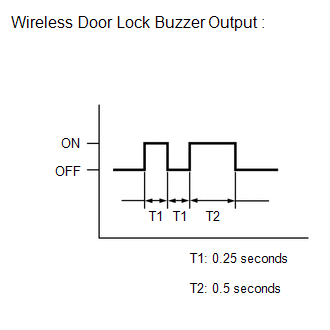
(f) Check that the system has switched to self-diagnostic mode by checking the wireless door lock buzzer output pattern.
(g) Inspect the diagnostic outputs when the door control transmitter module set sub-assembly switch is pressed. The diagnostic outputs can be checked by the wireless door lock buzzer output pattern.
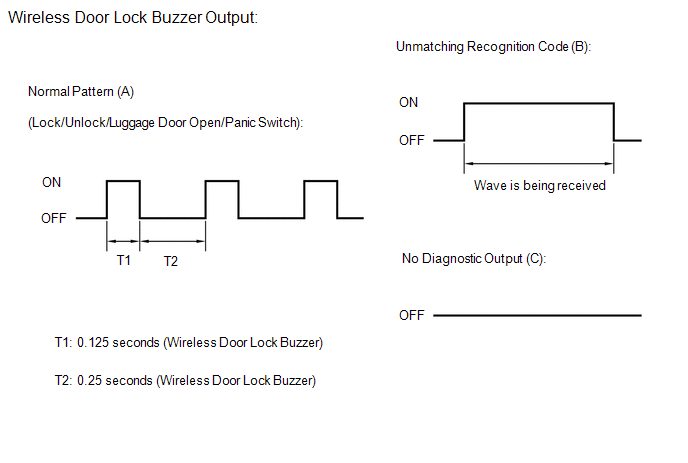 Result:
 |
Wireless Door Lock Buzzer Output |
Suspected Area |
|---|---|
|
A | Normal (No malfunction) |
|
B | Register wireless code |
|
C | Wave interference or malfunction of a related component |
READ NEXT:
 Data List / Active Test
DATA LIST / ACTIVE TEST DATA LIST HINT:
Using the Techstream to read the Data List allows the values or states of switches, sensors, actuators and other items to be read without removing any parts. T
Only Wireless Control Function is Inoperative
DESCRIPTION The door control and tire pressure monitoring system receiver assembly receives signals from the door control transmitter module set sub-assembly and sends these signals to the main body E
No Answer-Back
DESCRIPTION In some cases, wireless door lock control functions are normal but the hazard warning light and wireless door lock buzzer answer-back functions do not operate. In such cases, hazard warnin
SEE MORE:
Removal
REMOVAL CAUTION / NOTICE / HINT
The necessary procedures (adjustment, calibration, initialization or registration) that must be performed after parts are removed and installed, or replaced during front exhaust pipe assembly (TWC: Rear Catalyst), center exhaust pipe assembly and tail exhaust pipe a
Installation
INSTALLATION CAUTION / NOTICE / HINT
NOTICE:
Immediately after installing the brake pads, the braking performance may be reduced. Always perform a road test in a safe place while paying attention to the surroundings.
After replacing the rear disc brake pads, the brake pedal may feel soft
