
Toyota Camry (XV70): Adjustment
ADJUSTMENT
CAUTION / NOTICE / HINT
The necessary procedures (adjustment, calibration, initialization, or registration) that must be performed after completing the rear wheel alignment procedure are shown below.
Necessary Procedures After Procedure Performed|
Replaced Part or Performed Procedure |
Necessary Procedure | Effect/Inoperative Function when Necessary Procedure not Performed |
Link |
|---|---|---|---|
| Rear wheel alignment adjustment |
|
|
|
PROCEDURE
1. INSPECT TIRES
Click here .gif)
2. MEASURE VEHICLE HEIGHT
Click here
3. INSPECT CAMBER
NOTICE:
Inspect while the vehicle is unloaded.
| (a) Install a camber-caster-kingpin gauge. |
|
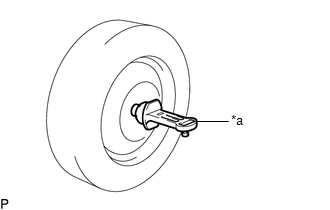
(b) Inspect the camber.
Camber (Unloaded Vehicle):
|
Model | Camber Inclination |
Right-left Difference |
|---|---|---|
|
*1: for Mexico
*2: for TRD | ||
| AXVA70L-CEZNBA AXVA70L-CEZGBA AXVA70L-CEZSBA AXVA70L-CEZPBA |
-1 | |
READ NEXT:
 Components
COMPONENTS ILLUSTRATION
*1 FRONT AXLE ASSEMBLY
*2 FRONT LOWER BALL JOINT ASSEMBLY
*3 COTTER PIN
- -
Tightening torque for "Major areas involving ba
SEE MORE:
Precaution
PRECAUTION INITIALIZATION NOTICE: Make sure to perform the necessary procedures (adjustment, calibration, initialization, or registration) after parts related to the cooling fan system have been removed/installed or replaced.
Click here
Indicator does not Illuminate
DESCRIPTION If none of the switch indicators on the air conditioning control assembly illuminate, the following suspected areas may be the cause.
Symptom Factor
None of the switch indicators on the air conditioning control assembly illuminate
Air conditioning amplifier assembl
