
Toyota Camry (XV70): Information display area
Displays the following items in the appropriate situation:
■ Warning/Message
- Alert from the LTA (Lane Tracing Assist)
- Dynamic radar cruise control with full-speed range
- Brake Override System/Drive-Start Control
 message
Displayed when a suggestion/advice pop-up display is displayed on the multi-information display. message
Displayed when a warning message is displayed on the multi-information display.- Outside temperature
Displayed in the following situations:- When the engine switch is turned to IGNITION ON mode
- When the low outside temperature indicator is flashing
Displayed content is the same as that displayed on the multi-information display. For details, refer to the explanation of the outside temperature display on the multi-information display.
■ Hands-free system status
Displayed when the hands-free system is operated.
■ Audio system operation status
Displayed when the audio system is operated.
■Head-up display
The head-up display may seem dark or hard to see when viewed through sunglasses, especially polarized sunglasses.
Adjust the brightness of the head-up display or remove your sunglasses.
■Display brightness
The brightness of the head-up display can be adjusted on
 of the multi-information
display. Also, it is automatically adjusted according to the ambient
brightness.
of the multi-information
display. Also, it is automatically adjusted according to the ambient
brightness.
■Enabling/disabling of the head-up display
If the head-up display is disabled, it will remain disabled when the engine switch is turned off then back to IGNITION ON mode.
■Street name display (vehicles with a navigation system)
Only street names which are included in the map data will be displayed.
WARNING
■Before using the head-up display
- Check that the position and brightness of the head-up display image does not interfere with safe driving. Incorrect adjustment of the image's position or brightness may obstruct the driver's view and lead to an accident, resulting in death or serious injury.
- Do not continuously look at the head-up display while driving as you may fail to see pedestrians, objects on the road, etc. ahead of the vehicle.
■Caution for changing settings of the head-up display
As the engine needs to be running while changing the settings of the headup display, ensure that the vehicle is parked in a place with adequate ventilation.
In a closed area such as a garage, exhaust gases including harmful carbon monoxide (CO) may collect and enter the vehicle. This may lead to death or a serious health hazard.
NOTICE
■To prevent damage to components
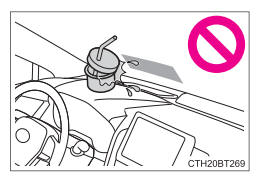
- Do not place any drinks near the head-up display projector. If the projector gets wet, electrical malfunctions may result.
- Do not place anything on or put stickers
onto the head-up display projector.
Doing so could interrupt head-up display indications.
- Do not touch the inside of the head-up
display projector or thrust sharp edges
or the like into the projector.
Doing so could cause mechanical malfunctions.
■When changing the settings of the head-up display
To prevent battery discharge, ensure that the engine is running while the changing the settings of the head-up display.
READ NEXT:
 Fuel consumption information
Fuel consumption information can be displayed on the audio
system screen.
Trip information
Audio (vehicles without Data Communication Module) or Audio
Plus (vehicles without Data Communication M
SEE MORE:
Brake Switch "B" Circuit Short to Battery (P070312)
DESCRIPTION The purpose of the stop light switch signal circuit is to prevent the engine from stalling when the brakes are suddenly applied while driving in the lock-up condition.
When the brake pedal is depressed, the stop light switch assembly sends a signal to the ECM. The ECM then cancels the
Right Rear Wheel Speed Sensor Circuit Short to Ground or Open (C051214)
DESCRIPTION Refer to DTC C051212 Click here
DTC No. Detection Item
DTC Detection Condition Trouble Area
C051214 Right Rear Wheel Speed Sensor Circuit Short to Ground or Open
A short or open circuit is detected in the speed sensor signal circuit for 0.12 seconds or
