
Toyota Camry (XV70): Stereo Jack Adapter Assembly
Toyota Camry Repair Manual XV70 (2018-2024) / Audio, Visual, Telematics / Audio / Video / Stereo Jack Adapter Assembly
Components
COMPONENTS
ILLUSTRATION
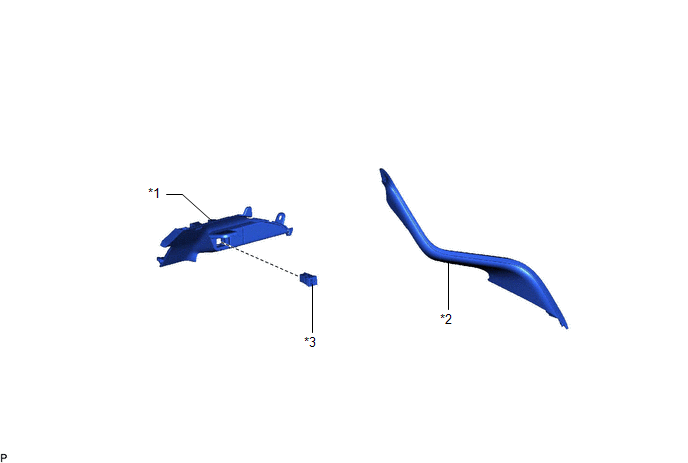
|
*1 | LOWER CENTER INSTRUMENT PANEL FINISH PANEL |
*2 | NO. 1 METER HOOD CLUSTER |
|
*3 | NO. 1 STEREO JACK ADAPTER ASSEMBLY |
- | - |
Removal
REMOVAL
PROCEDURE
1. REMOVE NO. 1 METER HOOD CLUSTER
Click here
.gif)
2. REMOVE LOWER CENTER INSTRUMENT PANEL FINISH PANEL
Click here
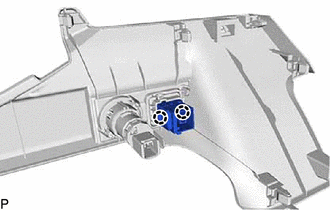
3. REMOVE NO. 1 STEREO JACK ADAPTER ASSEMBLY
| (a) Disengage the 2 claws and remove the No. 1 stereo jack adapter assembly. |
|
Installation
INSTALLATION
PROCEDURE
1. INSTALL NO. 1 STEREO JACK ADAPTER ASSEMBLY
(a) Engage the 2 claws to install the No. 1 stereo jack adapter assembly.
2. INSTALL LOWER CENTER INSTRUMENT PANEL FINISH PANEL
Click here
.gif)
3. INSTALL NO. 1 METER HOOD CLUSTER
Click here
READ NEXT:
 Back-up Battery
ComponentsCOMPONENTS ILLUSTRATION
*1 BACK-UP BATTERY
*2 TRANSCEIVER COVER RemovalREMOVAL CAUTION / NOTICE / HINT
The necessary procedures (adjustment, calibration, initializat
SEE MORE:
Terminals Of Ecu
TERMINALS OF ECU CHECK ECM (for A25A-FKS)
HINT: The standard voltage, resistance and waveform between each pair of the ECM terminals is shown in the table below. The appropriate conditions for checking each pair of the terminals is also indicated. The result of checks should be compared with the
Front Turn Signal Light Bulb
ComponentsCOMPONENTS ILLUSTRATION
*1 FRONT TURN SIGNAL LIGHT BULB
- - RemovalREMOVAL CAUTION / NOTICE / HINT
HINT:
Use the same procedure for the RH side and LH side.
The following procedure is for the LH side.
PROCEDURE 1. REMOVE FRONT TURN SIGNAL LIGHT BULB
(
© 2023-2026 Copyright www.tocamry.com
