
Toyota Camry (XV70): Components
COMPONENTS
ILLUSTRATION
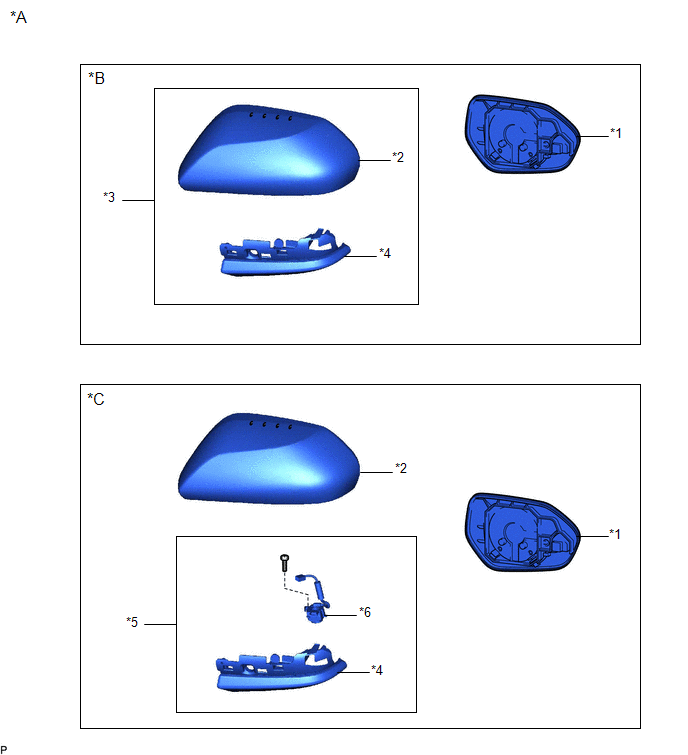
|
*A | for Type A |
*B | w/o Panoramic View Monitor System |
|
*C | w/ Panoramic View Monitor System |
- | - |
|
*1 | OUTER MIRROR |
*2 | OUTER MIRROR COVER |
|
*3 | OUTER MIRROR COVER WITH OUTER MIRROR HOLE COVER |
*4 | OUTER MIRROR HOLE COVER ASSEMBLY |
|
*5 | OUTER MIRROR HOLE COVER WITH SIDE TELEVISION CAMERA ASSEMBLY |
*6 | SIDE TELEVISION CAMERA ASSEMBLY |
ILLUSTRATION
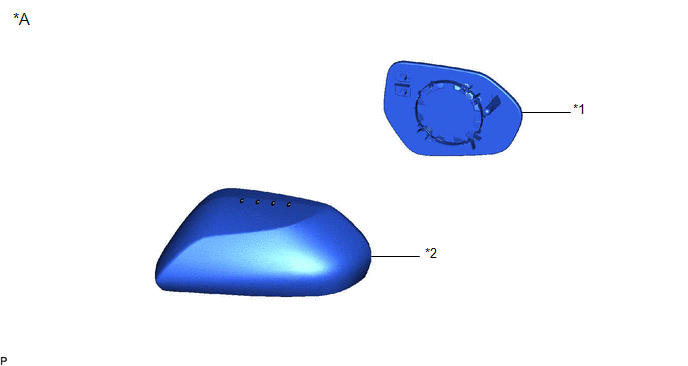
|
*A | for Type B |
- | - |
|
*1 | OUTER MIRROR |
*2 | OUTER MIRROR COVER |
READ NEXT:
 Removal
REMOVAL CAUTION / NOTICE / HINT
The necessary procedures (adjustment, calibration, initialization, or registration) that must be performed after parts are removed and installed, or replaced during
Installation
INSTALLATION CAUTION / NOTICE / HINT
HINT:
Use the same procedure for the RH side and LH side.
The following procedure is for the LH side.
PROCEDURE 1. INSTALL OUTER MIRROR HOLE COV
SEE MORE:
Removal
REMOVAL CAUTION / NOTICE / HINT
The necessary procedures (adjustment, calibration, initialization, or registration) that must be performed after parts are removed and installed, or replaced during front axle hub sub-assembly removal/installation are shown below. Necessary Procedures After Parts Re
Parts Location
PARTS LOCATION ILLUSTRATION
*1 OUTER REAR VIEW MIRROR ASSEMBLY WITH COVER RH
*2 OUTER REAR VIEW MIRROR ASSEMBLY WITH COVER LH
*3 BRAKE ACTUATOR ASSEMBLY - SKID CONTROL ECU
*4 ECM ILLUSTRATION
*1 OUTER MIRROR LH
*2 OUTER MIRROR RH
*
© 2023-2026 Copyright www.tocamry.com
