
Toyota Camry (XV70): Installation
INSTALLATION
CAUTION / NOTICE / HINT
HINT:
- Use the same procedure for the RH side and LH side.
- The following procedure is for the LH side.
PROCEDURE
1. INSTALL OUTER MIRROR HOLE COVER ASSEMBLY (for Type A)
(a) w/o Panoramic View Monitor System:
(1) Engage the guide and 5 claws to install the outer mirror hole cover assembly as shown in the illustration.
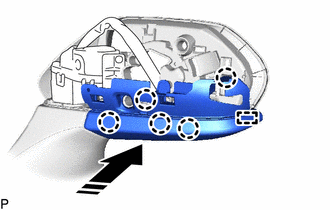
.png) |
Install in this Direction |
2. INSTALL SIDE TELEVISION CAMERA ASSEMBLY (for Type A)
w/ Panoramic View Monitor System:
Click here
.gif)
3. INSTALL OUTER MIRROR HOLE COVER WITH SIDE TELEVISION CAMERA ASSEMBLY (for Type A)
(a) w/ Panoramic View Monitor System:
(1) Engage the guide and 5 claws to install the outer mirror hole cover assembly as shown in the illustration.
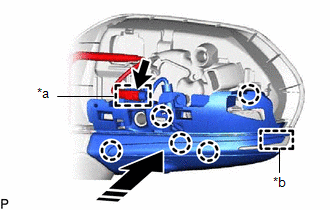
|
*a | Clamp |
|
*b | Guide |
|
|
Install in this Direction |
(2) Connect the connector.
(3) Engage the clamp.
4. INSTALL OUTER MIRROR COVER (for Type A)
(a) Engage the 3 guides and 8 claws to install the outer mirror cover as shown in the illustration.
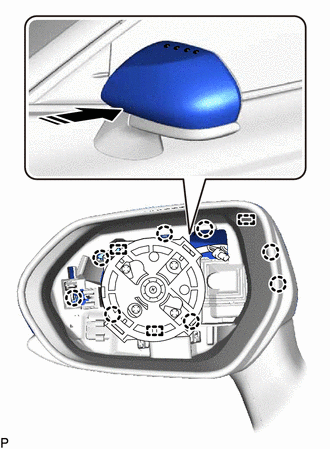
|
|
Install in this Direction |
5. INSTALL OUTER MIRROR (for Type A)
Click here
6. INSTALL OUTER MIRROR COVER (for Type B)
(a) Engage the 6 claws to install the outer mirror cover as shown in the illustration.
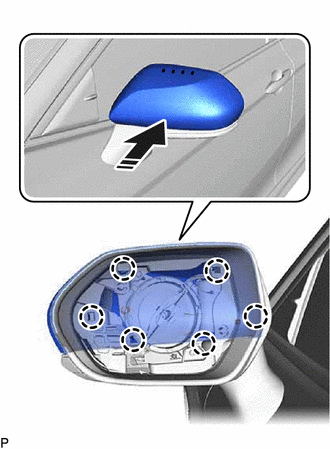
|
|
Install in this Direction |
7. INSTALL OUTER MIRROR (for Type B)
Click here
8. PERFORM CALIBRATION (w/ Panoramic View Monitor System)
Click here
READ NEXT:
 Components
COMPONENTS ILLUSTRATION
*A for Type A
*B for Type B
*1 OUTER MIRROR
- -
Removal
REMOVAL CAUTION / NOTICE / HINT
HINT:
Use the same procedure for the RH side and LH side.
The following procedure is for the LH side.
PROCEDURE 1. REMOVE OUTER MIRROR (for Type A)
SEE MORE:
Vehicle Speed Signal Circuit between Stereo Component Amplifier and Combination Meter
DESCRIPTION The stereo component amplifier assembly receives a vehicle speed signal from the combination meter assembly to control the ASL function.
HINT:
A voltage of 12 V or 5 V is output from each ECU and then input to the combination meter assembly. The signal is changed to a pulse signal
Adjustment
ADJUSTMENT CAUTION / NOTICE / HINT
*a Centering Bolt
*b Standard Bolt
HINT:
Use the same procedure for the RH side and LH side.
The following procedure is for the LH side.
Centering bolts are used to install the door hinges to the vehicle body and doo
