
Toyota Camry (XV70): Driving mode select switches
Toyota Camry Owner's Manual XV70 (2017-2024) / Driving / Using the driving
support systems / Driving mode select
switches
The driving modes can be selected to suit driving condition.
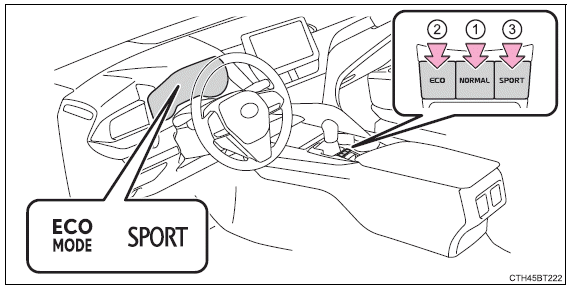
- Normal mode
Use for normal driving.
While in Eco drive mode or sport mode, press the switch to change the driving mode to normal mode. - Eco drive mode
Use Eco drive mode to help achieve low fuel consumption during trips that involve frequent accelerating.
When the "ECO" switch is pressed, the "ECO MODE" indicator comes on in the instrument cluster. - Sport mode
Use sport mode when increased acceleration response and precise
handling is desired, for example, when driving on mountain roads.When the "SPORT" switch is pressed, the "SPORT" indicator comes on in the instrument cluster.
■Operation of the air conditioning system in Eco drive mode
Eco drive mode controls the heating/cooling operations and fan speed of the air conditioning system to enhance fuel efficiency (P. 387, 394). To improve air conditioning performance, adjust the fan speed or turn off Eco drive mode.
■Sport mode automatic deactivation
Sport mode is automatically deactivated if the engine switch is turned off after driving in sport mode.
READ NEXT:
 Winter driving tips
Carry out the necessary preparations and inspections before
driving the vehicle in winter. Always drive the vehicle in a manner
appropriate to the prevailing weather conditions.
Preparation for win
Selecting tire chains
Vehicles with 16 and 17-inch tires
Use the correct tire chain size when mounting the snow chains.
Chain size is regulated for each tire size.
Side chain:
0.12 in. (3 mm) in diameter
0.39 in
SEE MORE:
Removal
REMOVAL CAUTION / NOTICE / HINT
The necessary procedures (adjustment, calibration, initialization or registration) that must be performed after parts are removed and installed, or replaced during vacuum warning switch assembly removal/installation are shown below. Necessary Procedures After Parts
Components
COMPONENTS ILLUSTRATION
*1 FRONT DIFFERENTIAL CASE FRONT TAPERED ROLLER BEARING (INNER RACE)
*2 FRONT DIFFERENTIAL CASE FRONT TAPERED ROLLER BEARING (OUTER RACE)
*3 FRONT DIFFERENTIAL CASE REAR TAPERED ROLLER BEARING (INNER RACE)
*4 FRONT DIFFERENTIAL CASE REAR
© 2023-2026 Copyright www.tocamry.com
