
Toyota Camry (XV70): Front Pillar Upper Cover
Components
COMPONENTS
ILLUSTRATION
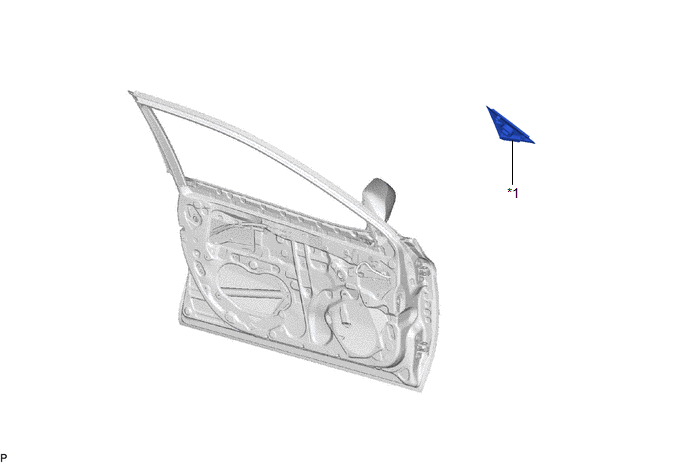
|
*1 | FRONT DOOR FRONT LOWER FRAME UPPER COVER |
- | - |
Removal
REMOVAL
CAUTION / NOTICE / HINT
The necessary procedures (adjustment, calibration, initialization or registration) that must be performed after parts are removed and installed, or replaced during front pillar upper cover removal/installation are shown below.
Necessary Procedure After Parts Removed/Installed/Replaced|
Replaced Part or Performed Procedure |
Necessary Procedure | Effect/Inoperative Function when Necessary Procedure not Performed |
Link |
|---|---|---|---|
|
Disconnect cable from negative battery terminal |
Perform steering sensor zero point calibration |
Lane Tracing Assist System |
|
|
Pre-collision System | |||
|
Memorize steering angle neutral point |
Parking Assist Monitor System |
| |
|
Panoramic View Monitor System |
| ||
|
Front door glass sub-assembly | Initialize power window control system |
|
|
HINT:
- Use the same procedure for the RH side and LH side.
- The following procedure is for the LH side.
PROCEDURE
1. REMOVE FRONT DOOR BELT MOULDING ASSEMBLY
Click here 
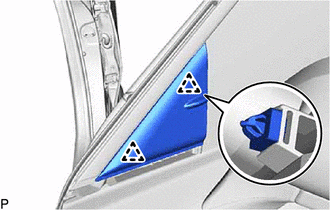
2. REMOVE FRONT DOOR FRONT LOWER FRAME UPPER COVER
| (a) Disengage the 2 clips to remove the front door front lower frame upper cover. |
|
Installation
INSTALLATION
CAUTION / NOTICE / HINT
HINT:
- Use the same procedure for the RH side and LH side.
- The following procedure is for the LH side.
PROCEDURE
1. INSTALL FRONT DOOR FRONT LOWER FRAME UPPER COVER
(a) Engage the 2 clips to install the front door front lower frame upper cover.
2. INSTALL FRONT DOOR BELT MOULDING ASSEMBLY
Click here

READ NEXT:
 Components
COMPONENTS ILLUSTRATION
*1 LUGGAGE COMPARTMENT DOOR OUTSIDE GARNISH PROTECTOR
*2 LUGGAGE COMPARTMENT DOOR OUTSIDE GARNISH SUB-ASSEMBLY
*3 NO. 2 LUGGAGE COMPARTMENT D
Removal
REMOVAL PROCEDURE 1. REMOVE REAR LIGHT ASSEMBLY LH
Click here
2. REMOVE REAR LIGHT ASSEMBLY RH
HINT: Use the same procedure as for the LH side. 3. REMOVE NO. 3 LUGGAGE COMPARTMENT DOOR OUT
SEE MORE:
Data List / Active Test
DATA LIST / ACTIVE TEST READ DATA LIST HINT:
Using the Techstream to read the Data List allows the values or states of switches, sensors, actuators and other items to be read without removing any parts. This non-intrusive inspection can be very useful because intermittent conditions or signals may
Stereo Component Amplifier Disconnected (B15D3)
DESCRIPTION The radio and display receiver assembly and stereo component amplifier assembly are connected by the AVC-LAN communication line.
DTC No. Detection Item
DTC Detection Condition Trouble Area
B15D3 Stereo Component Amplifier Disconnected
When either of the fol
