
Toyota Camry (XV70): Inspection
INSPECTION
PROCEDURE
1. INSPECT FUEL PRESSURE SENSOR (FUEL DELIVERY PIPE WITH SENSOR ASSEMBLY)
NOTICE:
- Do not remove the fuel pressure sensor from the fuel delivery pipe with sensor assembly.
- If the fuel pressure sensor is removed, replace the fuel pressure sensor (fuel delivery pipe with sensor assembly) with a new one.
(a) Check the fuel pressure sensor output voltage.
| (1) Apply 5 V between terminals 1 (VC) and 3 (E2). NOTICE:
HINT: If a stable power supply is not available, connect 4 nickel-metal hydride batteries (1.2 V each) or equivalent in series. |
|
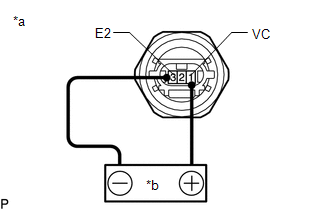
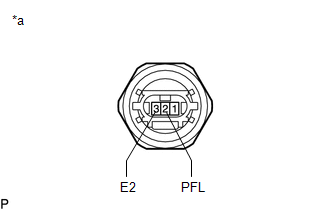
| (2) Measure the voltage according to the value(s) in the table below. Standard Voltage:
*: The output voltage changes depending on the voltage applied to the terminals. If the result is not as specified, replace the fuel pressure sensor (fuel delivery pipe with sensor assembly). |
|
READ NEXT:
 Installation
INSTALLATION PROCEDURE 1. INSTALL FUEL PRESSURE SENSOR (FUEL DELIVERY PIPE WITH SENSOR ASSEMBLY)
HINT: Perform "Inspection After Repair" after replacing the fuel pressure sensor (fuel delivery pipe
Components
COMPONENTS ILLUSTRATION
*A w/ Dust Cap
- -
*1 FUEL PRESSURE SENSOR (FUEL DELIVERY PIPE WITH SENSOR ASSEMBLY LH)
*2 FUEL PIPE PLUG SUB-ASSEMBLY
*3 DUST C
SEE MORE:
Driving Adjustment
DRIVING ADJUSTMENT CAUTION / NOTICE / HINT
NOTICE:
Make sure to read "Before Starting Driving Adjustment" before proceeding with work.
Click here
Make sure to perform the transition to online axis alignment mode with the vehicle stopped.
Transitioning to online axis alignment mode w
No Sound can be Heard from Speakers
PROCEDURE
1. CHECK AUDIO SETTINGS
(a) In sound output setting mode, set volume, fader and balance to the initial values and check that the sound is normal.
OK: Audio system returns to normal. HINT: Sound quality adjustment measures vary according to the type of amplifier.
OK
