
Toyota Camry (XV70): Luggage Compartment Door Weatherstrip
Components
COMPONENTS
ILLUSTRATION
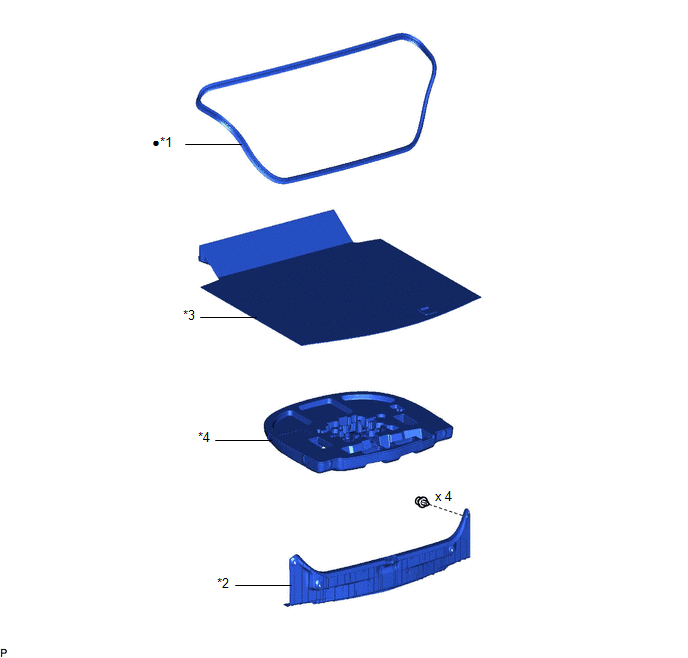
|
*1 | LUGGAGE COMPARTMENT DOOR WEATHERSTRIP |
*2 | REAR FLOOR FINISH PLATE |
|
*3 | SPARE WHEEL COVER ASSEMBLY |
*4 | SPARE WHEEL COVER TRAY |
|
● | Non-reusable part |
- | - |
Removal
REMOVAL
PROCEDURE
1. REMOVE SPARE WHEEL COVER ASSEMBLY
Click here
.gif)
2. REMOVE SPARE WHEEL COVER TRAY
Click here
3. REMOVE REAR FLOOR FINISH PLATE
Click here
4. REMOVE LUGGAGE COMPARTMENT DOOR WEATHERSTRIP
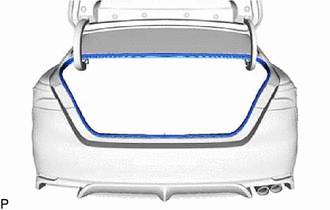
| (a) Remove the luggage compartment door weatherstrip. |
|
Installation
INSTALLATION
PROCEDURE
1. INSTALL LUGGAGE COMPARTMENT DOOR WEATHERSTRIP
| (a) Make sure to remove any non-drying sealant from the installation surfaces on the vehicle body. NOTICE: If there is any non-drying sealant remaining on the vehicle body, the luggage compartment door weatherstrip may not be able to be securely installed and may fall off. Make sure to completely remove the non-drying sealant from both the interior side and exterior side installation surfaces on the vehicle body. |
|
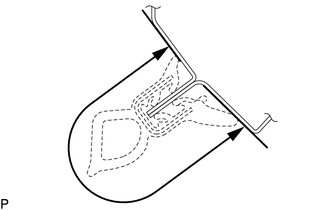
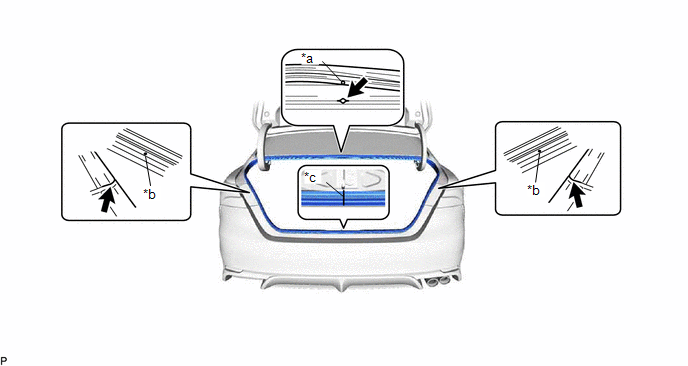
(b) Align the joint of a new luggage compartment door weatherstrip with the luggage compartment door lock striker and temporarily install the luggage compartment door weatherstrip.
|
*a | Alignment mark (Yellow) |
*b | Alignment mark (White) |
|
*c | Joint |
- | - |
.png) |
Flange Position | - |
- |
(c) Align the alignment marks on the luggage compartment door weatherstrip with the flanges on the vehicle body indicated by the arrows, and install the luggage compartment door weatherstrip.
NOTICE:
- Make sure to position the alignment marks correctly during installation. Failure to do so may lead to water ingress.
- After installation, check that the corners fit correctly.
HINT:
Make sure to install the parts of the luggage compartment door weatherstrip near the joint and alignment marks shown in the illustration first, and then install the corners.
2. INSTALL REAR FLOOR FINISH PLATE
Click here
.gif)
3. INSTALL SPARE WHEEL COVER TRAY
Click here
4. INSTALL SPARE WHEEL COVER ASSEMBLY
Click here
READ NEXT:
 Components
COMPONENTS ILLUSTRATION
*1 REAR ARMREST ASSEMBLY
*2 REAR DOOR ARMREST COVER SUB-ASSEMBLY
*3 REAR DOOR INNER GLASS WEATHERSTRIP
*4 REAR DOOR INSIDE HANDLE SU
Disassembly
DISASSEMBLY CAUTION / NOTICE / HINT
The necessary procedures (adjustment, calibration, initialization, or registration) that must be performed after parts are removed and installed, or replaced dur
SEE MORE:
Air Outlet Damper Control Servo Motor Circuit (B1443)
DESCRIPTION The No. 1 air conditioning radiator damper servo sub-assembly (mode) sends pulse signals to inform the air conditioning amplifier assembly of the damper position. The air conditioning amplifier assembly activates the motor (normal or reverse) based on these signals to move the air outlet
Precaution
PRECAUTION PRECAUTION FOR DISCONNECTING CABLE FROM NEGATIVE BATTERY TERMINAL
NOTICE: When disconnecting the cable from the negative (-) battery terminal, initialize the following system(s) after the cable is reconnected.
System See Procedure
Lane Tracing Assist System
