
Toyota Camry (XV70): Microphone
Components
COMPONENTS
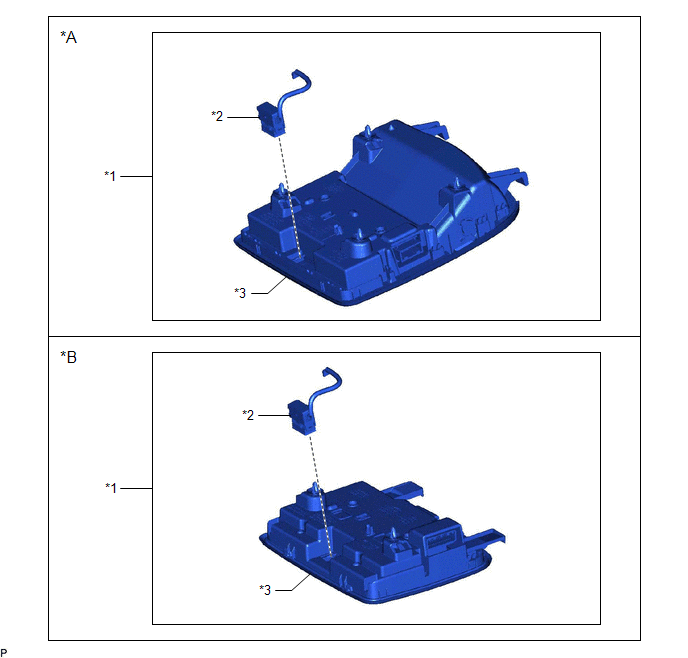
ILLUSTRATION
|
*A | for Normal Roof |
*B | except Normal Roof |
|
*1 | ROOF CONSOLE BOX ASSEMBLY |
*2 | TELEPHONE MICROPHONE ASSEMBLY |
|
*3 | ROOF CONSOLE BOX SUB-ASSEMBLY |
- | - |
Removal
REMOVAL
PROCEDURE
1. REMOVE ROOF CONSOLE BOX ASSEMBLY
Click here
.gif)
2. REMOVE TELEPHONE MICROPHONE ASSEMBLY
(a) for Normal Roof:
(1) Disconnect the connector.
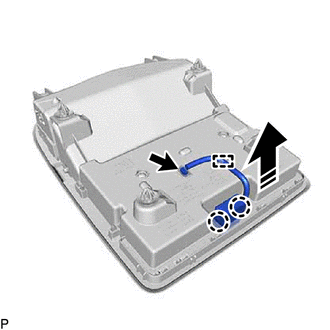
 |
Remove in this Direction |
(2) Disengage the clamp.
(3) Disengage the 2 claws and remove the telephone microphone assembly from the roof console box sub-assembly as shown in the illustration.
(b) except Normal Roof:
(1) Disconnect the connector.
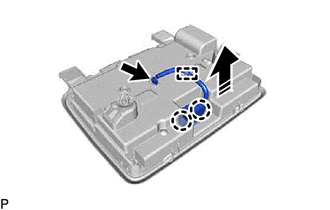
|
|
Remove in this Direction |
(2) Disengage the clamp.
(3) Disengage the 2 claws and remove the telephone microphone assembly from the roof console box sub-assembly as shown in the illustration.
Installation
INSTALLATION
PROCEDURE
1. INSTALL TELEPHONE MICROPHONE ASSEMBLY
(a) for Normal Roof:
(1) Engage the 2 claws to install the telephone microphone assembly to the roof console box sub-assembly as shown in the illustration.
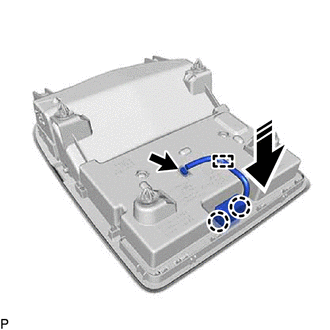
.png) |
Install in this Direction |
(2) Engage the clamp.
(3) Connect the connector.
(b) except Normal Roof:
(1) Engage the 2 claws to install the telephone microphone assembly to the roof console box sub-assembly as shown in the illustration.
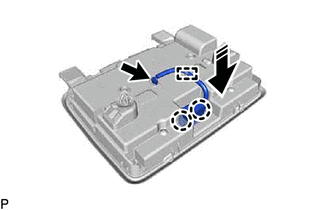
|
|
Install in this Direction |
(2) Engage the clamp.
(3) Connect the connector.
2. INSTALL ROOF CONSOLE BOX ASSEMBLY
Click here .gif)
READ NEXT:
 Components
COMPONENTS ILLUSTRATION
*A for Fold Down Seat Type
- -
*1 REAR SEAT CUSHION ASSEMBLY
*2 REAR SEAT CUSHION LOCK HOOK
*3 REAR SIDE SEATBACK ASSEMBLY LH
On-vehicle Inspection
ON-VEHICLE INSPECTION PROCEDURE
1. INSPECT RADIO SETTING CONDENSER (for High Mounted Stop Light) (a) With the radio setting condenser installed, check that there is no looseness or other abnormaliti
SEE MORE:
System Description
SYSTEM DESCRIPTION ILLUMINATED ENTRY SYSTEM (a) The illuminated entry system has the following control functions:
Control Outline
Lights that Operate Actuation Area-linked*1
When a registered key is brought within any vehicle exterior detection area around the doors, the lights t
Before Starting Driving Adjustment
BEFORE STARTING DRIVING ADJUSTMENT CAUTION / NOTICE / HINT
NOTICE: When replacing the windshield glass of a vehicle equipped with a forward recognition camera, make sure to use a Toyota genuine part. If a non-Toyota genuine part is used, the forward recognition camera may not be able to be install
