
Toyota Camry (XV70): Operating Light Control Rheostat does not Change Light Brightness
DESCRIPTION
The combination meter assembly receives signals through this circuit to adjust the illumination of the combination meter assembly. The combination meter assembly sets the illumination level based on the user operation of the light control rheostat switch in the trip switch.
WIRING DIAGRAM
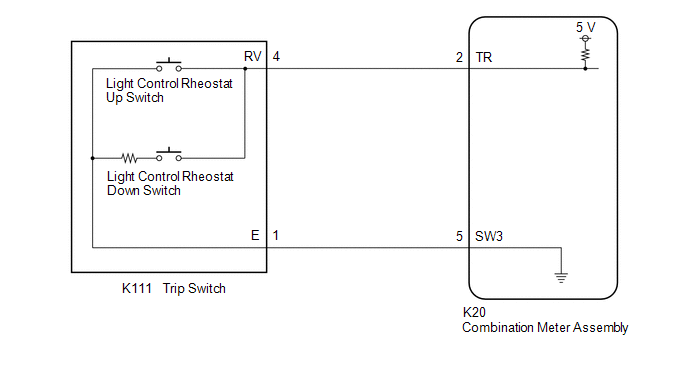
CAUTION / NOTICE / HINT
NOTICE:
When replacing the combination meter assembly, always replace it with a new one. If a combination meter assembly which was installed to another vehicle is used, the information stored in it will not match the information from the vehicle and a DTC may be stored.
HINT:
- The illumination level of the combination meter assembly can be adjusted by pressing the light control rheostat switch (trip switch).
- The illumination of the combination meter assembly dims when the taillights are turned on.
- Setting the illumination to maximum brightness cancels the above dimming of the illumination.
PROCEDURE
|
1. | READ VALUE USING TECHSTREAM (LIGHT CONTROL SWITCH (UP) , LIGHT CONTROL SWITCH (DOWN)) |
(a) Connect the Techstream to the DLC3.
(b) Turn the ignition switch to ON.
(c) Turn the Techstream on.
(d) Enter the following menus: Body Electrical / Combination Meter / Data List.
(e) Read the Data List according to the display on the Techstream.
Body Electrical > Combination Meter > Data List|
Tester Display | Measurement Item |
Range | Normal Condition |
Diagnostic Note |
|---|---|---|---|---|
|
Light Control Switch (UP) |
Light control rheostat up switch (Trip switch) |
OFF or ON | OFF: Switch released ON: Switch pushed | - |
|
Light Control Switch (DOWN) |
Light control rheostat down switch (Trip switch) |
OFF or ON | OFF: Switch released ON: Switch pushed | - |
|
Tester Display |
|---|
| Light Control Switch (UP) |
|
Light Control Switch (DOWN) |
OK:
Light control rheostat up or down switch condition displayed on the Techstream changes with the actual switch operation.
| OK |  | REPLACE COMBINATION METER ASSEMBLY
|
|

| 2. |
INSPECT TRIP SWITCH |
(a) Remove the trip switch.
Click here 
(b) Inspect the trip switch.
Click here
| NG | | REPLACE TRIP SWITCH |
|
| 3. |
CHECK HARNESS AND CONNECTOR (TRIP SWITCH - COMBINATION METER ASSEMBLY) |
(a) Disconnect the K20 combination meter assembly connector.
(b) Measure the resistance according to the value(s) in the table below.
Standard Resistance:
|
Tester Connection | Condition |
Specified Condition |
|---|---|---|
|
K111-4 (RV) - K20-2 (TR) |
Always | Below 1 ? |
|
K111-1 (E) - K20-5 (SW3) |
Always | Below 1 ? |
|
K111-4 (RV) or K20-2 (TR) - Body ground |
Always | 10 k? or higher |
| OK | | REPLACE COMBINATION METER ASSEMBLY
|
| NG | | REPAIR OR REPLACE HARNESS OR CONNECTOR |
READ NEXT:
SEE MORE:
 Components
COMPONENTS ILLUSTRATION
*A for A25A-FKS
*B for 2GR-FKS
*1 FRONT FENDER APRON SEAL LH
*2 FRONT FLOOR COVER LH
*3 FRONT WHEEL OPENING EXTENSION PAD LH
*4 FRONT WHEEL OPENING EXTENSION PAD RH
*5 NO. 1 ENGINE UNDER COVER
*6 NO. 2
Hood
Release the lock from the inside of the vehicle to open the hood.
1. Pull the hood lock release lever.
The hood will pop up slightly.
2. Pull up the auxiliary catch lever
and lift the hood.
3. Hold the hood open by inserting
the support rod into the slot.
■Open hood warning buzzer
