
Toyota Camry (XV70): Outer Mirror Switch
Components
COMPONENTS
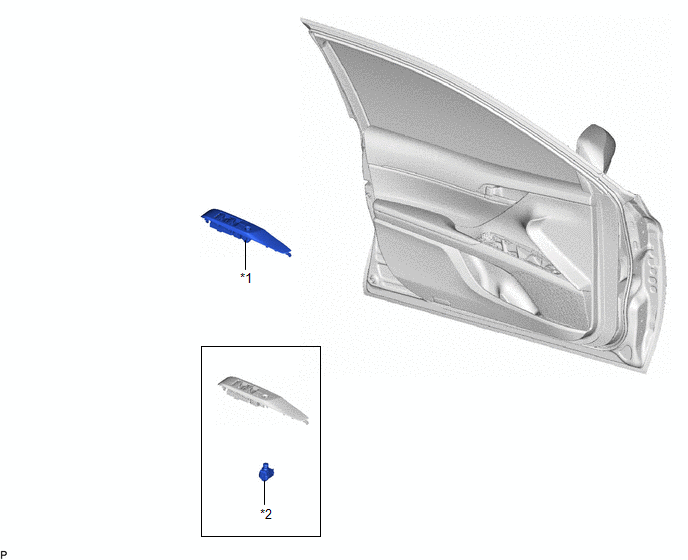
ILLUSTRATION
|
*1 | MULTIPLEX NETWORK MASTER SWITCH ASSEMBLY WITH FRONT DOOR UPPER ARMREST BASE PANEL |
*2 | OUTER MIRROR SWITCH ASSEMBLY |
Removal
REMOVAL
PROCEDURE
1. REMOVE MULTIPLEX NETWORK MASTER SWITCH ASSEMBLY WITH FRONT DOOR UPPER ARMREST BASE PANEL
Click here .gif)
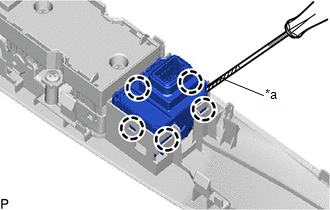
2. REMOVE OUTER MIRROR SWITCH ASSEMBLY
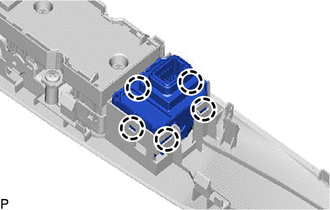
| (a) Using a screwdriver, disengage the 5 claws and remove the outer mirror switch assembly. HINT: Tape the screwdriver tip before use. |
|
Inspection
INSPECTION
PROCEDURE
1. INSPECT OUTER MIRROR SWITCH ASSEMBLY
(a) Check the mirror select switch and mirror surface adjust switch.
(1) Turn the mirror select switch to the L position.
| (2) Measure the resistance according to the value(s) in the table below. Standard Resistance (for Left Side):
|
|
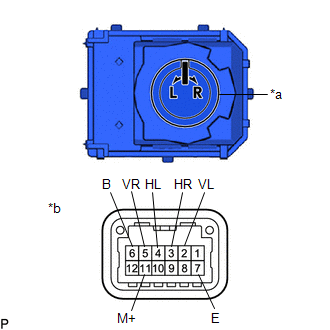
(3) Turn the mirror select switch to the R position.
(4) Measure the resistance according to the value(s) in the table below.
Standard Resistance (for Right Side):
|
Tester Connection | Condition |
Specified Condition |
|---|---|---|
|
5 (VR) - 6 (B) 11 (M+) - 7 (E) |
Up | Below 1 Ω |
|
Off | 10 kΩ or higher | |
|
5 (VR) - 7 (E) 11 (M+) - 6 (B) |
Down | Below 1 Ω |
|
Off | 10 kΩ or higher | |
|
3 (HR) - 6 (B) 11 (M+) - 7 (E) |
Left | Below 1 Ω |
|
Off | 10 kΩ or higher | |
|
3 (HR) - 7 (E) 11 (M+) - 6 (B) |
Right | Below 1 Ω |
|
Off | 10 kΩ or higher |
If the result is not as specified, replace the outer mirror switch assembly.
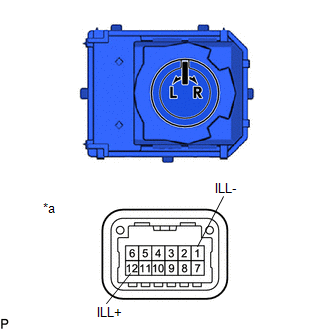
(b) Check that the LED illuminates.
| (1) Apply auxiliary battery voltage to the outer mirror switch assembly and check that the LED illuminates. OK:
If the result is not as specified, replace the outer mirror switch assembly. |
|
Installation
INSTALLATION
PROCEDURE
1. INSTALL OUTER MIRROR SWITCH ASSEMBLY
| (a) Engage the 5 claws to install the outer mirror switch assembly. |
|
2. INSTALL MULTIPLEX NETWORK MASTER SWITCH ASSEMBLY WITH FRONT DOOR UPPER ARMREST BASE PANEL
Click here .gif)
READ NEXT:
 Components
COMPONENTS ILLUSTRATION
*A for Front Passenger Side
*B for Driver Side
*C w/o Courtesy Light
*D w/ Courtesy Light
*1 COURTESY LIGHT ASSEMBLY
Removal
REMOVAL CAUTION / NOTICE / HINT
The necessary procedures (adjustment, calibration, initialization, or registration) that must be performed after parts are removed and installed, or replaced during
SEE MORE:
Cooling System
On-vehicle InspectionON-VEHICLE INSPECTION CAUTION / NOTICE / HINT
CAUTION: Do not remove the radiator cap sub-assembly while the engine and radiator assembly are still hot. Pressurized, hot engine coolant and steam may be released and cause serious burns.
PROCEDURE
1. INSPECT FOR COOLANT LEA
Dtc Check / Clear
DTC CHECK / CLEAR CHECK DTC (for TIRE PRESSURE WARNING ECU AND RECEIVER)
(a) Turn the ignition switch off. (b) Connect the Techstream to the DLC3.
(c) Turn the ignition switch to ON. (d) Turn the Techstream on.
(e) Enter the following menus: Chassis / Tire Pressure Monitor / Trouble Codes. Cha
