
Toyota Camry (XV70): Parts Location
PARTS LOCATION
ILLUSTRATION
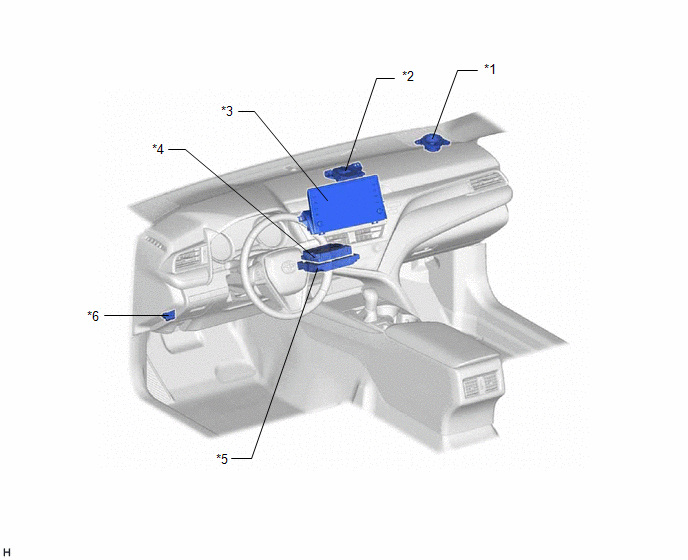
|
*1 | FRONT NO. 2 SPEAKER ASSEMBLY RH |
*2 | NAVIGATION ANTENNA ASSEMBLY - Telephone Sub |
|
*3 | RADIO AND DISPLAY RECEIVER ASSEMBLY |
*4 | DCM (TELEMATICS TRANSCEIVER) |
|
*5 | NAVIGATION ECU (w/ Navigation System) |
*6 | DLC3 |
ILLUSTRATION
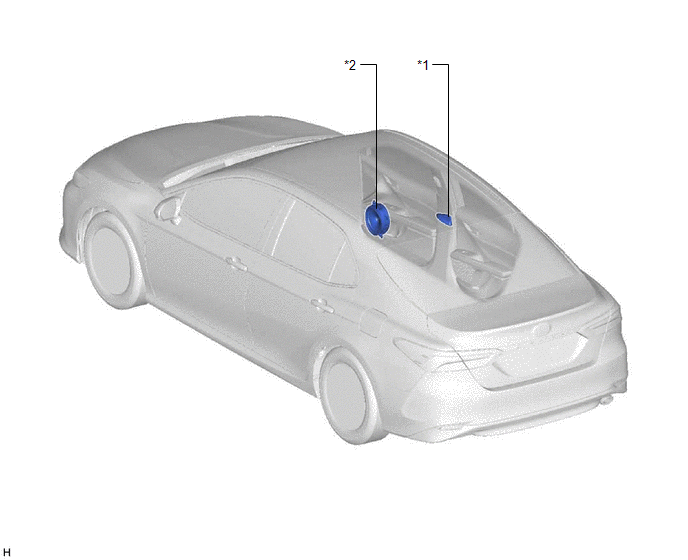
|
*1 | TELEPHONE ANTENNA ASSEMBLY - GPS - Telephone Main |
*2 | FRONT NO. 1 SPEAKER ASSEMBLY RH (for 4 Speakers) |
READ NEXT:
 System Diagram
SYSTEM DIAGRAM w/ Navigation System
System Description
SYSTEM DESCRIPTION DESCRIPTION
Toyota Entune allows the vehicle to receive information from the call center and links the information to the audio and visual system*1 or navigation system*2. Toyo
How To Proceed With Troubleshooting
CAUTION / NOTICE / HINT
HINT:
Use the following procedure to troubleshoot the Entune system.
*: Use the Techstream.
PROCEDURE
1. VEHICLE BROUGHT TO WORKSHOP
NEX
SEE MORE:
System Diagram
SYSTEM DIAGRAM ELECTRICAL REMOTE CONTROL MIRROR FUNCTION
MIRROR HEATER FUNCTION
Communication Table
Sender Receiver
Signal Communication Method
Air Conditioning Control Assembly
Air Conditioning Amplifier Assembly
Mirror heater switch (rear window
Parking Brake System(w/ Electric Parking Brake System)
PrecautionPRECAUTION
NOTICE:
If the battery is connected, the parking brake will operate when the electric parking brake switch assembly is pulled to the lock side even if the engine switch is off. Do not operate the electric parking brake switch assembly with the battery connected unless spec
© 2023-2026 Copyright www.tocamry.com
