
Toyota Camry (XV70): System Diagram
SYSTEM DIAGRAM
w/ Navigation System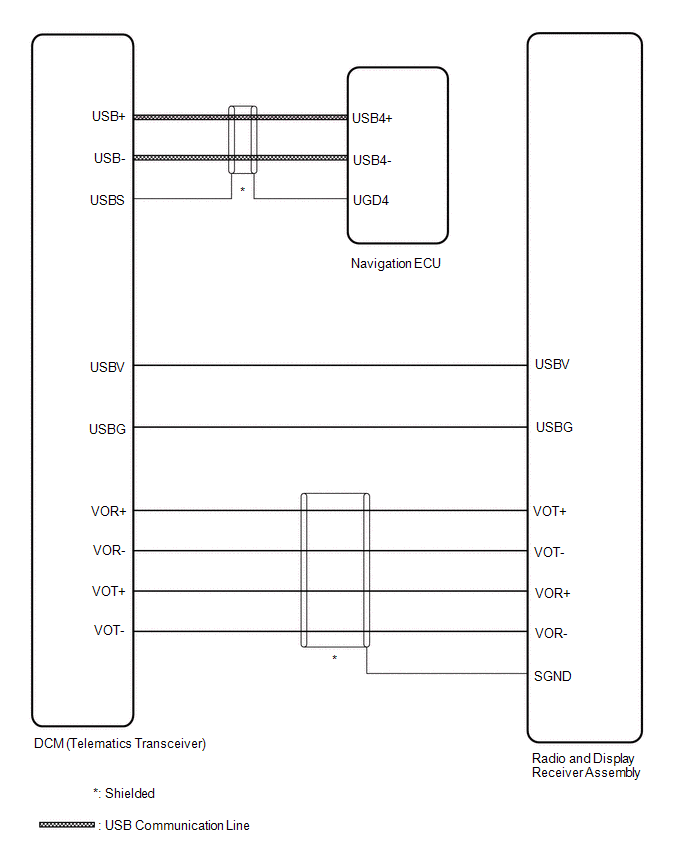
READ NEXT:
 System Description
SYSTEM DESCRIPTION DESCRIPTION
Toyota Entune allows the vehicle to receive information from the call center and links the information to the audio and visual system*1 or navigation system*2. Toyo
How To Proceed With Troubleshooting
CAUTION / NOTICE / HINT
HINT:
Use the following procedure to troubleshoot the Entune system.
*: Use the Techstream.
PROCEDURE
1. VEHICLE BROUGHT TO WORKSHOP
NEX
Operation Check
OPERATION CHECK TOYOTA ENTUNE APP SUITE CONNECT RESET PROCEDURE
(a) Duplicate the problem symptom. (b) Check for DTCs and repair the systems for which any DTCs are output.
Click here
(c) Chec
SEE MORE:
Seat belts
Make sure that all occupants are wearing their seat belts before
driving the vehicle.
Correct use of the seat belts
Extend the shoulder belt so that
it comes fully over the shoulder,
but does not come into contact
with the neck or slide off the
shoulder.
Position the lap belt as low
Terminals Of Ecu
TERMINALS OF ECU TERMINALS OF ECU
*a Component without harness connected
(Skid Control ECU (Brake Actuator Assembly))
- -
HINT:
As a waterproof connector is used for the brake actuator assembly, voltage and waveform inspections cannot be performed with the connector c
© 2023-2026 Copyright www.tocamry.com
