
Toyota Camry (XV70): Disassembly
Toyota Camry Repair Manual XV70 (2018-2024) / Steering / Steering Gear / Linkage / Steering Gear / Disassembly
DISASSEMBLY
PROCEDURE
1. REMOVE STEERING RACK BOOT CLIP (for LH Side)
(a) Using pliers, remove the steering rack boot clip.
2. REMOVE STEERING RACK BOOT CLIP (for RH Side)
HINT:
Perform the same procedure as for the LH side.
3. REMOVE NO. 2 STEERING RACK BOOT CLAMP (for LH Side)
| (a) Using a screwdriver, remove the No. 2 steering rack boot clamp. NOTICE: Be careful not to damage the No. 2 steering rack boot. |
|
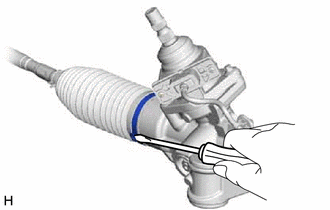
4. REMOVE NO. 2 STEERING RACK BOOT CLAMP (for RH Side)
HINT:
Perform the same procedure as for the LH side.
5. REMOVE NO. 2 STEERING RACK BOOT
(a) Remove the No. 2 steering rack boot.
NOTICE:
- Check that there is no water, foreign matter or rust inside of the removed No. 2 steering rack boot.
- If there is no water, foreign matter or rust inside of the No. 2 steering rack boot, pull out the rack bar and check for water, foreign matter or rust.
- If water or foreign matter in either part, replace them with a new rack and pinion power steering gear assembly.
- In order to avoid water or foreign matter from adhering to the parts, do not touch the parts unless working in a dust-free, indoors environment.
6. REMOVE NO. 1 STEERING RACK BOOT
HINT:
Perform the same procedure as for the No. 2 steering rack boot.
READ NEXT:
 Inspection
INSPECTION PROCEDURE 1. INSPECT TIE ROD ASSEMBLY LH
(a) Secure the tie rod assembly LH in a vise between aluminum plates.
NOTICE: Do not overtighten the vise.
(b) Instal
Reassembly
REASSEMBLY PROCEDURE 1. INSTALL NO. 2 STEERING RACK BOOT
(a) Apply lithium soap base glycol grease to the inside of the small opening of a new No. 2 steering rack boot.
Lithium
Installation
INSTALLATION PROCEDURE 1. INSTALL STEERING GEAR HEAT INSULATOR (for 2GR-FKS)
(a) Install the steering gear heat insulator to the rack and pinion power steering gear assembly with the 2 bolts in
SEE MORE:
Transmitter ID not Registered (Main) (C2171)
DESCRIPTION The IDs of each tire pressure warning valve and transmitter are registered to the tire pressure warning ECU and receiver.
When the ECU detects that a transmitter ID code is not registered in the ECU, this DTC is stored.
DTC No. Detection Item
DTC Detection Condition Trou
Oil And Oil Filter
ComponentsCOMPONENTS ILLUSTRATION
*1 FRONT WHEEL OPENING EXTENSION PAD LH
*2 FRONT WHEEL OPENING EXTENSION PAD RH
*3 NO. 1 ENGINE UNDER COVER
*4 REAR ENGINE UNDER COVER RH
N*m (kgf*cm, ft.*lbf): Specified torque
- - ILLUSTRATION
© 2023-2026 Copyright www.tocamry.com
