
Toyota Camry (XV70): Door Courtesy Light Bulb
Replacement
REPLACEMENT
CAUTION / NOTICE / HINT
HINT:
- Use the same procedure for the RH side and LH side.
- The following procedure is for the LH side.
PROCEDURE
1. REMOVE COURTESY LIGHT ASSEMBLY
Click here 
2. REMOVE COURTESY LIGHT BULB
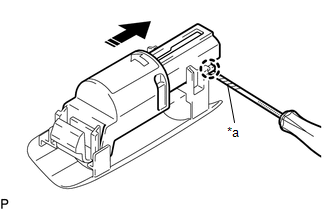
(a) Using a screwdriver with its tip wrapped with protective tape, disengage the claw and remove the courtesy light housing with the courtesy light cover as shown in the illustration.
|
*a | Protective Tape |
 |
Remove in this Direction |
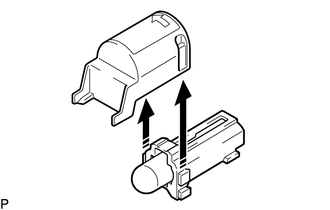
(b) Remove the courtesy light cover from the courtesy light housing as shown in the illustration.
|
|
Remove in this Direction |
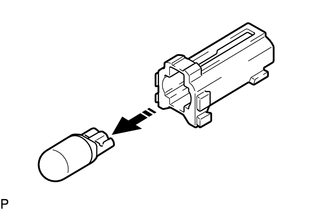
(c) Remove the courtesy light bulb from the courtesy light housing as shown in the illustration.
|
|
Remove in this Direction |
3. INSTALL COURTESY LIGHT BULB
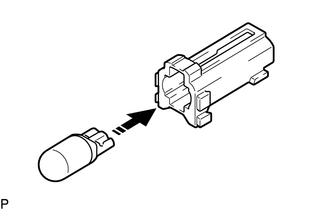
(a) Install the courtesy light bulb to the courtesy light housing as shown in the illustration.
|
|
Install in this Direction |
(b) Install the courtesy light cover to the courtesy light housing as shown in the illustration.
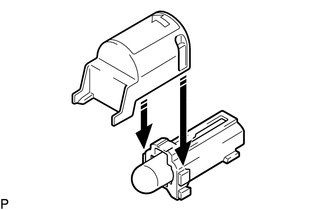
|
|
Install in this Direction |
(c) Engage the claw to install the courtesy light housing with the courtesy light cover as shown in the illustration.
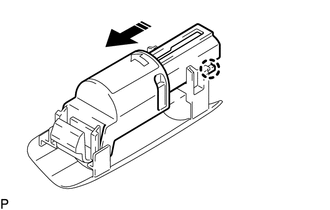
|
|
Install in this Direction |
4. INSTALL COURTESY LIGHT ASSEMBLY
Click here
READ NEXT:
 Footwell Light
ComponentsCOMPONENTS ILLUSTRATION
*A for Driver Side
*B for Front Passenger Side
*1 NO. 1 INSTRUMENT PANEL UNDER COVER SUB-ASSEMBLY
*2 NO. 1 INTERIOR ILLUMINATION LIGHT
Front Console Light
ComponentsCOMPONENTS ILLUSTRATION
*1 NO. 1 METER HOOD CLUSTER
*2 NO. 2 INTERIOR ILLUMINATION LIGHT SUB-ASSEMBLY RemovalREMOVAL PROCEDURE
1. REMOVE NO. 1 METER HOOD CLUSTER Click he
SEE MORE:
Dtc Check / Clear
DTC CHECK / CLEAR DTC CHECK USING TECHSTREAM (a) Connect the Techstream to the DLC3.
(b) Turn the ignition switch to ON. (c) Turn the Techstream on.
(d) Enter the following menus: Body Electrical / Air Conditioner / Trouble Codes. Body Electrical > Air Conditioner > Trouble Codes
(e) Check
Ambient Light
ComponentsCOMPONENTS ILLUSTRATION
*1 INSTRUMENT PANEL LIGHT ASSEMBLY
*2 NO. 1 METER HOOD CLUSTER
*3 NO. 2 INSTRUMENT PANEL GARNISH SUB-ASSEMBLY
*4 NO. 3 INSTRUMENT PANEL REGISTER ASSEMBLY RemovalREMOVAL PROCEDURE
1. REMOVE NO. 1 METER HOOD CLUSTER Click here
