
Toyota Camry (XV70): Initialization
INITIALIZATION
NOTICE:
- Initialization can be confirmed through the tire pressure warning light.
- If the ignition switch is turned off during initialization, the tire pressure warning ECU and receiver memorizes that initialization was being performed. Therefore, it is not necessary to perform the initialization procedure again after turning the ignition switch to ON.
- The order in which the data is received is random.
- If the signals from all the tire pressure warning valve and transmitters are received, initialization is completed.
- Initialization is completed when the Data List "ID Tire Inflation Pressure" display shows the correct pressures.
Click here
.gif)
- Initialization is normally completed within a few minutes.
However, it may take 10 minutes or more until the tire pressure of the tire inflation pressure display function is shown (w/ Tire Inflation Pressure Display Function).
- It may take a few minutes until the values are displayed. If the values are not displayed after a few minutes, perform troubleshooting according to the inspection procedure for DTCs C2121 to C2124 (C2125: w/ Full Size Spare Tire).
Click here
- If initialization has not been completed successfully, DTC C2177 is stored after a vehicle speed of 40 km/h (25 mph) or more is detected for 20 minutes or more.
- During test mode (sensor check mode), the system will not change to initialization mode even if the initialization procedure is performed.
- If initialization is performed, the existing tire positions will be cleared, but will be automatically identified when the vehicle is driven at 40 km/h (25 mph) or more for 10 to 30 minutes (w/ Tire Inflation Pressure Display Function).
- w/ ID Switching Function:
While the answer-back function for the ID switching function is operating, the system will not change to initialization mode even if the initialization procedure is performed.
BEFORE INITIALIZATION
(a) Set the tire pressure to the specified value.
NOTICE:
Refer to the link as the procedure for adjusting the tire pressures differs depending on the temperature of the tires.
Click here
HINT:
The tire pressure warning system illuminates the tire pressure warning light to warn the driver when the following condition is met:
- The tire pressure drops to approximately 75% or less of the tire pressure set when system initialization was performed using the steering pad switch assembly.
INITIALIZATION PROCEDURE
(a) Turn the ignition switch to ON.
(b) Select "Set Pressure" on the multi-information display and press and hold the "OK" switch (steering pad switch assembly) until the tire pressure warning light blinks 3 times.
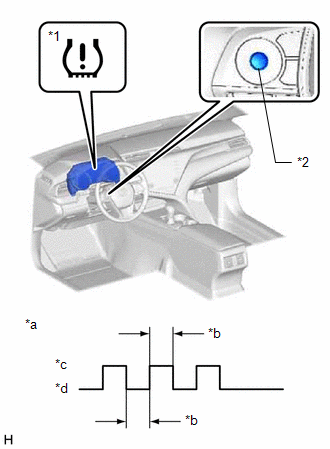
|
*1 | Tire Pressure Warning Light |
|
*2 | "OK" Switch (Steering Pad Switch Assembly) |
|
*a | Tire Pressure Warning Light Output Pattern |
|
*b | 1 sec. |
|
*c | ON |
|
*d | OFF |
(c) Turn the ignition switch off.
(d) Connect the Techstream to the DLC3.
(e) Turn the ignition switch to ON.
(f) Turn the Techstream on.
(g) Enter the following menus: Chassis / Tire Pressure Monitor / Data List.
Chassis > Tire Pressure Monitor > Data List|
Tester Display | Measurement Item |
Range | Normal Condition |
Diagnostic Note |
|---|---|---|---|---|
|
ID 1 Tire Inflation Pressure |
ID1 tire inflation pressure |
min.: Absolute pressure (abs) / 0 kPa (0 kgf/cm2, 0 psi), Relative pressure (Gauge) / 0 kPa (0 kgf/cm2, 0 psi) max.: Absolute pressure (abs) / 480 kPa (4.9 kgf/cm2, 70 psi), Relative pressure (Gauge) / 380 kPa (3.9 kgf/cm2, 55 psi) |
Actual tire inflation pressure |
If N/A is displayed, data has not been received.*1 |
|
ID 2 Tire Inflation Pressure |
ID2 tire inflation pressure |
min.: Absolute pressure (abs) / 0 kPa (0 kgf/cm2, 0 psi), Relative pressure (Gauge) / 0 kPa (0 kgf/cm2, 0 psi) max.: Absolute pressure (abs) / 480 kPa (4.9 kgf/cm2, 70 psi), Relative pressure (Gauge) / 380 kPa (3.9 kgf/cm2, 55 psi) |
Actual tire inflation pressure |
If N/A is displayed, data has not been received.*1 |
|
ID 3 Tire Inflation Pressure |
ID3 tire inflation pressure |
min.: Absolute pressure (abs) / 0 kPa (0 kgf/cm2, 0 psi), Relative pressure (Gauge) / 0 kPa (0 kgf/cm2, 0 psi) max.: Absolute pressure (abs) / 480 kPa (4.9 kgf/cm2, 70 psi), Relative pressure (Gauge) / 380 kPa (3.9 kgf/cm2, 55 psi) |
Actual tire inflation pressure |
If N/A is displayed, data has not been received.*1 |
|
ID 4 Tire Inflation Pressure |
ID4 tire inflation pressure |
min.: Absolute pressure (abs) / 0 kPa (0 kgf/cm2, 0 psi), Relative pressure (Gauge) / 0 kPa (0 kgf/cm2, 0 psi) max.: Absolute pressure (abs) / 480 kPa (4.9 kgf/cm2, 70 psi), Relative pressure (Gauge) / 380 kPa (3.9 kgf/cm2, 55 psi) |
Actual tire inflation pressure |
If N/A is displayed, data has not been received.*1 |
|
ID 5 Tire Inflation Pressure |
ID5 tire inflation pressure |
min.: Absolute pressure (abs) / 0 kPa (0 kgf/cm2, 0 psi), Relative pressure (Gauge) / 0 kPa (0 kgf/cm2, 0 psi) max.: Absolute pressure (abs) / 480 kPa (4.9 kgf/cm2, 70 psi), Relative pressure (Gauge) / 380 kPa (3.9 kgf/cm2, 55 psi) |
Actual tire inflation pressure |
|
HINT:
- *1: It may take a few minutes until the values are displayed.
- *2: w/ Full Size Spare Tire
- The wheel position cannot be determined from ID1 through ID5 on the Data List.
(h) Check that initialization has been completed.
(i) Confirm that the tire pressure data of all tires is displayed on the Techstream screen.
READ NEXT:
 Test Mode Procedure
TEST MODE PROCEDURE TEST MODE (SIGNAL CHECK MODE) PROCEDURE
HINT:
When entering test mode (signal check mode), the tire pressure warning ECU and receiver sets all the test mode (signal check mod
Problem Symptoms Table
PROBLEM SYMPTOMS TABLE
HINT:
Use the table below to help determine the cause of problem symptoms. If multiple suspected areas are listed, the potential causes of the symptoms are listed in order
Terminals Of Ecu
TERMINALS OF ECU CHECK TIRE PRESSURE WARNING ECU AND RECEIVER
(a) Disconnect the R127 or R128 tire pressure warning ECU and receiver connector and measure the voltage or resistance on the wire harne
SEE MORE:
Disassembly
DISASSEMBLY CAUTION / NOTICE / HINT
NOTICE:
Do not disconnect the tube shown in the illustration when disassembling the fuel suction tube with pump and gauge assembly. Doing so will cause reassembly of the fuel suction tube with pump and gauge assembly to be impossible as the tube is pressed i
Illumination for Panel Switch does not Come on with Tail Switch ON
CAUTION / NOTICE / HINT
NOTICE:
Depending on the parts that are replaced during vehicle inspection or maintenance, performing initialization, registration or calibration may be needed. Refer to Precaution for Audio and Visual System.
Click here
When replacing the radio and display
