
Toyota Camry (XV70): Inspection
INSPECTION
PROCEDURE
1. INSPECT TIRES
(a) Inspect the tires for wear and proper inflation pressure.
Cold Tire Inflation Pressure:
for 2WD|
Tire Size | Cold Tire Inflation Pressure | |
|---|---|---|
|
Front | Rear | |
|
205/65R16 95H 215/55R17 94V 235/45R18 94V 235/40R19 92V 235/45R18 94W | 240 kPa (2.4 kgf/cm2, 35 psi) |
240 kPa (2.4 kgf/cm2, 35 psi) |
|
235/40R19 96Y | 230 kPa (2.3 kgf/cm2, 33 psi) |
230 kPa (2.3 kgf/cm2, 33 psi) |
|
Tire Size | Cold Tire Inflation Pressure | |
|---|---|---|
|
Front | Rear | |
|
215/55R17 94V 235/45R18 94V 235/40R19 92V |
250 kPa (2.5 kgf/cm2, 36 psi) |
250 kPa (2.5 kgf/cm2, 36 psi) |
Cold Tire Inflation Pressure (for Compact Spare Tire):
|
Tire Size | Cold Tire Inflation Pressure |
|---|---|
|
T155/70D17 110M | 420 kPa (4.2 kgf/cm2, 60 psi) |
(1) Perform initialization.
Click here
.gif)
(2) Tire pressure adjustment method when warm:
- Turn the ignition switch off.
- Connect the Techstream to the DLC3.
- Turn the ignition switch to ON.
- Turn the Techstream on.
- Enter the following menus: Chassis / Tire Pressure Monitor / Data List.
- Adjust the tire pressure so that the displayed value is equal to the set pressure.
- Perform initialization and check that initialization completes.
Click here
- Check and record the value of the Data List item "Temperature in Tire". (Ts)
- Check and record the ambient temperature during tire pressure adjustment. (Tm)
- Readjust the tire pressure according to the difference between the tire internal temperature (Ts) and the ambient temperature (Tm). (P)
HINT:
Tire internal temperature: Ts, Ambient temperature: Tm, Tire pressure readjustment value: P
P = (Specified Pressure) + (Ts - Tm)
- Check the pressure adjustment value with the Data List item "Tire Inflation Pressure".
| (b) Using a dial indicator, check the runout of the tires. Maximum Tire Runout: 1.4 mm (0.0551 in.) HINT: Measure the runout with the wheel assembly removed from the vehicle. |
|

2. ROTATE TIRES
(a) Remove the wheel assembly.
Click here
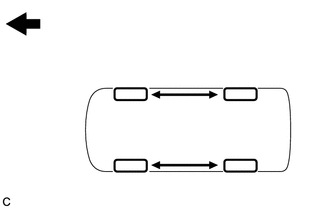
(b) Rotate the tires as shown in the illustration.
.png) |
Front |
(c) Install the wheel assembly.
Click here
(d) Perform initialization.
Click here
3. INSPECT AND ADJUST WHEEL BALANCE
(a) Inspect and adjust the off-the-car balance.
(1) for Steel Wheel:
Maximum Wheel Imbalance:
8.0 g (0.0176 lb)
HINT:
- Use clip-on type balance weights for both the inner and outer side.
- If the tires vibrate even after the off-the-car balance adjustment, adjust the wheel balance with on-the-car balancing as necessary.
| (2) except Steel Wheel: Maximum Wheel Imbalance: 8.0 g (0.0176 lb) NOTICE:
HINT:
|
|

4. INSPECT FRONT AXLE HUB BEARING
Click here
5. INSPECT REAR AXLE HUB BEARING
for 2WD with Electric Parking Brake System: Click here
for 2WD without Electric Parking Brake System: Click here
for AWD: Click here
READ NEXT:
 Components
COMPONENTS ILLUSTRATION
*A for Fold Down Seat Type
- -
*1 REAR CENTER SEAT OUTER BELT ASSEMBLY
*2 REAR SEAT CUSHION ASSEMBLY
*3 REAR SEAT CUSHION LOCK H
SEE MORE:
ABS Warning Light Remains ON
DESCRIPTION This procedure is for troubleshooting when the ABS warning light remains on but no DTCs are output.
The skid control ECU (brake actuator assembly) controls the ABS warning light in the combination meter assembly via CAN communication. CAUTION / NOTICE / HINT
NOTICE:
After replaci
Knock Sensor 1 Bank 1 or Single Sensor Circuit Short to Ground (P032511,P033011)
DESCRIPTION A flat-type knock control sensor (non-resonant type) has a structure that can detect vibrations between approximately 5 kHz and 15 kHz.
The knock control sensor is fitted onto the engine block to detect engine knocking.
The knock control sensor contains a piezoelectric element which
