
Toyota Camry (XV70): Installation
INSTALLATION
CAUTION / NOTICE / HINT
HINT:
- Use the same procedure for the RH side and LH side.
- The following procedure is for the LH side.
PROCEDURE
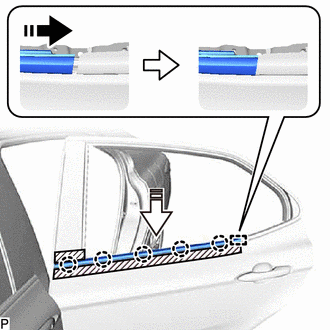
1. INSTALL REAR DOOR BELT MOULDING ASSEMBLY
(a) Engage the guide and 5 claws to install a new rear door belt moulding assembly as shown in the illustration.
.png) |
Install in this Direction (1) |
.png) |
Install in this Direction (2) |
2. INSTALL REAR DOOR GLASS SUB-ASSEMBLY
Click here
.gif)
3. INSTALL REAR DOOR QUARTER WINDOW GLASS
Click here
4. INSTALL REAR DOOR REAR LOWER WINDOW FRAME SUB-ASSEMBLY
Click here
5. CONNECT REAR DOOR WEATHERSTRIP
Click here
6. INSTALL REAR DOOR GLASS RUN
Click here
7. INSTALL REAR DOOR PANEL PROTECTOR
Click here
8. INSTALL REAR DOOR NO. 1 VENT SEAL
Click here
9. INSTALL REAR DOOR SERVICE HOLE COVER
Click here
10. INSTALL REAR DOOR NO. 2 SERVICE HOLE COVER
Click here
11. INSTALL REAR DOOR INNER GLASS WEATHERSTRIP
Click here
12. INSTALL REAR DOOR TRIM BOARD SUB-ASSEMBLY
Click here
13. INSTALL REAR ARMREST ASSEMBLY
Click here
14. INSTALL REAR POWER WINDOW REGULATOR SWITCH ASSEMBLY WITH REAR DOOR UPPER ARMREST BASE PANEL
Click here
15. INSTALL REAR DOOR ARMREST COVER SUB-ASSEMBLY
Click here
16. CONNECT CABLE TO NEGATIVE BATTERY TERMINAL
for A25A-FKS:
Click here
for 2GR-FKS:
Click here
17. INITIALIZE POWER WINDOW CONTROL SYSTEM
Click here
18. INSPECT POWER WINDOW OPERATION
Click here
READ NEXT:
 Components
COMPONENTS ILLUSTRATION
*1 REAR DOOR FRONT WINDOW FRAME MOULDING
*2 REAR DOOR WEATHERSTRIP
*3 REAR DOOR WINDOW FRAME MOULDING SUB-ASSEMBLY
*4 RIVET
Removal
REMOVAL CAUTION / NOTICE / HINT
The necessary procedures (adjustment, calibration, initialization or registration) that must be performed after parts are removed and installed, or replaced during r
SEE MORE:
Brake System Control Module "A" System Voltage System Voltage High (C137BA3)
DESCRIPTION If a malfunction is detected in the power supply circuit, the skid control ECU (brake actuator assembly) stores this DTC and the fail-safe function prohibits ABS operation.
This DTC is stored when the +BS terminal voltage deviates due to a malfunction in a power supply or charging syst
System Too Lean Bank 1 (P017100,P017200,P017400,P017500,P117000,P117B00)
DESCRIPTION The fuel trim is related to the feedback compensation value, not to the basic injection duration. The fuel trim consists of both the short-term and long-term fuel trims.
The short-term fuel trim is fuel compensation that is used to constantly maintain the air fuel ratio at stoichiometr
