
Toyota Camry (XV70): License Plate Light Assembly
Components
COMPONENTS
ILLUSTRATION
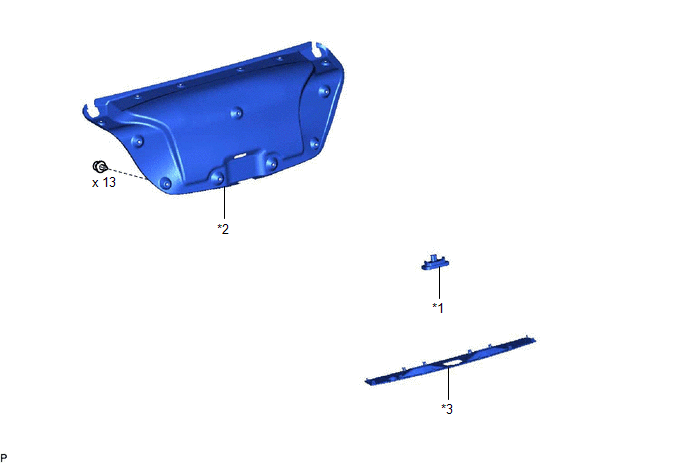
|
*1 | LICENSE PLATE LIGHT ASSEMBLY |
*2 | LUGGAGE COMPARTMENT DOOR COVER |
|
*3 | NO. 3 LUGGAGE COMPARTMENT DOOR OUTSIDE GARNISH |
- | - |
Removal
REMOVAL
CAUTION / NOTICE / HINT
HINT:
- Use the same procedure for the RH side and LH side.
- The following procedure is for the LH side.
PROCEDURE
1. REMOVE LUGGAGE COMPARTMENT DOOR COVER
Click here .gif)
2. REMOVE NO. 3 LUGGAGE COMPARTMENT DOOR OUTSIDE GARNISH
Click here
3. REMOVE LICENSE PLATE LIGHT ASSEMBLY
| (a) Disconnect the connector. |
|
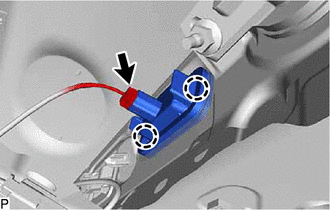
(b) Disengage the 2 claws to remove the license plate light assembly.
Inspection
INSPECTION
PROCEDURE
1. INSPECT LICENSE PLATE LIGHT ASSEMBLY
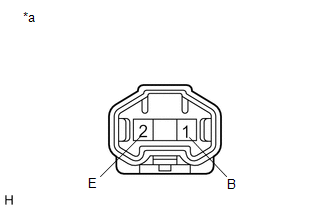
|
*a | Component without harness connected (License Plate Light Assembly) |
(a) Connect 4 dry-cell batteries (1.5 V) in series.
NOTICE:
Do not use rechargeable batteries as they may not output a voltage of 1.5 V.
(b) Apply 6 V batter voltage to the terminals of the connector and check that the license plate light illuminates.
OK:
|
Condition | Specified Condition |
|---|---|
|
Positive (+) lead from the batteries → Terminal 1 (B) Negative (-) lead from the batteries → Terminal 2 (E) |
License plate light illuminates |
If the result is not as specified, replace the license plate light assembly.
Installation
INSTALLATION
CAUTION / NOTICE / HINT
HINT:
- Use the same procedure for the RH side and LH side.
- The following procedure is for the LH side.
PROCEDURE
1. INSTALL LICENSE PLATE LIGHT ASSEMBLY
(a) Engage the 2 claws to install the license plate light assembly.
(b) Connect the connector.
2. INSTALL NO. 3 LUGGAGE COMPARTMENT DOOR OUTSIDE GARNISH
Click here .gif)
3. INSTALL LUGGAGE COMPARTMENT DOOR COVER
Click here
READ NEXT:
 Precaution
PRECAUTION PRECAUTION FOR DISCONNECTING CABLE FROM NEGATIVE BATTERY TERMINAL
NOTICE: When disconnecting the cable from the negative (-) battery terminal, initialize the following systems after the
Parts Location
PARTS LOCATION ILLUSTRATION
*A w/ Side Turn Signal Light
*B for A25A-FKS
*C for 2GR-FKS
- -
*1 HEADLIGHT ASSEMBLY LH
*2 HEADLIGHT ASSEMB
SEE MORE:
Dtc Check / Clear
DTC CHECK / CLEAR NOTICE: When the diagnosis system is changed from normal mode to check mode or vice versa, all DTCs and freeze frame data recorded in normal mode are cleared. Before changing modes, always check and make a note of DTCs and freeze frame data.
HINT:
DTCs which are stored in the
Components
COMPONENTS ILLUSTRATION
*1 FRONT CENTER UPPER SUSPENSION BRACE SUB-ASSEMBLY
- -
Tightening torque for "Major areas involving basic vehicle performance such as moving/turning/stopping" : N*m (kgf*cm, ft.*lbf)
N*m (kgf*cm, ft.*lbf): Specified torque
