
Toyota Camry (XV70): Removal
REMOVAL
CAUTION / NOTICE / HINT
The necessary procedures (adjustment, calibration, initialization, or registration) that must be performed after parts are removed and installed, or replaced during stereo component amplifier assembly removal/installation are shown below.
Necessary Procedure After Parts Removed/Installed/Replaced|
Replaced Part or Performed Procedure |
Necessary Procedures | Effect/Inoperative Function when Necessary Procedure not Performed |
Link |
|---|---|---|---|
| Disconnect cable from negative battery terminal |
Perform steering sensor zero point calibration |
Lane Tracing Assist System |
|
|
Pre-collision System | |||
|
Memorize steering angle neutral point |
Parking Assist Monitor System |
| |
|
Panoramic View Monitor System |
|
CAUTION:
Some of these service operations affect the SRS airbag system. Read the precautionary notices concerning the SRS airbag system before servicing.
Click here .gif)
.png)
PROCEDURE
1. REMOVE FRONT SEAT ASSEMBLY LH
Click here
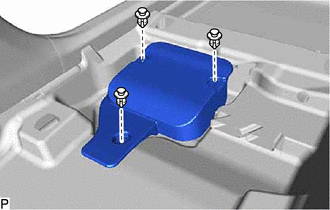
2. REMOVE AUDIO AMPLIFIER COVER
| (a) Remove the 3 clips and audio amplifier cover. |
|
3. REMOVE STEREO COMPONENT AMPLIFIER ASSEMBLY WITH BRACKET
| (a) Disconnect each connector. |
|
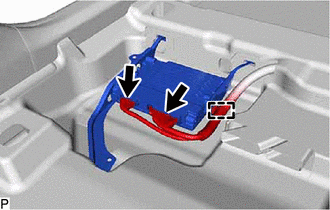
(b) Disengage the clamp.
|
(c) Turn back the front floor carpet assembly and front floor mat as shown in the illustration. |
|
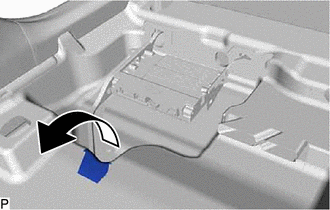
| (d) Remove the bolt. |
|
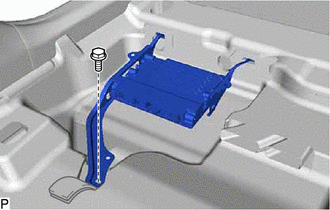
(e) Disengage the 2 guides and remove the stereo component amplifier assembly with bracket as shown in the illustration.
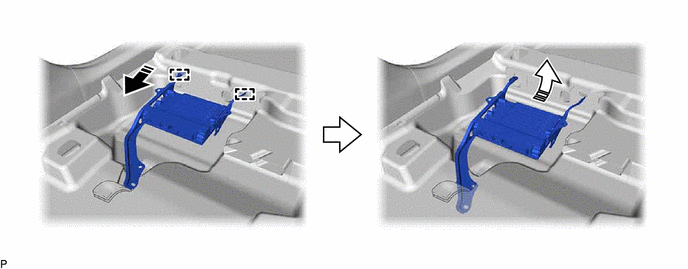
.png) |
Remove in this Direction (1) |
.png) |
Remove in this Direction (2) |
4. REMOVE NO. 1 AMPLIFIER BRACKET
| (a) Remove the 2 screws and No. 1 amplifier bracket. |
|
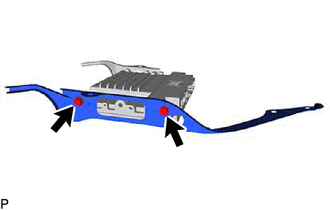
5. REMOVE NO. 2 AMPLIFIER BRACKET
| (a) Remove the 2 screws and No. 2 amplifier bracket. |
|
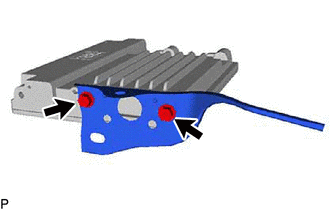
6. REMOVE STEREO COMPONENT AMPLIFIER ASSEMBLY
READ NEXT:
 Installation
INSTALLATION PROCEDURE 1. INSTALL STEREO COMPONENT AMPLIFIER ASSEMBLY
2. INSTALL NO. 2 AMPLIFIER BRACKET (a) Install the No. 2 amplifier bracket with the 2 screws.
3. INSTALL NO. 1 AMPLIFIER BRACK
Stereo Jack Adapter Assembly
ComponentsCOMPONENTS ILLUSTRATION
*1 LOWER CENTER INSTRUMENT PANEL FINISH PANEL
*2 NO. 1 METER HOOD CLUSTER
*3 NO. 1 STEREO JACK ADAPTER ASSEMBLY
- - RemovalRE
SEE MORE:
How To Proceed With Troubleshooting
CAUTION / NOTICE / HINT
HINT:
Use the following procedure to troubleshoot the LIN communication system.
*: Use the Techstream.
PROCEDURE
1. VEHICLE BROUGHT TO WORKSHOP
NEXT
2.
CUSTOMER PROBLEM ANALYSIS
HINT:
In troubleshoot
Precaution
PRECAUTION PRECAUTION FOR DISCONNECTING CABLE FROM NEGATIVE BATTERY TERMINAL
NOTICE: When disconnecting the cable from the negative (-) battery terminal, initialize the following systems after the cable is reconnected.
System See Procedure
Lane Tracing Assist System
