
Toyota Camry (XV70): System Diagram
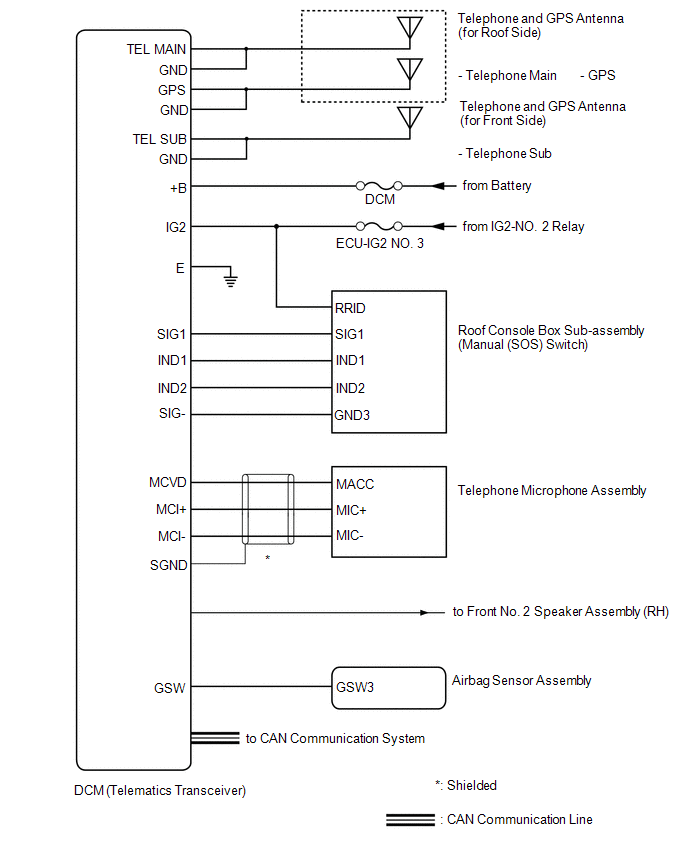
SYSTEM DIAGRAM
READ NEXT:
 System Description
SYSTEM DESCRIPTION DESCRIPTION (a) Safety Connect performs ACN (Automatic Collision Notification), manual emergency calling, stolen vehicle tracking and roadside assistance service by, audio and data
How To Proceed With Troubleshooting
CAUTION / NOTICE / HINT
HINT:
Use the following procedure to troubleshoot the safety connect system.
*: Use the Techstream.
PROCEDURE
1. VEHICLE BROUGHT TO WORKSHOP
Dcm Operation History
DCM OPERATION HISTORY DCM OPERATION HISTORY
HINT:
This function shows the telematics network status when the DCM (telematics transceiver) was operated. Use this when no DTC is present but this t
SEE MORE:
Dynamic radar cruise
control
Summary of functions
In vehicle-to-vehicle distance control mode, the vehicle automatically
accelerates and decelerates to match the speed changes of the preceding
vehicle even if the accelerator pedal is not depressed. In constant
speed control mode, the vehicle runs at a fixed speed.
Use the
Sensor (Motor) Failure (B2341,B2344)
DESCRIPTION When the sliding roof ECU (sliding roof drive gear sub-assembly) detects a motor malfunction and the sliding roof operation is stopped, DTC B2341 is stored.
When the sliding roof ECU (sliding roof drive gear sub-assembly) detects a gear position malfunction and the sliding roof operat
© 2023-2026 Copyright www.tocamry.com
