
Toyota Camry (XV70): Components
COMPONENTS
ILLUSTRATION
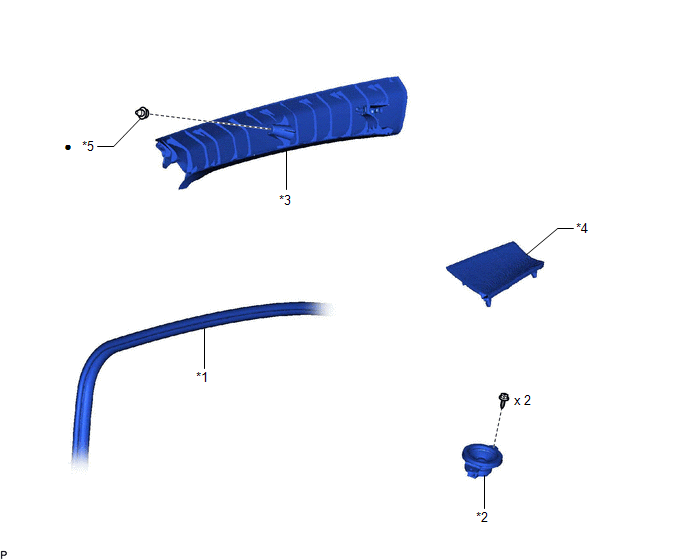
|
*1 | FRONT DOOR OPENING TRIM WEATHERSTRIP |
*2 | FRONT NO. 2 SPEAKER ASSEMBLY |
|
*3 | FRONT PILLAR GARNISH |
*4 | NO. 1 INSTRUMENT PANEL SPEAKER PANEL |
|
*5 | CLIP |
- | - |
|
● | Non-reusable part |
- | - |
READ NEXT:
 Removal
REMOVAL CAUTION / NOTICE / HINT
HINT:
Use the same procedure for the RH side and LH side.
The following procedure is for the LH side.
PROCEDURE 1. DISCONNECT FRONT DOOR OPENING TRIM WEAT
Inspection
INSPECTION PROCEDURE 1. INSPECT FRONT NO. 2 SPEAKER ASSEMBLY (for 6 Speakers)
(a) With the speaker installed, check that there is no looseness or other abnormalities.
(b) Check that there is no fo
Installation
INSTALLATION CAUTION / NOTICE / HINT
HINT:
Use the same procedure for the RH side and LH side.
The following procedure is for the LH side.
PROCEDURE 1. INSTALL FRONT NO. 2 SPEAKER ASSEMB
SEE MORE:
Installation
INSTALLATION PROCEDURE 1. INSTALL FUEL PIPE PLUG SUB-ASSEMBLY
(a) Install a new O-ring, No. 1 fuel injector back-up ring, No. 2 fuel injector back-up ring and No. 3 fuel injector back-up ring to the fuel pipe plug sub-assembly as shown in the illustration.
*1 Fuel Pipe Plug Sub-assemb
Driving the vehicle
The following procedures should be observed to ensure safe
driving:
Driving
1. With the brake pedal depressed, shift the shift lever to D.
2. Release the parking brake.
3. Gradually release the brake pedal and gently depress the accelerator
pedal to accelerate the vehicle.
Stopping
1. With t
© 2023-2026 Copyright www.tocamry.com
