
Toyota Camry (XV70): Components
COMPONENTS
ILLUSTRATION
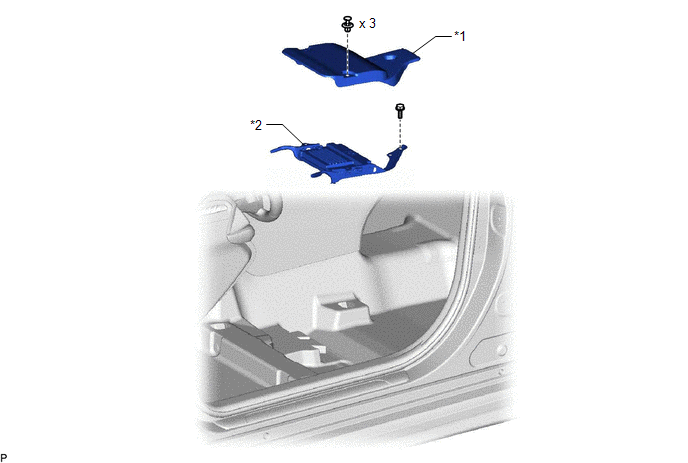
|
*1 | AUDIO AMPLIFIER COVER |
*2 | STEREO COMPONENT AMPLIFIER ASSEMBLY WITH BRACKET |
ILLUSTRATION

|
*1 | NO. 1 AMPLIFIER BRACKET |
*2 | NO. 2 AMPLIFIER BRACKET |
|
*3 | STEREO COMPONENT AMPLIFIER ASSEMBLY |
- | - |
READ NEXT:
 Removal
REMOVAL CAUTION / NOTICE / HINT
The necessary procedures (adjustment, calibration, initialization, or registration) that must be performed after parts are removed and installed, or replaced during s
Installation
INSTALLATION PROCEDURE 1. INSTALL STEREO COMPONENT AMPLIFIER ASSEMBLY
2. INSTALL NO. 2 AMPLIFIER BRACKET (a) Install the No. 2 amplifier bracket with the 2 screws.
3. INSTALL NO. 1 AMPLIFIER BRACK
Stereo Jack Adapter Assembly
ComponentsCOMPONENTS ILLUSTRATION
*1 LOWER CENTER INSTRUMENT PANEL FINISH PANEL
*2 NO. 1 METER HOOD CLUSTER
*3 NO. 1 STEREO JACK ADAPTER ASSEMBLY
- - RemovalRE
SEE MORE:
Removal
REMOVAL CAUTION / NOTICE / HINT
The necessary procedures (adjustment, calibration, initialization or registration) that must be performed after parts are removed and installed, or replaced during rear door belt moulding removal/installation are shown below. Necessary Procedure After Parts Removed
Diagnosis System
DIAGNOSIS SYSTEM CHECK WARNING LIGHT
NOTICE:
When there is a problem with the tire pressure warning system, the tire pressure warning light blinks at 0.5 second intervals, and illuminates after 1 minute.
When the malfunction has been corrected, the tire pressure warning light goes off.
© 2023-2026 Copyright www.tocamry.com
