
Toyota Camry (XV70): High Mounted Stop Light Assembly
Components
COMPONENTS
ILLUSTRATION
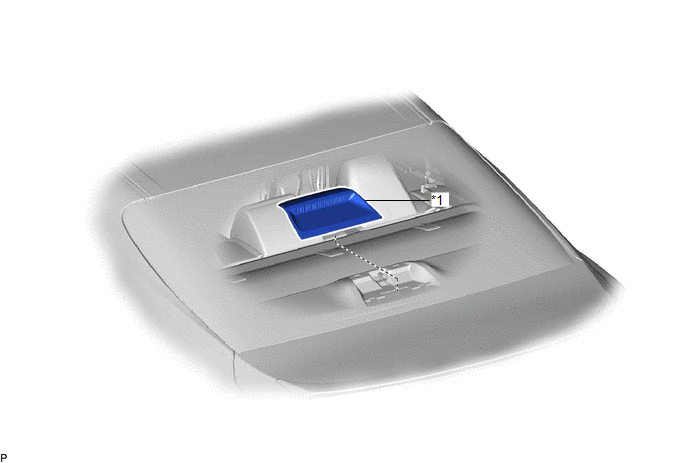
|
*1 | CENTER STOP LIGHT SET |
- | - |
Removal
REMOVAL
PROCEDURE
1. REMOVE CENTER STOP LIGHT SET
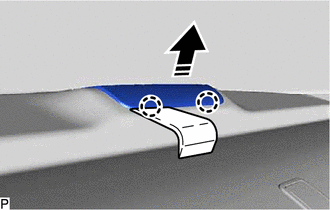
(a) Using a moulding remover, disengage the 2 claws as shown in the illustration.
.png) |
Remove in this Direction |
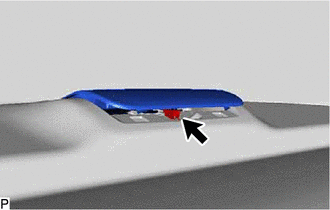
| (b) Disconnect the connector. |
|
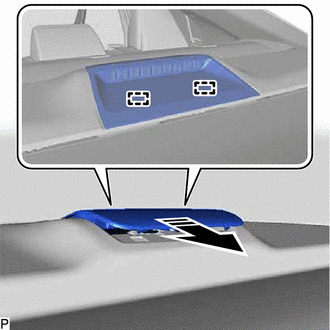
(c) Disengage the 2 guides as shown in the illustration to remove the center stop light set.
|
|
Remove in this Direction |
Inspection
INSPECTION
PROCEDURE
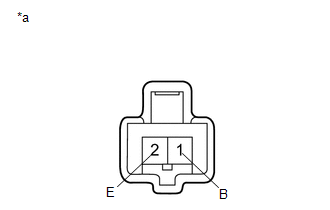
1. INSPECT CENTER STOP LIGHT SET
|
*a | Component without harness connected (Center Stop Light Set) |
(a) Apply battery voltage to the center stop light set and check that the light illuminates.
OK:
|
Condition | Specified Condition |
|---|---|
|
Battery positive (+) → Terminal 1 (B) Battery negative (-) → Terminal 2 (E) |
Center stop light illuminates |
If the result is not as specified, replace the center stop light set.
Installation
INSTALLATION
PROCEDURE
1. INSTALL CENTER STOP LIGHT SET
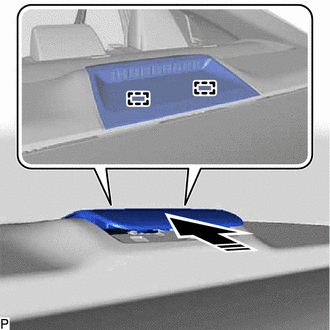
(a) Engage the 2 guides as shown in the illustration.
.png) |
Install in this Direction |
(b) Connect the connector.
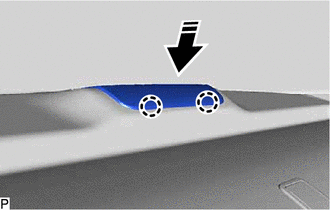
(c) Engage the 2 claws as shown in the illustration to install the center stop light set.
|
|
Install in this Direction |
READ NEXT:
 License Plate Light Assembly
ComponentsCOMPONENTS ILLUSTRATION
*1 LICENSE PLATE LIGHT ASSEMBLY
*2 LUGGAGE COMPARTMENT DOOR COVER
*3 NO. 3 LUGGAGE COMPARTMENT DOOR OUTSIDE GARNISH
- -
Precaution
PRECAUTION PRECAUTION FOR DISCONNECTING CABLE FROM NEGATIVE BATTERY TERMINAL
NOTICE: When disconnecting the cable from the negative (-) battery terminal, initialize the following systems after the
SEE MORE:
Cruise Control Input Processor (P160700)
DESCRIPTION When the ECM detects that it is not functioning normally, DTC P160700 is stored.
DTC No. Detection Item
DTC Detection Condition Trouble Area
MIL DTC Output from
P160700 Cruise Control Input Processor
When the ignition switch is ON and control of vehi
Precaution
PRECAUTION PRECAUTION FOR DISCONNECTING CABLE FROM NEGATIVE BATTERY TERMINAL
NOTICE: When disconnecting the cable from the negative (-) battery terminal, initialize the following systems after the cable is reconnected.
System Name See Procedure
Lane Tracing Assist System
