
Toyota Camry (XV70): Inside rear view mirror
The rear view mirror's position can be adjusted to enable sufficient confirmation of the rear view.
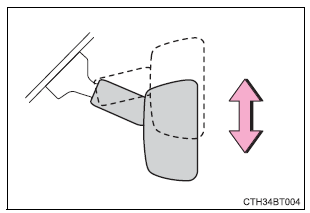
Adjusting the height of rear view mirror
The height of the rear view mirror can be adjusted to suit your driving posture.
Adjust the height of the rear view mirror by moving it up and down.
Anti-glare function
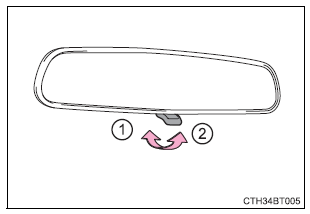
Manual anti-glare inside rear view mirror
Reflected light from the headlights of vehicles behind can be reduced by operating the lever.
- Normal position
- Anti-glare position
Auto anti-glare inside rear view mirror
Responding to the level of brightness of the headlights of vehicles behind, the reflected light is automatically reduced.
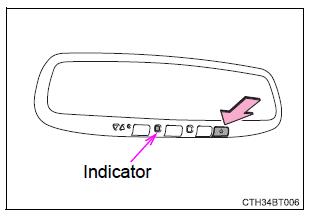
Changing automatic anti-glare function mode
On/off
When the automatic anti-glare function is in ON mode, the indicator illuminates.
The function will set to ON mode each time the engine switch is turned to IGNITION ON mode.
Pressing the button turns the function to OFF mode. (The indicator also turns off.)
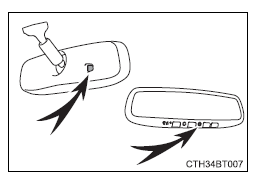
■To prevent sensor error (vehicles with an auto anti-glare inside rear view mirror)
To ensure that the sensors operate properly, do not touch or cover them.
WARNING
Do not adjust the position of the mirror while driving.
Doing so may lead to mishandling of the vehicle and cause an accident, resulting in death or serious injury.
READ NEXT:
 Outside rear view mirrors
Adjustment procedure
1. To select a mirror to adjust, turn
the switch.
Left
Right
2. To adjust the mirror, operate the
switch.
Up
Right
Down
Left
Folding the mirrors
Push
Power windows
Opening and closing procedures
The power windows can be opened and closed using the switches.
Operating the switch moves the windows as follows:
Closing
One-touch closing*
Opening
One-to
SEE MORE:
Registration
REGISTRATION CAUTION / NOTICE / HINT
NOTICE:
When the automatic transaxle assembly is replaced, the transaxle compensation code must be registered to the ECM (proceed to Procedure 1).
After the automatic transaxle assembly is installed, the Quick Response (QR) code label will be positioned w
Components
COMPONENTS ILLUSTRATION
*1 REAR CENTER SEAT OUTER BELT ASSEMBLY
*2 REAR SEAT CUSHION ASSEMBLY
*3 REAR SEAT CUSHION LOCK HOOK
*4 REAR SEAT INNER BELT ASSEMBLY RH
*5 WASHER
- -
Tightening torque for "Major areas involving basic veh
