
Toyota Camry (XV70): Installation
INSTALLATION
PROCEDURE
1. INSTALL ENGINE OIL PRESSURE SWITCH ASSEMBLY
| (a) Apply adhesive to 2 or 3 threads of the engine oil pressure switch assembly. Adhesive: Toyota Genuine Adhesive 1344, Three Bond 1344 or equivalent NOTICE:
|
|
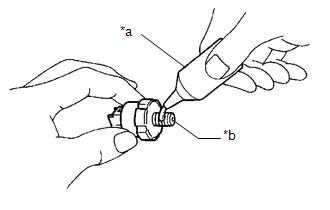
(b) Using a 24 mm deep socket wrench, install the engine oil pressure switch assembly.
Torque:
15 N·m {153 kgf·cm, 11 ft·lbf}
NOTICE:
Do not start the engine for at least 1 hour after installation.
(c) Connect the engine oil pressure switch assembly connector.
(d) Engage the clamp to connect the wire harness protector.
2. ADD ENGINE OIL
Click here .gif)
3. CHECK ENGINE OIL LEVEL
Click here
4. INSPECT FOR OIL LEAK
Click here
5. INSTALL FRONT FENDER APRON SEAL RH
Click here
READ NEXT:
 Components
COMPONENTS ILLUSTRATION
*1 ENGINE OIL PRESSURE SWITCH ASSEMBLY
*2 FRONT FENDER APRON SEAL RH
*3 WIRE HARNESS PROTECTOR
- -
N*m (kgf*cm, ft*lbf): Sp
Removal
REMOVAL PROCEDURE 1. REMOVE FRONT FENDER APRON SEAL RH
Click here
2. DRAIN ENGINE OIL Click here
3. REMOVE ENGINE OIL PRESSURE SWITCH ASSEMBLY
(a) Disengage the clamp to disco
Inspection
INSPECTION PROCEDURE 1. INSPECT ENGINE OIL PRESSURE SWITCH ASSEMBLY
(a) Disengage the clamp to disconnect the wire harness protector.
*1 Wire Harness Protector
SEE MORE:
Data List / Active Test
DATA LIST / ACTIVE TEST DATA LIST HINT:
Using the Techstream to read the Data List allows the values or states of switches, sensors, actuators and other items to be read without removing any parts. This non-intrusive inspection can be very useful because intermittent conditions or signals may be d
Components
COMPONENTS ILLUSTRATION
*A for Fold Down Seat Type
- -
*1 REAR SEAT CUSHION ASSEMBLY
*2 REAR SEAT CUSHION LOCK HOOK
*3 REAR SIDE SEATBACK ASSEMBLY LH
*4 REAR CENTER SEAT OUTER BELT ASSEMBLY
*5 REAR SEAT INNER BELT ASSEMBLY RH
*6
© 2023-2026 Copyright www.tocamry.com
