
Toyota Camry (XV70): Installation
INSTALLATION
PROCEDURE
1. INSTALL FRONT NO. 1 STABILIZER BAR BUSHING (for LH Side)
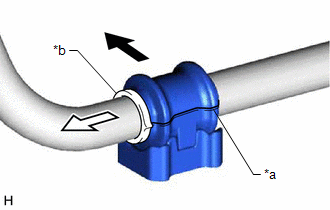
(a) Install the front No. 1 stabilizer bar bushing to the front stabilizer bar as shown in the illustration.
|
*a | Cutout |
|
*b | Stopper Ring |
.png) |
Front of the Vehicle |
.png) |
Outside of the Vehicle |
NOTICE:
- Install the front No. 1 stabilizer bar bushing so that the cutout is facing the rear of the vehicle.
- Install the front No. 1 stabilizer bar bushing onto the front stabilizer bar so that the stopper ring of the front stabilizer bar faces the outside of the vehicle.
2. INSTALL FRONT NO. 1 STABILIZER BAR BUSHING (for RH Side)
HINT:
Perform the same procedure as for the LH side.
3. INSTALL FRONT STABILIZER BAR
(a) Install the front stabilizer bar with the 2 front stabilizer bar bushings to the front frame assembly.
NOTICE:
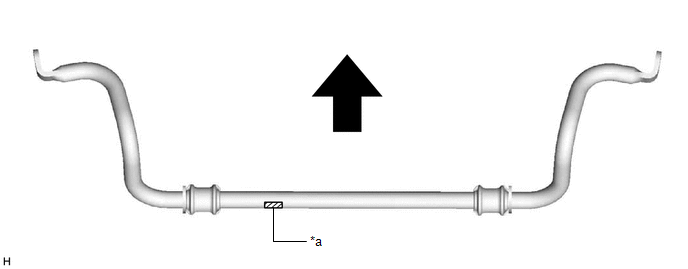
Make sure that the identification mark is positioned as shown in the illustration.
|
*a | Identification Mark |
- | - |
|
|
Front of the Vehicle |
- | - |
4. INSTALL FRONT NO. 1 STABILIZER BRACKET LH
(a) Install the front No. 1 stabilizer bracket LH to the front frame assembly with the 2 bolts.
Torque:
44 N
READ NEXT:
 Components
COMPONENTS ILLUSTRATION
*A for A25A-FKS
*B for AWD
*1 FRONT FRAME ASSEMBLY
*2 FUEL DELIVERY GUARD
*3 STEERING GEAR HEAT INSULATOR
*4 WIRE HARNES
Removal
REMOVAL CAUTION / NOTICE / HINT
The necessary procedures (adjustment, calibration, initialization, or registration) that must be performed after parts are removed and installed, or replaced during f
SEE MORE:
Installation
INSTALLATION CAUTION / NOTICE / HINT
NOTICE:
Immediately after installing the brake pads, the braking performance may be reduced. Always perform a road test in a safe place while paying attention to the surroundings.
After replacing the rear disc brake pads, the brake pedal may feel soft
Reassembly
REASSEMBLY PROCEDURE 1. INSTALL COOLER DRYER
(a) Using pliers, install a new cooler dryer to the modulator.
*a Modulator
(b) Sufficiently apply compressor oil to 3 O-rings and the fitting surfaces of a new cap.
Compressor Oil: ND-OIL 12 or equivalen
