
Toyota Camry (XV70): Operation Check
OPERATION CHECK
AUTOMATIC LIGHT CONTROL SYSTEM OPERATION CHECK
NOTICE:
Make sure that the customize settings are set to default when performing the automatic light control system operation check.
Click here .gif)
(a) Turn the ignition switch to ON.
(b) Turn the light control switch to the AUTO position.
(c) Cover the automatic light control sensor.
(d) Check that the taillights and low beam headlights come on.
(e) Uncover the automatic light control sensor.
(f) Check that the low beam headlights and taillights turn off.
LIGHT AUTO TURN-OFF SYSTEM OPERATION CHECK
NOTICE:
Make sure that the customize settings are set to default when performing the light auto turn-off system operation check.
Click here
(a) When the taillights are on (low beam headlights are not on)
(1) Close all of the doors.
(2) Turn the ignition switch to ON.
(3) Turn the taillights on.
(4) Turn the ignition switch off.
(5) Open the driver door.
(6) Check that all of the lights turn off immediately.
(b) When the low beam headlights are on
(1) Close all of the doors.
(2) Turn the ignition switch to ON.
(3) Turn the low beam headlights on.
(4) Turn the ignition switch off.
(5) Open any of the doors.
(6) Close the door.
(7) Check that all of the lights turn off after 30 seconds (delay function).
HINT:
Before the lights turn off, if the lock button on the key is pushed after all of the doors are locked, all of the lights will turn off immediately.
DAYTIME RUNNING LIGHT SYSTEM OPERATION CHECK
NOTICE:
Make sure that the customize settings are set to default when performing the daytime running light system operation check.
Click here
(a) Start the engine.
(b) Turn the light control switch to the tail or AUTO position (with the low beam headlights not turned on via the automatic light control system).
(c) Release the parking brake.
(d) Check that the daytime running lights come on.
NOTICE:
Make sure that the customize settings are set to default when performing the wiper-linked low beam headlight control system operation check.
Click here
WIPER-LINKED LOW BEAM HEADLIGHT CONTROL SYSTEM OPERATION CHECK
(a) Turn the ignition switch to ON.
(b) Shine a light on the automatic light control sensor.*
HINT:
*: If troubleshooting is being performed in a bright area, such as outside on a sunny day, it will not be necessary to perform this step.
(c) Turn the light control switch to the AUTO position.
(d) Operate the front wipers for 10 seconds or more (except MIST or washer-linked wiper operation) and check that the low beam headlights*1 or high beam headlights*2 illuminate.
- *1: Dimmer switch not high position
- *2: Dimmer switch high position
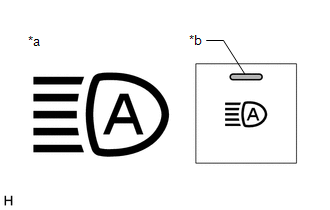
|
*a | Automatic High Beam Indicator Light on Combination Meter Assembly |
|
*b | Auto High Beam Switch Indicator |
AUTOMATIC HIGH BEAM SYSTEM OPERATION CHECK
(a) Check the operation of the automatic high beam indicator light.
(1) Turn the ignition switch to ON.
(2) Turn the light control switch to the AUTO or head position.
(3) Move the dimmer switch to the low position.
(4) Press the auto high beam switch (indicator illuminates).
(5) Check that the automatic high beam indicator illuminates.
NOTICE:
If the forward recognition camera cannot correctly recognize the view ahead due to bad weather (dense fog, etc.) or if dirt, etc., is obstructing the windshield glass, the automatic high beam indicator in the combination meter assembly may not illuminate and the automatic high beam system may not operate.
(b) Check the operation of the automatic high beam function.
(1) At night, when driving the vehicle with the automatic high beam system in standby mode, check that the high beams automatically turn on after a short delay when all of the following conditions are met:
- The vehicle speed is more than approximately 34 km/h (21 mph).
- The area in front of the vehicle is dark.
- There are no oncoming vehicles with headlights on.
- There are no preceding vehicles with taillights on.
- There are few streetlights along the street ahead.
(2) At night, when driving the vehicle with the high beams turned on by the automatic high beam system, check that the automatic high beam system turns off the high beams and returns to standby mode when any of the following conditions are met:
- The vehicle speed is less than approximately 27 km/h (17 mph).
- The level of ambient light is higher than a specified threshold.
- There are oncoming vehicles with headlights on.
- There are preceding vehicles with taillights on.
- Light from streetlights ahead is higher than a specified threshold.
READ NEXT:
 Customize Parameters
CUSTOMIZE PARAMETERS CUSTOMIZE LIGHTING SYSTEM (EXT)
NOTICE:
When the customer requests a change in a function, first make sure that the function can be customized.
Be sure to make a n
Problem Symptoms Table
PROBLEM SYMPTOMS TABLE
NOTICE:
Before replacing the main body ECU (multiplex network body ECU), refer to Registration.*
Click here
When replacing the combination meter assembly, a
Terminals Of Ecu
TERMINALS OF ECU CHECK MAIN BODY ECU (MULTIPLEX NETWORK BODY ECU) AND INSTRUMENT PANEL JUNCTION BLOCK ASSEMBLY
(a) Disconnect the instrument panel junction block assembly and main body ECU (multip
SEE MORE:
Components
COMPONENTS ILLUSTRATION
*1 REAR DIFFERENTIAL CARRIER ASSEMBLY
*2 WIRE HARNESS CLAMP BRACKET
*3 REAR UPPER DIFFERENTIAL MOUNT STOPPER
*4 REAR LOWER DIFFERENTIAL MOUNT STOPPER
*5 REAR SUSPENSION MEMBER SUB-ASSEMBLY
- -
Tightening t
Problem Symptoms Table
PROBLEM SYMPTOMS TABLE
HINT:
Use the table below to help determine the cause of problem symptoms. If multiple suspected areas are listed, the potential causes of the symptoms are listed in order of probability in the "Suspected Area" column of the table. Check each symptom by checking the suspect
