
Toyota Camry (XV70): Parts Location
PARTS LOCATION
ILLUSTRATION
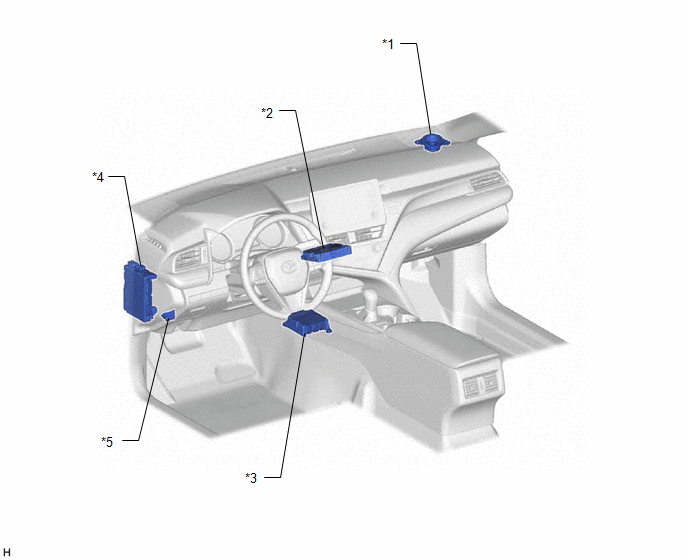
|
*1 | FRONT NO. 2 SPEAKER ASSEMBLY (RH) |
*2 | DCM (TELEMATICS TRANSCEIVER) - BUB (BACK-UP BATTERY) |
|
*3 | AIRBAG SENSOR ASSEMBLY |
*4 | INSTRUMENT PANEL JUNCTION BLOCK ASSEMBLY - DCM FUSE - ECU-IG2 NO. 3 FUSE |
|
*5 | DLC3 |
- | - |
ILLUSTRATION
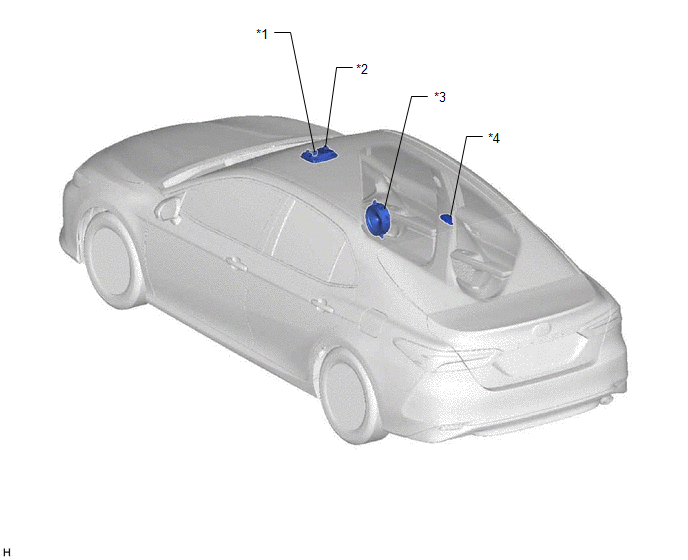
|
*1 | TELEPHONE MICROPHONE ASSEMBLY |
*2 | ROOF CONSOLE BOX SUB-ASSEMBLY - MANUAL (SOS) SWITCH |
|
*3 | FRONT NO. 1 SPEAKER ASSEMBLY (RH) |
*4 | TELEPHONE AND GPS ANTENNA (for Roof Side) - Telephone Main - GPS |
ILLUSTRATION
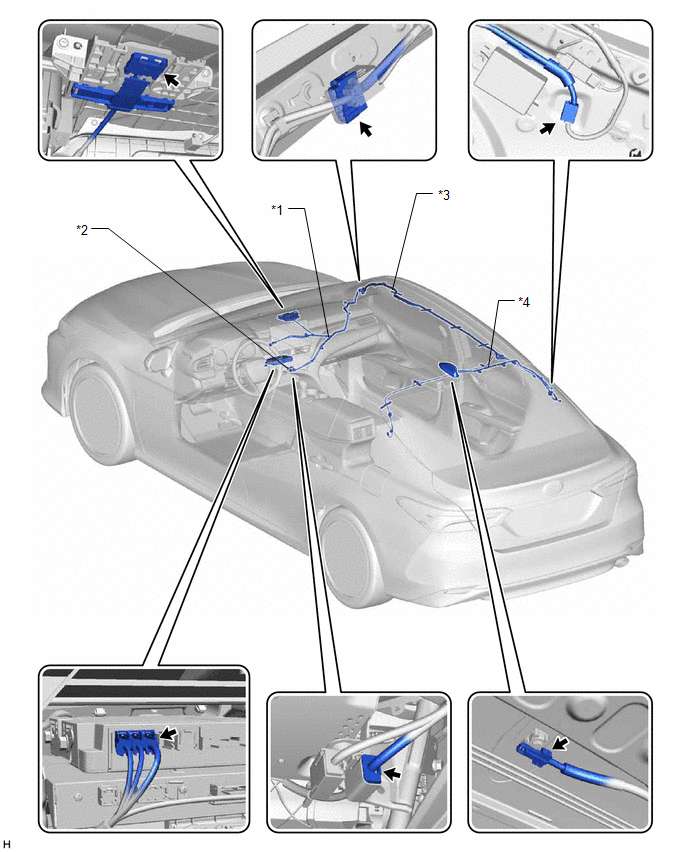
|
*1 | TELEPHONE AND GPS ANTENNA CORD (ANTENNA CORD SUB-ASSEMBLY (for Type A)) |
*2 | TELEPHONE AND GPS ANTENNA CORD (ANTENNA CORD SUB-ASSEMBLY (for Type B)) |
|
*3 | TELEPHONE AND GPS ANTENNA CORD (NO. 2 ANTENNA CORD SUB-ASSEMBLY) |
*4 | TELEPHONE AND GPS ANTENNA CORD (NO. 5 ANTENNA CORD SUB-ASSEMBLY) |
READ NEXT:
 System Diagram
SYSTEM DIAGRAM
System Description
SYSTEM DESCRIPTION DESCRIPTION (a) Safety Connect performs ACN (Automatic Collision Notification), manual emergency calling, stolen vehicle tracking and roadside assistance service by, audio and data
How To Proceed With Troubleshooting
CAUTION / NOTICE / HINT
HINT:
Use the following procedure to troubleshoot the safety connect system.
*: Use the Techstream.
PROCEDURE
1. VEHICLE BROUGHT TO WORKSHOP
SEE MORE:
Vehicle Lift And Support Locations
VEHICLE LIFT AND SUPPORT LOCATIONS NOTICE ABOUT VEHICLE CONDITION WHEN RAISING VEHICLE
(a) The vehicle must be unloaded before jacking up or raising the vehicle. Never jack up or raise a heavily loaded vehicle.
(b) When removing any heavy components like the engine or transmission, the vehicle c
Lost Communication with Power Source Control (B278C)
DESCRIPTION This DTC is stored when LIN communication between the certification ECU (smart key ECU assembly) and power management control ECU stops for 10 seconds or more.
DTC No. Detection Item
DTC Detection Condition Trouble Area
B278C Lost Communication with Power Source
© 2023-2026 Copyright www.tocamry.com
