
Toyota Camry (XV70): Parts Location
Toyota Camry Repair Manual XV70 (2018-2024) / Brake / Parking Brake / Electric Parking Brake System / Parts Location
PARTS LOCATION
ILLUSTRATION
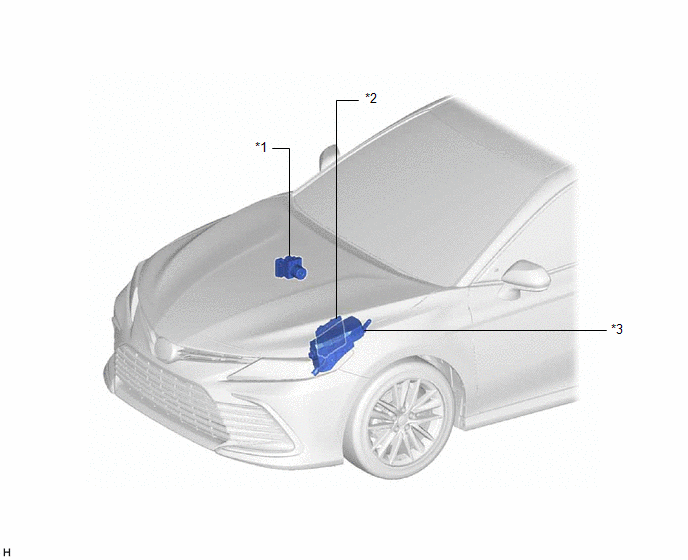
|
*1 | BRAKE ACTUATOR ASSEMBLY - SKID CONTROL ECU | *2 |
ECM |
| *3 |
ENGINE ROOM RELAY BLOCK AND JUNCTION BLOCK ASSEMBLY - ABS NO. 2 FUSE |
- | - |
ILLUSTRATION
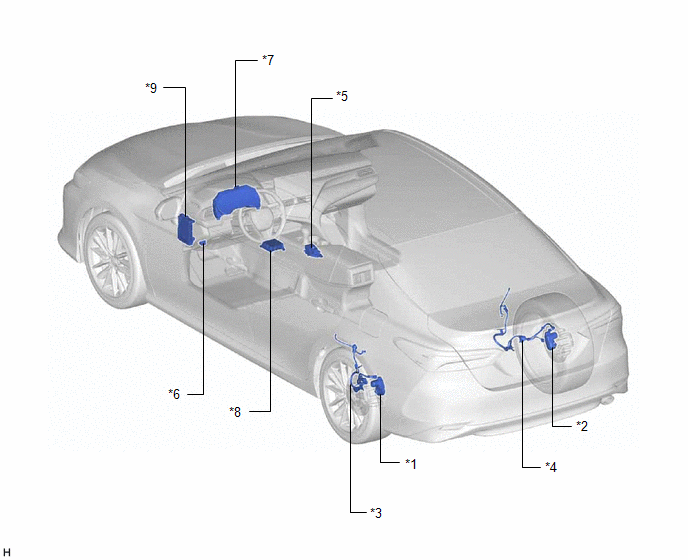
|
*1 | PARKING BRAKE ACTUATOR ASSEMBLY LH |
*2 | PARKING BRAKE ACTUATOR ASSEMBLY RH |
|
*3 | NO. 2 PARKING BRAKE WIRE ASSEMBLY |
*4 | NO. 1 PARKING BRAKE WIRE ASSEMBLY |
|
*5 | ELECTRIC PARKING BRAKE SWITCH ASSEMBLY |
*6 | DLC3 |
|
*7 | COMBINATION METER ASSEMBLY |
*8 | ACCELERATION SENSOR (AIRBAG SENSOR ASSEMBLY) |
|
*9 | INSTRUMENT PANEL JUNCTION BLOCK ASSEMBLY - ECU-IG1 NO. 2 FUSE - ECU-B NO. 2 FUSE |
- | - |
READ NEXT:
 System Diagram
SYSTEM DIAGRAM
How To Proceed With Troubleshooting
CAUTION / NOTICE / HINT HINT: *: Use the Techstream. PROCEDURE
1.
VEHICLE BROUGHT TO WORKSHOP
NEXT
2.
CUSTOMER PROBLEM ANALYSIS (a) Interview
Problem Symptoms Table
PROBLEM SYMPTOMS TABLE
HINT:
Use the table below to help determine the cause of problem symptoms. If multiple suspected areas are listed, the potential causes of the symptoms are listed in order
SEE MORE:
Does not Play even after Bluetooth Audio Mode is Selected
CAUTION / NOTICE / HINT
NOTICE:
Depending on the parts that are replaced during vehicle inspection or maintenance, performing initialization, registration or calibration may be needed. Refer to Precaution for Navigation System.
Click here
When replacing the radio and display receiver
Removal
REMOVAL PROCEDURE 1. REMOVE FRONT FENDER APRON SEAL RH
Click here
2. DRAIN ENGINE OIL Click here
3. REMOVE ENGINE OIL PRESSURE SWITCH ASSEMBLY
(a) Disengage the clamp to disconnect the wire harness protector.
*1 Wire Harness Protector
© 2023-2026 Copyright www.tocamry.com
