
Toyota Camry (XV70): Parts Location
PARTS LOCATION
ILLUSTRATION
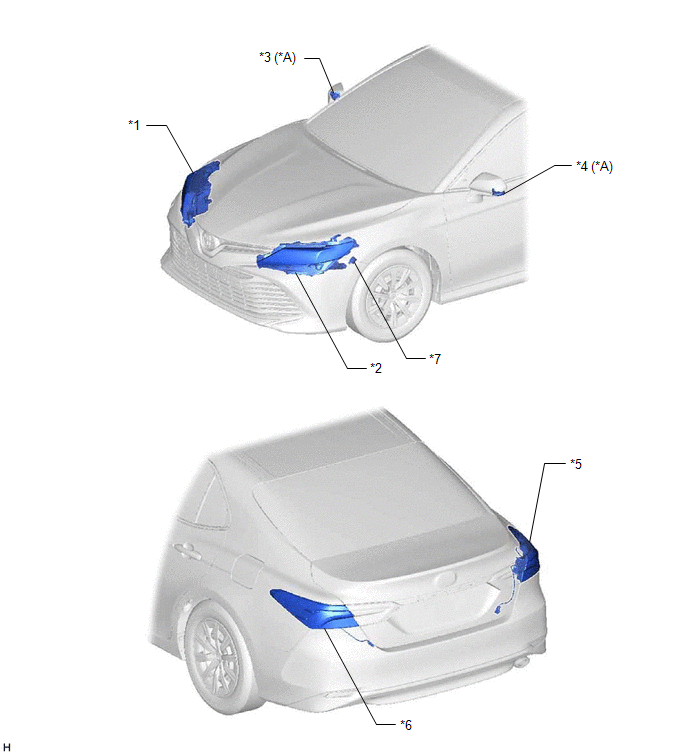
|
*A | w/ Side Turn Signal Light |
- | - |
|
*1 | HEADLIGHT ASSEMBLY RH - TURN SIGNAL LIGHT | *2 |
HEADLIGHT ASSEMBLY LH - TURN SIGNAL LIGHT |
|
*3 | SIDE TURN SIGNAL LIGHT ASSEMBLY RH |
*4 | SIDE TURN SIGNAL LIGHT ASSEMBLY LH |
|
*5 | REAR COMBINATION LIGHT ASSEMBLY RH - TURN SIGNAL LIGHT | *6 |
REAR COMBINATION LIGHT ASSEMBLY LH - TURN SIGNAL LIGHT |
|
*7 | WIRELESS DOOR LOCK BUZZER |
- | - |
ILLUSTRATION
|
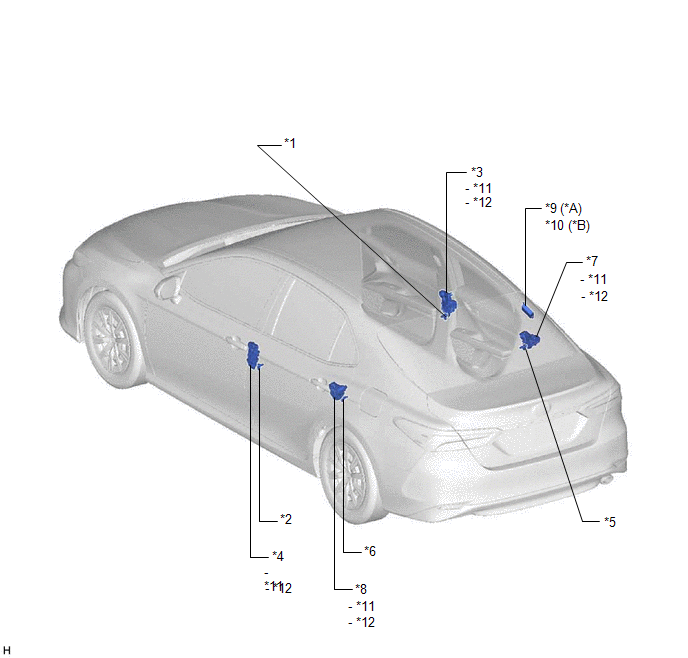
*1 | FRONT DOOR COURTESY LIGHT SWITCH ASSEMBLY (for RH) |
*2 | FRONT DOOR COURTESY LIGHT SWITCH ASSEMBLY (for LH) |
|
*3 | FRONT DOOR LOCK WITH MOTOR ASSEMBLY RH |
*4 | FRONT DOOR LOCK WITH MOTOR ASSEMBLY LH |
|
*5 | REAR DOOR COURTESY LIGHT SWITCH ASSEMBLY (for RH) |
*6 | REAR DOOR COURTESY LIGHT SWITCH ASSEMBLY (for LH) |
|
*7 | REAR DOOR LOCK WITH MOTOR ASSEMBLY RH |
*8 | REAR DOOR LOCK WITH MOTOR ASSEMBLY LH |
|
*9 | ELECTRICAL KEY AND TIRE PRESSURE MONITORING SYSTEM RECEIVER ASSEMBLY |
*10 | DOOR LOCK MOTOR |
|
*11 | DOOR UNLOCK DETECTION SWITCH |
- | - |
ILLUSTRATION
|
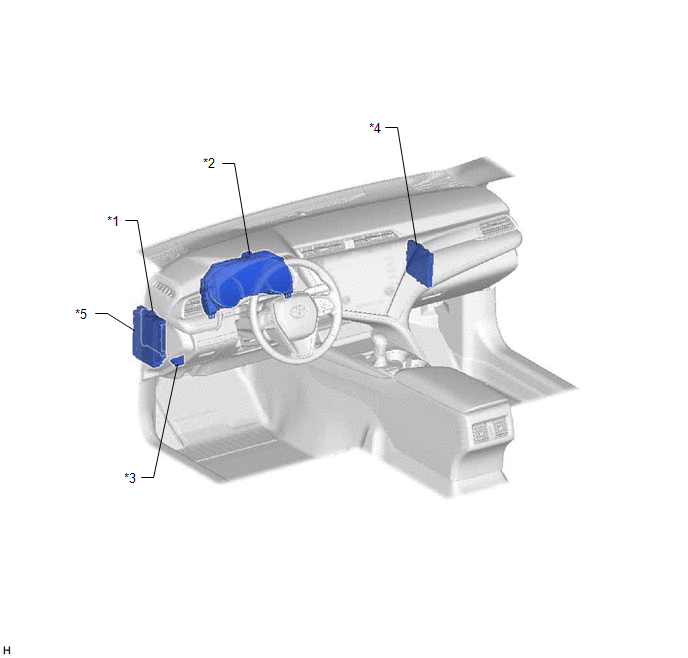
*1 | MAIN BODY ECU (MULTIPLEX NETWORK BODY ECU) |
*2 | COMBINATION METER ASSEMBLY |
|
*3 | DLC3 |
*4 | CERTIFICATION ECU (SMART KEY ECU ASSEMBLY) |
|
*5 | INSTRUMENT PANEL JUNCTION BLOCK ASSEMBLY - AM2 FUSE - ECU-DCC NO. 2 FUSE - ECU-ACC FUSE - ECU-IG1 NO. 4 FUSE |
- | - |
READ NEXT:
 System Diagram
SYSTEM DIAGRAM WIRELESS DOOR LOCK CONTROL SYSTEM
POWER DOOR LOCK CONTROL SYSTEM
Click here
How To Proceed With Troubleshooting
CAUTION / NOTICE / HINT NOTICE: Make sure to check the following before proceeding with troubleshooting.
Do not perform "Smart Code Reset" (all key ID erasure) until the malfunctions and symptoms h
Customer Problem Analysis Check
CUSTOMER PROBLEM ANALYSIS CHECK
HINT: Be sure to ask the customer in detail about the following points concerning the vehicle operating conditions, environment and problem, and then check for DTCs
SEE MORE:
Initialization
INITIALIZATION INITIALIZATION SERVO MOTOR (a) Connect the Techstream to the DLC3.
(b) Turn the ignition switch to ON. (c) Press the OFF switch. (d) Turn the Techstream on.
(e) Enter the following menus: Body Electrical / Air Conditioner / Utility / Servomotor Initialization.
(f) According to the
Front Wiper Rubber
ComponentsCOMPONENTS ILLUSTRATION
*1 FRONT WIPER BLADE
*2 WIPER RUBBER
*3 FRONT WIPER RUBBER BACKING PLATE
- - ReplacementREPLACEMENT CAUTION / NOTICE / HINT
NOTICE: Make sure to hold the front wiper arm while lifting it as lifting the front wiper ar
