
Toyota Camry (XV70): Power outlet
Toyota Camry Owner's Manual XV70 (2017-2024) / Interior features / Other interior features / Power outlet
Please use as a power supply for electronic goods that use less than 12 VDC/10 A (power consumption of 120 W).
Open the lid.
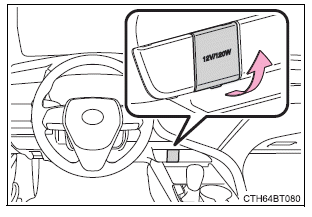
■The power outlet can be used when
Vehicles without a smart key system: The engine switch is in the "ACC" or "ON" position.
Vehicles with a smart key system: The engine switch is in ACCESSORY or IGNITION ON mode.
■When turning the engine switch off
Disconnect electrical devices with charging functions, such as mobile battery packs.
If such devices are left connected, the engine switch may not be turned off normally.
NOTICE
- To avoid damaging the power outlet, close the power outlet lid when
it is
not in use.
Foreign objects or liquids that enter the power outlet may cause a short circuit.
- To prevent battery discharge, do not use the power outlet longer than necessary when the engine is not running.
READ NEXT:
 USB charging ports
The USB charging ports are used to supply 2.5 A (USB Type-A port)
or 3.0 A (USB Type-C port) of electricity at 5 V to external devices.
The USB charging ports are for charging only. They are not d
Wireless charger (if equipped)
A portable device, such as a smartphone or mobile battery, can be
charged by just placing it on the charging area, provided the device is
compatible with the Qi wireless charging standard created by
Armrest (if equipped)
Fold down the armrest for use.
NOTICE
To prevent damage to the armrest, do not apply too much load on the
armrest.
Assist grips
An assist grip installed on the ceiling
can be used to support
SEE MORE:
AVC-LAN Circuit
DESCRIPTION Each unit of the audio and visual system connected to the AVC-LAN (communication bus) transmits signals via AVC-LAN communication.
If a short to +B or short to ground occurs in an AVC-LAN communication line, the audio and visual system will not function normally because communication i
Front Side Marker Light Bulb
ReplacementREPLACEMENT CAUTION / NOTICE / HINT
HINT:
Use the same procedure for the RH side and LH side.
The following procedure is for the LH side.
PROCEDURE 1. REMOVE FRONT SIDE MARKER LIGHT BULB
Click here 2. INSTALL FRONT SIDE MARKER LIGHT BULB
Click here
© 2023-2026 Copyright www.tocamry.com
