
Toyota Camry (XV70): Rear Speed Sensor (for Awd)
Components
COMPONENTS
ILLUSTRATION
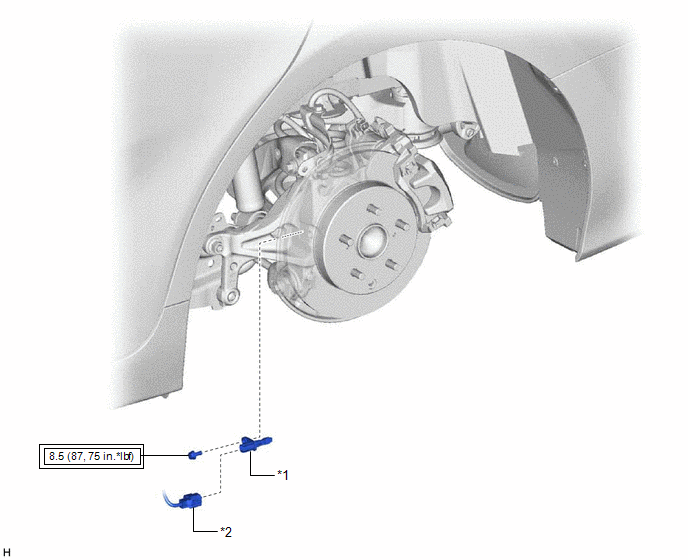
|
*1 | REAR SKID CONTROL SENSOR |
*2 | NO. 2 PARKING BRAKE WIRE ASSEMBLY |
.png) |
Tightening torque for "Major areas involving basic vehicle performance such as moving/turning/stopping": N*m (kgf*cm, ft.*lbf) |
- | - |
Removal
REMOVAL
CAUTION / NOTICE / HINT
HINT:
- Use the same procedure for the RH side and LH side.
- The following procedure is for the LH side.
PROCEDURE
1. REMOVE REAR WHEEL
Click here
.gif)
2. REMOVE REAR SKID CONTROL SENSOR
| (a) Using a screwdriver with its tip wrapped with protective tape, disconnect the No. 2 parking brake wire assembly connector from the rear skid control sensor. NOTICE:
|
|
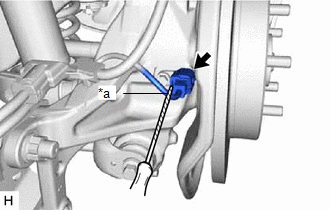
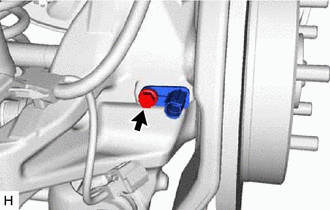
| (b) Remove the bolt and the rear skid control sensor from the rear axle carrier sub-assembly. NOTICE:
|
|
Installation
INSTALLATION
CAUTION / NOTICE / HINT
HINT:
- Use the same procedure for the RH side and LH side.
- The following procedure is for the LH side.
PROCEDURE
1. INSTALL REAR SKID CONTROL SENSOR
(a) Install the rear skid control sensor to the rear axle carrier sub-assembly with the bolt.
Torque:
8.5 N
READ NEXT:
 Steering Angle Sensor
ComponentsCOMPONENTS ILLUSTRATION
*1 STEERING SENSOR
*2 SPIRAL CABLE SUB-ASSEMBLY RemovalREMOVAL CAUTION / NOTICE / HINT
The necessary procedures (adjustment, calibration, ini
Precaution
PRECAUTION PRECAUTION FOR DISCONNECTING CABLE FROM NEGATIVE BATTERY TERMINAL
NOTICE: When disconnecting the cable from the negative (-) battery terminal, initialize the following system(s) after the
SEE MORE:
Reassembly
REASSEMBLY PROCEDURE 1. INSTALL FUEL PUMP
HINT: Perform "Inspection After Repair" after replacing the fuel pump.
Click here
(a) Apply gasoline to a new O-ring. Then install the O-ring and fuel pump spacer to the fuel pump.
*1 O-ring
*2 Fu
Brake Switch "A"/"B" Signal Cross Coupled (P05042B)
DESCRIPTION The stop light switch assembly is a duplex system that transmits two signals: STP and ST1-. These two signals are used by the ECM to monitor whether or not the brake system is working properly. If the signals, which indicate the brake pedal is being depressed and released, are detected s
