
Toyota Camry (XV70): Registration
REGISTRATION
PROCEDURE
1. BEFORE REGISTRATION
NOTICE:
- The transmitter ID is written on the tire pressure warning valve and transmitter. It is not possible to read the transmitter ID after installing the tire onto the wheel. Therefore, make a note of the transmitter ID before installing the tire.
- Make sure to perform ID registration using the Techstream after replacing the tire pressure warning ECU and receiver.
(a) When replacing the tire pressure warning ECU and receiver:
(1) When replacing the tire pressure warning ECU and receiver, read the transmitter IDs and number of the transmitters (4 or 5) stored in the old ECU using the Techstream and write them down before removal.
(2) If reading the stored transmitter IDs is impossible due to malfunctions of components such as the tire pressure warning ECU and receiver, remove the tires from the wheels and check the IDs located on the tire pressure warning valve and transmitters.
(b) When replacing a tire pressure warning valve and transmitter:
(1) Take a note of the 7-digit number (transmitter ID) written on the tire pressure warning valve and transmitter.
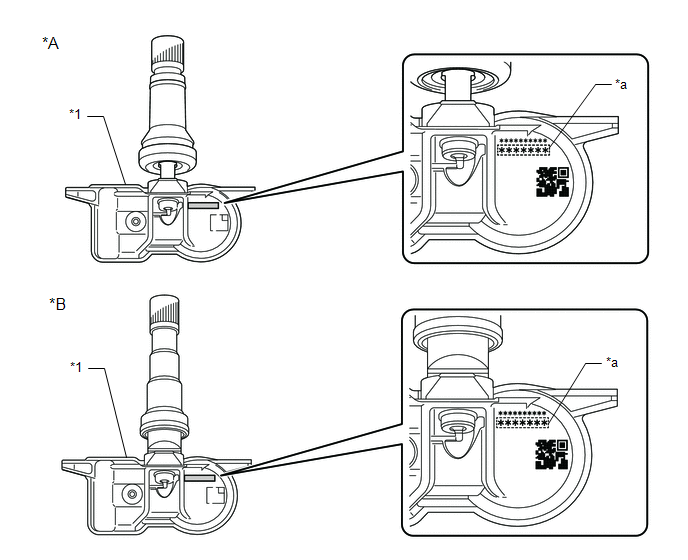
|
*A | for Type A |
*B | for Type B |
|
*1 | Tire Pressure Warning Valve and Transmitter |
- | - |
|
*a | Transmitter ID (7-digit Number) |
- | - |
2. REGISTER TRANSMITTER ID (USING TECHSTREAM)
w/ ID Switching Function:- When performing ID registration for the 2nd tire set, make sure that ID registration has been completed for the main tire set.
- If ID registration for the main tire set has not been completed, it is not possible to perform ID registration for the 2nd tire set.
- When performing ID registration for the 2nd tire set, place the tires and wheels of the 2nd tire set and main tire set close to the vehicle (less than 10 m (32.8 ft.) away from the vehicle).
HINT:
When registering an ID on the 2nd tire set, a tire and wheel which have an ID from the main tire set are necessary to also perform ID certification for the main tire set. If ID certification is not performed on the main tire set, DTC C2126 is stored by the tire pressure warning ECU and receiver.
- When using the 2nd tire set or switching from the 2nd tire set to the main tire set after registration for the 2nd tire set is completed, switch to the appropriate set of IDs after installing the tires and wheels.
HINT:
- The previously registered IDs will be cleared from memory when registration is completed.
- If the ID registration step is not completed within 300 seconds, ID registration will be canceled.
- w/ ID Switching Function:
In order to perform ID registration for the 2nd set of tires, select "2nd Set" on the display screen.
(a) Set the tire pressure to the specified value.
Click here
.gif)
(b) Turn the ignition switch off.
(c) Connect the Techstream to the DLC3.
(d) Turn the ignition switch to ON.
(e) Turn the Techstream on.
(f) Enter the following menus: Chassis / Tire Pressure Monitor / Utility / ID Registration/Tire Number Registration.
Chassis > Tire Pressure Monitor > Utility|
Tester Display |
|---|
| ID Registration/Tire Number Registration |
(g) Perform the procedure displayed on the Techstream.
HINT:
The number of registered tire pressure warning valve and transmitters can only be set to 4 when the value is currently set to 5. The number of registered tire pressure warning valve and transmitters should only be changed from the default value when requested by the customer.
3. CONFIRMATION OF TRANSMITTER ID REGISTRATION (USING TECHSTREAM)
NOTICE:
- It may take a few minutes until the values are displayed. If the values are not displayed after a few minutes, perform troubleshooting according to the inspection procedure for DTCs C2121 to C2124 (C2125: w/ Full Size Spare Tire).
Click here
- If the transmitter IDs have not been registered, DTC C2171 is stored in the tire pressure warning ECU and receiver after 3 minutes or more.
- If normal pressure values are displayed, the transmitter IDs have been registered correctly.
- If the tire pressure values are not displayed after a few minutes, the transmitter IDs may be incorrect or the system may have a malfunction.
- After all transmitter IDs are registered, DTC C2126 is stored in the tire pressure warning ECU and receiver and the tire pressure warning light blinks for 1 minute and then illuminates. When the tire pressure warning ECU and receiver successfully receives signals from all the transmitters whose IDs are stored in the ECU, DTC C2126 is cleared and the tire pressure warning light goes off.
(a) When checking the ID registration for the 2nd tire set (w/ ID Switching Function):
Operate the steering pad switch assembly and switch the IDs to the 2nd set of tires.
(b) Enter the following menus: Chassis / Tire Pressure Monitor / Data List.
Chassis > Tire Pressure Monitor > Data List|
Tester Display | Measurement Item |
Range | Normal Condition |
Diagnostic Note |
|---|---|---|---|---|
|
ID 1 Tire Inflation Pressure |
ID1 tire inflation pressure |
min.: Absolute pressure (abs) / 0 kPa (0 kgf/cm2, 0 psi), Relative pressure (Gauge) / 0 kPa (0 kgf/cm2, 0 psi) max.: Absolute pressure (abs) / 480 kPa (4.9 kgf/cm2, 70 psi), Relative pressure (Gauge) / 380 kPa (3.9 kgf/cm2, 55 psi) |
Actual tire inflation pressure |
If N/A is displayed, data has not been received.*1 |
|
ID 2 Tire Inflation Pressure |
ID2 tire inflation pressure |
min.: Absolute pressure (abs) / 0 kPa (0 kgf/cm2, 0 psi), Relative pressure (Gauge) / 0 kPa (0 kgf/cm2, 0 psi) max.: Absolute pressure (abs) / 480 kPa (4.9 kgf/cm2, 70 psi), Relative pressure (Gauge) / 380 kPa (3.9 kgf/cm2, 55 psi) |
Actual tire inflation pressure |
If N/A is displayed, data has not been received.*1 |
|
ID 3 Tire Inflation Pressure |
ID3 tire inflation pressure |
min.: Absolute pressure (abs) / 0 kPa (0 kgf/cm2, 0 psi), Relative pressure (Gauge) / 0 kPa (0 kgf/cm2, 0 psi) max.: Absolute pressure (abs) / 480 kPa (4.9 kgf/cm2, 70 psi), Relative pressure (Gauge) / 380 kPa (3.9 kgf/cm2, 55 psi) |
Actual tire inflation pressure |
If N/A is displayed, data has not been received.*1 |
|
ID 4 Tire Inflation Pressure |
ID4 tire inflation pressure |
min.: Absolute pressure (abs) / 0 kPa (0 kgf/cm2, 0 psi), Relative pressure (Gauge) / 0 kPa (0 kgf/cm2, 0 psi) max.: Absolute pressure (abs) / 480 kPa (4.9 kgf/cm2, 70 psi), Relative pressure (Gauge) / 380 kPa (3.9 kgf/cm2, 55 psi) |
Actual tire inflation pressure |
If N/A is displayed, data has not been received.*1 |
|
ID 5 Tire Inflation Pressure |
ID5 tire inflation pressure |
min.: Absolute pressure (abs) / 0 kPa (0 kgf/cm2, 0 psi), Relative pressure (Gauge) / 0 kPa (0 kgf/cm2, 0 psi) max.: Absolute pressure (abs) / 480 kPa (4.9 kgf/cm2, 70 psi), Relative pressure (Gauge) / 380 kPa (3.9 kgf/cm2, 55 psi) |
Actual tire inflation pressure |
|
HINT:
- *1: It may take a few minutes until the values are displayed. If the values are not displayed after a few minutes, perform troubleshooting according to the inspection procedure for DTCs C2121 to C2124 (C2125: w/ Full Size Spare Tire).
- *2: w/ Full Size Spare Tire
|
Tester Display |
|---|
| ID 1 Tire Inflation Pressure |
|
ID 2 Tire Inflation Pressure |
|
ID 3 Tire Inflation Pressure |
|
ID 4 Tire Inflation Pressure |
|
ID 5 Tire Inflation Pressure |
(c) Reduce the tire inflation pressure of each tire 40 kPa (0.4 kgf/cm2, 5.8 psi) or more, and check that the "ID Tire Inflation Pressure" data is updated and that the actual tire inflation pressures are displayed.
(d) After confirming that all of the tire inflation pressure values (except the compact spare tire) have been updated, adjust the tire inflation pressure to the specified value, operate the steering pad switch assembly and perform initialization.
4. REGISTER TRANSMITTER ID (USING AUTOMATIC ID REGISTRATION FUNCTION) (w/ Tire Inflation Pressure Display Function)
NOTICE:
- If the automatic ID registration operation is canceled while registration is being performed, DTC C2126 is stored in the tire pressure warning ECU and receiver.
- If the automatic ID registration is started while DTC C2126 is stored, DTC C2126 and C2128 are stored in the tire pressure warning ECU and receiver.
- During registration, DTC C2128 is stored by the tire pressure warning ECU and receiver and the tire pressure warning light blinks for 1 minute then illuminates. When the tire pressure warning ECU and receiver successfully receives signals from all the transmitters whose IDs are stored in the ECU, DTC C2128 is cleared and the tire pressure warning light turns off.
- If a tire pressure warning valve and transmitter of the same type is carried in the vehicle, registration may not complete.
HINT:
- When registration is complete, all previously registered IDs are cleared.
- If DTCs C2176, C2179 and U0129 are stored, registration mode cannot be entered.
- If the Techstream is being used to display the Data List, registration mode cannot be entered.
- If the Techstream is used to display the Data List during registration, registration will be canceled.
- If DTCs C2176, C2179 and U0129 are stored during registration, registration will be canceled.
- If the ignition switch is turned off before the vehicle is driven after entering registration mode, registration will be canceled.
(a) Adjust the tire pressure in all tires to the specified pressure.
(b) Turn the ignition switch off and stop the vehicle for 15 minutes or more.
HINT:
After stopping the vehicle for 15 minutes or more, the frequency of electrical wave signals sent by the tire pressure warning valve and transmitters increases for the first few minutes of driving (8 times the normal frequency).
(c) Select "Change Wheel" on the multi-information display and press and hold the "OK" switch (steering pad switch assembly) until the tire pressure warning light blinks 3 times.
HINT:
During registration, the tire pressure warning light blinks for 1 minute before turning on, the multi-information display tire pressure displays as "- -" and "Tire Pressure Recalibrating Please Wait until Complete" is displayed.
(d) Drive at approximately 40 km/h (25 mph) for approximately 10 to 30 minutes during 1 trip.
(e) During the procedure, make 2 or more right or left turns.
HINT:
Do not drive the vehicle in reverse during registration.
If the vehicle is driven in reverse during registration, the information may be reset before registration completes, and registration may take longer than normal to complete.
(f) When registration is completed, the tire pressure warning light turns off, the normal tire pressure is displayed on the multi-information display and "Tire Pressure Recalibrating Please Wait until Complete" stops displaying.
HINT:
- Registration may take longer than normal in the following situations.
- The vehicle is stopped frequently
- The vehicle is stopped for long period of time
- The vehicle is driven in reverse
- The vehicle is driven on rough roads or uneven surfaces
- The vehicle is driven in close proximity to another vehicle with the same type of tire pressure warning valve and transmitter installed for a long period of time
- The vehicle was not stopped for 15 minutes or more before registration
- The vehicle is driven at 40 km/h (25 mph) or less for a long period of time
- The ignition switch is turned off during ID registration
5. TIRE POSITION IDENTIFICATION (USING TECHSTREAM) (w/ Tire Inflation Pressure Display Function)
(a) Set the tire pressure to the specified value.
Click here
(b) Turn the ignition switch off.
(c) Connect the Techstream to the DLC3.
(d) Turn the ignition switch to ON.
(e) Turn the Techstream on.
(f) Enter the following menus: Chassis / Tire Pressure Monitor / Data List.
Chassis > Tire Pressure Monitor > Data List|
Tester Display | Measurement Item |
Range | Normal Condition |
Diagnostic Note |
|---|---|---|---|---|
|
ID 1 Tire Inflation Pressure |
ID1 tire inflation pressure |
min.: Absolute pressure (abs) / 0 kPa (0 kgf/cm2, 0 psi), Relative pressure (Gauge) / 0 kPa (0 kgf/cm2, 0 psi) max.: Absolute pressure (abs) / 480 kPa (4.9 kgf/cm2, 70 psi), Relative pressure (Gauge) / 380 kPa (3.9 kgf/cm2, 55 psi) |
Actual tire inflation pressure |
If N/A is displayed, data has not been received.*1 |
|
ID 2 Tire Inflation Pressure |
ID2 tire inflation pressure |
min.: Absolute pressure (abs) / 0 kPa (0 kgf/cm2, 0 psi), Relative pressure (Gauge) / 0 kPa (0 kgf/cm2, 0 psi) max.: Absolute pressure (abs) / 480 kPa (4.9 kgf/cm2, 70 psi), Relative pressure (Gauge) / 380 kPa (3.9 kgf/cm2, 55 psi) |
Actual tire inflation pressure |
If N/A is displayed, data has not been received.*1 |
|
ID 3 Tire Inflation Pressure |
ID3 tire inflation pressure |
min.: Absolute pressure (abs) / 0 kPa (0 kgf/cm2, 0 psi), Relative pressure (Gauge) / 0 kPa (0 kgf/cm2, 0 psi) max.: Absolute pressure (abs) / 480 kPa (4.9 kgf/cm2, 70 psi), Relative pressure (Gauge) / 380 kPa (3.9 kgf/cm2, 55 psi) |
Actual tire inflation pressure |
If N/A is displayed, data has not been received.*1 |
|
ID 4 Tire Inflation Pressure |
ID4 tire inflation pressure |
min.: Absolute pressure (abs) / 0 kPa (0 kgf/cm2, 0 psi), Relative pressure (Gauge) / 0 kPa (0 kgf/cm2, 0 psi) max.: Absolute pressure (abs) / 480 kPa (4.9 kgf/cm2, 70 psi), Relative pressure (Gauge) / 380 kPa (3.9 kgf/cm2, 55 psi) |
Actual tire inflation pressure |
If N/A is displayed, data has not been received.*1 |
|
ID 5 Tire Inflation Pressure |
ID5 tire inflation pressure |
min.: Absolute pressure (abs) / 0 kPa (0 kgf/cm2, 0 psi), Relative pressure (Gauge) / 0 kPa (0 kgf/cm2, 0 psi) max.: Absolute pressure (abs) / 480 kPa (4.9 kgf/cm2, 70 psi), Relative pressure (Gauge) / 380 kPa (3.9 kgf/cm2, 55 psi) |
Actual tire inflation pressure |
|
HINT:
- *1: It may take a few minutes until the values are displayed.
- *2: w/ Full Size Spare Tire
|
Tester Display |
|---|
| ID 1 Tire Inflation Pressure |
|
ID 2 Tire Inflation Pressure |
|
ID 3 Tire Inflation Pressure |
|
ID 4 Tire Inflation Pressure |
|
ID 5 Tire Inflation Pressure |
(g) Rapidly reduce the tire pressure for each wheel at least 40 kPa (0.4 kgf/cm2, 5.8 psi) within 30 seconds.
NOTICE:
- It may take a few minutes until the values are displayed.
- When an "ID Tire Inflation Pressure" value has not changed, reset the tire pressure to the appropriate specified value and rotate the tire 90 to 270 degrees. Then rapidly release the tire pressure and recheck the value.
(h) Read the "ID Tire Inflation Pressure" value and identify the tire with reduced pressure, and record the corresponding tire pressure warning valve and transmitter (ID1 to ID5).
(i) Repeat for each tire.
(j) Set the tire pressure to the specified value.
Click here
(k) Enter the following menus: Chassis / Tire Pressure Monitor / Utility / Tire Position Write.
Chassis > Tire Pressure Monitor > Utility|
Tester Display |
|---|
| Tire Position Write |
(l) Perform the procedure displayed on the Techstream.
6. TIRE POSITION IDENTIFICATION (NOT USING TECHSTREAM) (w/ Tire Inflation Pressure Display Function)
(a) Set the tire pressure to the specified value.
Click here
(b) Perform initialization to clear the existing tire position information, then drive the vehicle at 40 km/h (25 mph) or more for 10 to 30 minutes in 1 trip until each tire position is automatically identified.
HINT:
- Do not drive the vehicle in reverse gear while performing Tire Position Identification. If the vehicle is driven in reverse gear while performing Tire Position Identification, identification information will be discarded and Tire Position Identification may take longer than usual.
- Tire Position Identification may take longer than normal in the following situations.
- The vehicle is stopped frequently
- The vehicle is stopped for long period of time
- The vehicle is driven in reverse
- The vehicle is driven on rough roads or uneven surfaces
- The vehicle is driven in close proximity to another vehicle with the same type of tire pressure warning valve and transmitter installed for a long period of time
- The vehicle was not stopped for 15 minutes or more before registration
- The vehicle is driven at 40 km/h (25 mph) or less for a long period of time
7. METHOD TO SWITCH ID (w/ ID Switching Function)
(a) Method to switch IDs:
NOTICE:
- When the tire pressure warning system is malfunctioning, be sure to perform troubleshooting for the system before performing ID switching.
- It is not possible to perform the ID switching function while the system is being checked or during Test Mode.
(1) Install the tires and wheels that use the correct IDs to the vehicle.
(2) Turn the ignition switch to ON.
(3) Operate the steering pad switch assembly, select "Change Wheel" on the multi-information display and press and hold the "OK" switch (steering pad switch assembly).
(4) Check the answer-back function of the tire pressure warning light.
HINT:
Make sure that the tire pressure warning light illuminates for 3 seconds and turns off for 0.5 seconds 3 times.
(b) ID switching function check:
NOTICE:
- It may take up to 2 to 3 minutes in order to update the tire pressure data.
- If all of the tire pressure data values (except the compact spare tire) are updated, ID switching has been completed.
- After switching the IDs, DTC C2126 is stored in the tire pressure warning ECU and receiver and the tire pressure warning light blinks for 1 minute and then illuminates. If data from all of the tire pressure warning valve and transmitters registered in the tire pressure warning ECU and receiver is sent to the tire pressure warning ECU and receiver, DTC C21216 is cleared and the tire pressure warning light turns off.
(1) Connect the Techstream to the DLC3.
(2) Enter the following menus: Chassis / Tire Pressure Monitor / Data List.
(3) Reduce the tire inflation pressure of each tire 40 kPa (0.4 kgf/cm2, 5.8 psi) or more, and check that the "ID Tire Inflation Pressure" data is updated and that the actual tire inflation pressures are displayed.
(4) After confirming that all of the tire inflation pressure values (except the compact spare tire) have been updated, adjust the tire inflation pressure to the specified value, operate the steering pad switch assembly and perform initialization.
READ NEXT:
 Initialization
INITIALIZATION
NOTICE:
Initialization can be confirmed through the tire pressure warning light.
If the ignition switch is turned off during initialization, the tire pressure warning ECU and
Test Mode Procedure
TEST MODE PROCEDURE TEST MODE (SIGNAL CHECK MODE) PROCEDURE
HINT:
When entering test mode (signal check mode), the tire pressure warning ECU and receiver sets all the test mode (signal check mod
Problem Symptoms Table
PROBLEM SYMPTOMS TABLE
HINT:
Use the table below to help determine the cause of problem symptoms. If multiple suspected areas are listed, the potential causes of the symptoms are listed in order
SEE MORE:
Stop Lamp Relay Actuator Stuck Off (C13807F)
DESCRIPTION Refer to DTC C13807E. Click here
DTC No. Detection Item
DTC Detection Condition Trouble Area
C13807F Stop Lamp Relay Actuator Stuck Off
When the voltage at the +BS terminal is between 10 V or more and the stop light control relay (stop light switch asse
Components
COMPONENTS ILLUSTRATION
*1 TRANSMISSION VALVE BODY ASSEMBLY
*2 TRANSAXLE CASE GASKET
*3 NO. 1 FRONT OIL PUMP COVER GASKET
*4 NO. 2 FRONT OIL PUMP COVER GASKET
Tightening torque for "Major areas involving basic vehicle performance such as moving/tu
