
Toyota Camry (XV70): Removal
REMOVAL
CAUTION / NOTICE / HINT
The necessary procedures (adjustment, calibration, initialization, or registration) that must be performed after parts are removed and installed, or replaced during front bumper assembly removal/installation are shown below.
Necessary Procedure After Parts Removed/Installed/Replaced|
Replaced Part or Performed Procedure |
Necessary Procedure | Effect/Inoperative Function when Necessary Procedure not Performed |
Link |
|---|---|---|---|
| *1: Applies only for when removing and installing or replacing the rear television camera assembly. | |||
| Front bumper assembly (w/ Panoramic view monitor system) |
Front television camera view adjustment |
Panoramic View Monitor System |
|
Replacement or removal and installation of 2 or more parts:
|
| ||
HINT:
When the front bumper is damaged or deformed due to an accident or contact with other objects, etc., or the bumper installation area on the body is repaired, it is necessary to perform millimeter wave radar sensor adjustment.
Target Adjustment (Triangle Target):
Click here
.gif)
Target Adjustment (Flat Surface Target):
Click here
Driving Adjustment:
Click here
PROCEDURE
1. REMOVE COOL AIR INTAKE DUCT SEAL
| (a) Remove the 5 clips. |
|
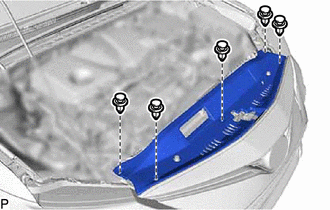
(b) Disengage the guide and remove the cool air intake duct seal as shown in the illustration.
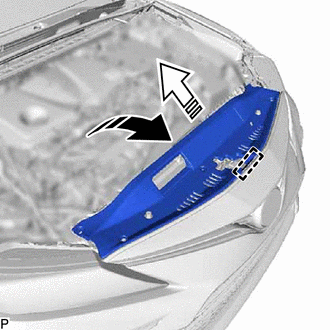
.png) |
Remove in this Direction (1) |
.png) |
Remove in this Direction (2) |
2. REMOVE FRONT BUMPER ASSEMBLY
(a) Apply protective tape around the front bumper assembly as shown in the illustration.
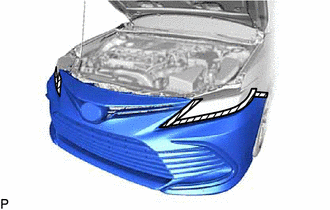
.png) |
Protective Tape |
(b) Using a screwdriver with its tip wrapped with protective tape, disengage the 2 claws as shown in the illustration.
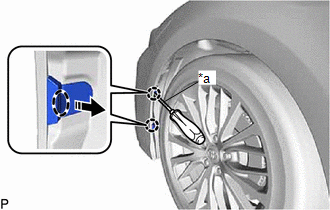
|
*a | Protective Tape |
.png) |
Insert Screwdriver Here |
|
|
Remove in this Direction |
HINT:
Use the same procedure for the RH side and LH side.
| (c) Remove the clip. HINT: Use the same procedure for the RH side and LH side. |
|
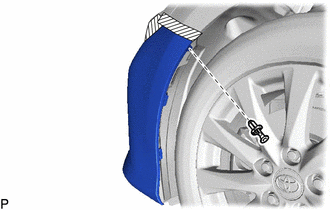
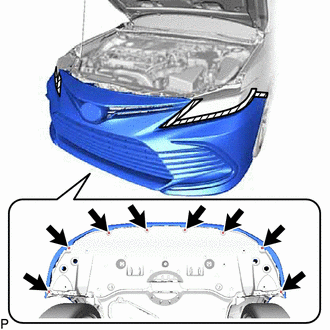
| (d) Remove the 8 screws. |
|
(e) Disengage the 3 claws as shown in the illustration.
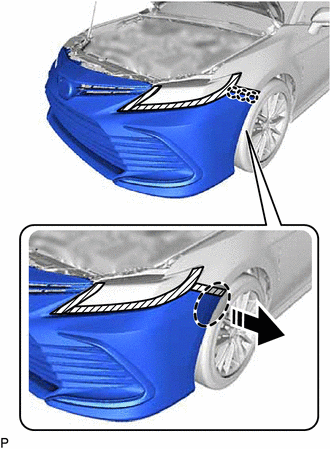
|
|
Place Hand Here |
|
|
Remove in this Direction |
HINT:
Use the same procedure for the RH side and LH side.
(f) w/ Pre-collision System:
| (1) Disconnect the connector. |
|
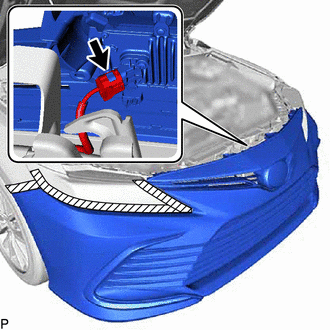
(g) w/ Parking Support Brake System:
| (1) Disconnect the connector. |
|
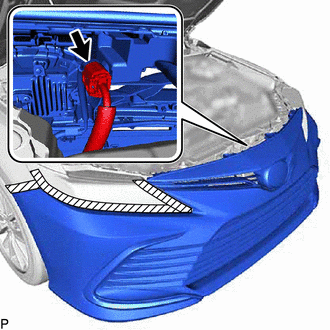
| (h) Remove the 2 clips. |
|
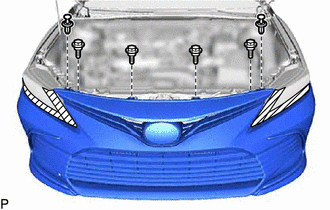
(i) Remove the 4 bolts.
(j) Disengage the 2 claws and 2 guides to remove the front bumper assembly as shown in the illustration.
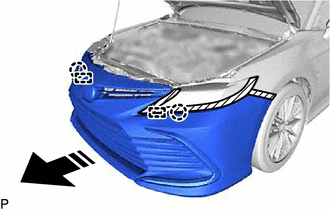
|
|
Remove in this Direction |
READ NEXT:
 Disassembly
DISASSEMBLY PROCEDURE 1. REMOVE FRONT CENTER ULTRASONIC SENSOR (w/ Parking Support Brake System)
Click here 2. REMOVE FRONT CORNER ULTRASONIC SENSOR (w/ Parking Support Brake System)
Click her
Reassembly
REASSEMBLY PROCEDURE 1. INSTALL FRONT BUMPER SIDE RETAINER LH
(a) Engage the 2 clips as shown in the illustration.
Install in this Direction
(b) Install the front bum
Installation
INSTALLATION CAUTION / NOTICE / HINT
HINT:
When the front bumper is damaged or deformed due to an accident or contact with other objects, etc., or the bumper installation area on the body is
SEE MORE:
Installation
INSTALLATION PROCEDURE 1. ADJUST COMPRESSOR OIL
(a) When replacing the compressor assembly with magnetic clutch with a new one:
(1) Remove the drain bolt (seal washer) from a new compressor assembly with magnetic clutch.
*a Drain Bolt (Seal Washer)
(2
Air outlets - Manual air conditioning system
■ Location of air outlets
The air outlets and air volume
change according to the
selected airflow mode.
■ Adjusting the position of and opening and closing the air outlets
Direct air flow to the left or
right, up or down.
Turn the knob to open or
close the vent.
■For quick
