
Toyota Camry (XV70): Terminals Of Ecu
TERMINALS OF ECU
CHECK SKID CONTROL ECU (BRAKE ACTUATOR ASSEMBLY)
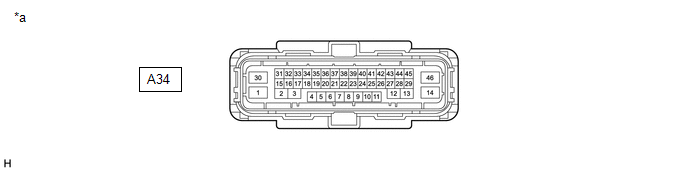
|
*a | Front view of wire harness connector (to Skid Control ECU (Brake Actuator Assembly)) |
- | - |
(a) Disconnect the A34 skid control ECU (brake actuator assembly) connector.
(b) Measure the voltage and resistance according to the value (s) in the table below.
|
Terminal No. (Symbol) | Wiring Color |
Terminal Description | Condition |
Specified Condition |
|---|---|---|---|---|
|
A34-30 (+BS) - Body ground |
G - Body ground | Parking brake motor power supply |
Always | 11 to 14 V |
|
A34-36 (IG1) - Body ground |
B - Body ground | IG power supply |
Ignition switch ON | 11 to 14 V |
|
A34-46 (GND1) - Body ground |
W-B - Body ground | Ground |
Always | Below 1 Ω |
|
A34-14 (GND2) - Body ground |
W-B - Body ground | Ground |
Always | Below 1 Ω |
|
A34-2 (MRR+) - Body ground |
Y - Body ground | Parking brake motor RH (parking brake actuator assembly RH) (+) |
- | - |
|
A34-3 (MRR-) - Body ground |
L - Body ground | Parking brake motor RH (parking brake actuator assembly RH) (-) |
- | - |
|
A34-13 (MRL+) - Body ground |
G - Body ground | Parking brake motor LH (parking brake actuator assembly LH) (+) |
- | - |
|
A34-12 (MRL-) - Body ground |
W - Body ground | Parking brake motor LH (parking brake actuator assembly LH) (-) |
- | - |
|
A34-18 (POL) - Body ground |
L - Body ground | Electric parking brake switch indicator light |
- | - |
|
A34-31 (SWI1) - Body ground |
P - Body ground | Electric parking brake switch |
- | - |
|
A34-32 (SWO1) - Body ground |
SB - Body ground | Electric parking brake switch |
- | - |
|
A34-15 (SWI2) - Body ground |
W - Body ground | Electric parking brake switch |
- | - |
|
A34-16 (SWO2) - Body ground |
V - Body ground | Electric parking brake switch |
- | - |
|
A34-5 (CANH) - Body ground |
Y - Body ground | CAN communication line H |
- | - |
|
A34-19 (CANL) - Body ground |
W - Body ground | CAN communication line L |
- | - |
READ NEXT:
 Dtc Check / Clear
DTC CHECK / CLEAR CHECK DTC AND FREEZE FRAME DATA (USING TECHSTREAM)
(a) Turn the ignition switch off. (b) Connect the Techstream to the DLC3.
(c) Turn the ignition switch to ON. (d) Turn the Tech
Freeze Frame Data
FREEZE FRAME DATA FREEZE FRAME DATA
HINT:
When a DTC is stored, the freeze frame data stores the current vehicle (sensor) state as.
The freeze frame data cannot be cleared or updated until
Fail-safe Chart
FAIL-SAFE CHART
DTC Trouble Area
Parking Brake Indicator Light
Brake System Warning Light (Yellow)
Fail-safe Deactivation Condition
C059704 Skid control ECU (brake act
SEE MORE:
Left Front Wheel Speed Sensor Circuit Short to Ground or Open (C050014)
DESCRIPTION Refer to DTC C050012 Click here
DTC No. Detection Item
DTC Detection Condition Trouble Area
C050014 Left Front Wheel Speed Sensor Circuit Short to Ground or Open
A short or open circuit is detected in the speed sensor signal circuit for 0.12 seconds or
Multi-axis Acceleration Sensor Module "A" Supply Voltage Circuit Voltage Out of Range (C14D71C)
DESCRIPTION The airbag sensor assembly has a built-in yaw rate and acceleration sensor and detects the vehicle condition.
This DTC is stored when the skid control ECU (brake actuator assembly) receives a sensor supply voltage malfunction signal from the yaw rate and acceleration sensor (airbag sen
