
Toyota Camry (XV70): 2gr-fks Drive Belt
Components
COMPONENTS
ILLUSTRATION
|
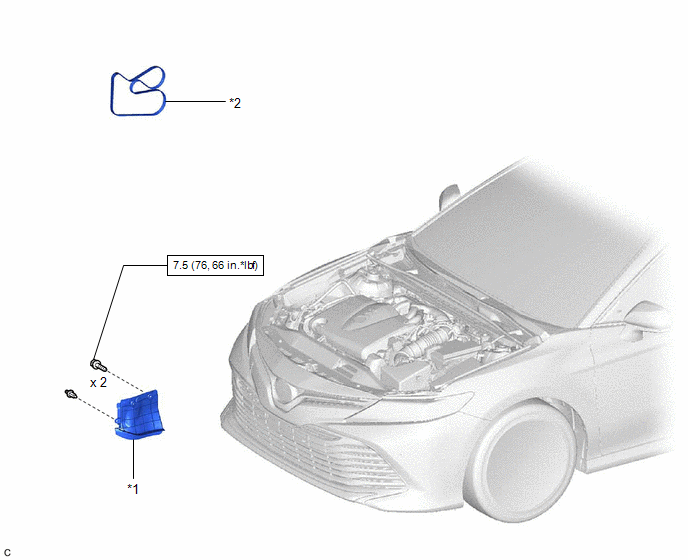
*1 | FRONT FENDER APRON SEAL RH |
*2 | V-RIBBED BELT |
Removal
REMOVAL
PROCEDURE
1. REMOVE FRONT WHEEL RH
Click here
.gif)
2. REMOVE FRONT FENDER APRON SEAL RH
Click here
3. REMOVE V-RIBBED BELT
|
(a) Release the V-ribbed belt tension by turning the V-ribbed belt tensioner assembly counterclockwise. |
|
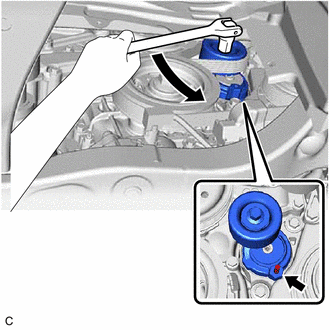
(b) Turn the V-ribbed belt tensioner assembly counterclockwise to align its holes, and then insert a 5 mm hexagon wrench to secure the V-ribbed belt tensioner assembly.
(c) Remove the V-ribbed belt from the V-ribbed belt tensioner assembly.
Installation
INSTALLATION
PROCEDURE
1. INSTALL V-RIBBED BELT
HINT:
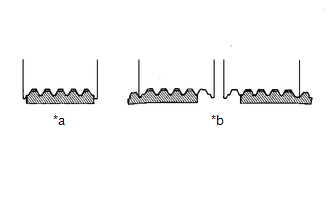
When reusing the V-ribbed belt, check the ribs and back of the V-ribbed belt for wear and cracks. If wear or a crack that reaches the core (at more than 1 point) is found, replace the V-ribbed belt.
| (a) Install the V-ribbed belt. NOTICE:
|
|
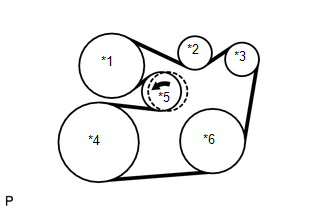
(b) Turn the V-ribbed belt tensioner assembly counterclockwise and remove the 5 mm hexagon wrench.
| (c) After installing the V-ribbed belt, check that it fits properly in the ribbed grooves. Confirm that the V-ribbed belt has not slipped out of the grooves on the bottom of the pulley by hand. |
|
2. INSTALL FRONT FENDER APRON SEAL RH
Click here
.gif)
3. INSTALL FRONT WHEEL RH
Click here
READ NEXT:
 Components
COMPONENTS ILLUSTRATION
*1 FRONT WHEEL OPENING EXTENSION PAD LH
*2 FRONT WHEEL OPENING EXTENSION PAD RH
*3 NO. 1 ENGINE UNDER COVER
*4 REAR ENGINE UNDER COVER RH
Replacement
REPLACEMENT CAUTION / NOTICE / HINT
CAUTION:
Prolonged and repeated contact with engine oil will result in the removal of natural oils from the skin, leading to dryness, irritation and dermatiti
SEE MORE:
Diagnostic Trouble Code Chart
DIAGNOSTIC TROUBLE CODE CHART Charging System
DTC No. Detection Item
Warning Indicate Memory
Note Link
P161A87 Lost Communication with Alternator Missing Message
Charge warning is not displayed
DTC stored SAE Code: P161A
Black Screen
PROCEDURE
1. CHECK DISPLAY SETTING
(a) Check that the display is not in screen off mode. OK: The display setting is not in screen off mode.
NG
CHANGE SCREEN TO SCREEN ON MODE
OK
2.
CHECK IMAGE QUALITY SETTING (a) Check that the
