
Toyota Camry (XV70): Inspection
INSPECTION
PROCEDURE
1. INSPECT VSC OFF SWITCH
| (a) Make sure that there is no looseness at the locking part and the connecting part of the connector. OK: The connector is securely connected. |
|
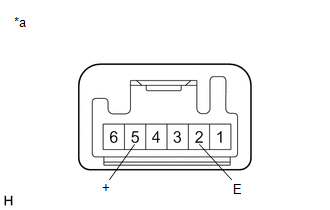
(b) Disconnect the VSC OFF switch connector.
(c) Check both the connector case and the terminal for deformation and corrosion.
OK:
No deformation or corrosion.
(d) Measure the resistance according to the value(s) in the table below.
Standard Resistance:
|
Tester Connection | Condition |
Specified Condition |
|---|---|---|
|
5 (+) - 2 (E) | Switch pushed |
Below 1 Ω |
|
5 (+) - 2 (E) | Switch not pushed |
10 kΩ or higher |
If the result is not as specified, replace the VSC OFF switch.
READ NEXT:
 Installation
INSTALLATION PROCEDURE 1. INSTALL VSC OFF SWITCH
(a) Engage the 2 claws to install the VSC OFF switch to the No. 1 instrument panel sub-assembly.
2. INSTALL NO. 1 INSTRUMENT PANEL SUB-ASSEMBLY Cli
SEE MORE:
Battery
Check the battery as follows.
■ Battery exterior
Make sure that the battery terminals are not corroded and that
there are no loose connections, cracks, or loose clamps.
Terminals
Hold-down clamp
■Before recharging
When recharging, the battery produces hydrogen gas which is flammab
On-vehicle Inspection
ON-VEHICLE INSPECTION PROCEDURE
1. INSPECT FRONT LOWER BALL JOINT ASSEMBLY
(a) Check for looseness. (1) Lift up the vehicle. (2) Move the front lower No. 1 suspension arm sub-assembly up and down by hand with a force of 294 N (30 kgf) or more to check that there is no looseness at the front
© 2023-2026 Copyright www.tocamry.com
