
Toyota Camry (XV70): Inspection
INSPECTION
PROCEDURE
1. INSPECT NO. 1 VACUUM SWITCHING VALVE ASSEMBLY (for ACIS)
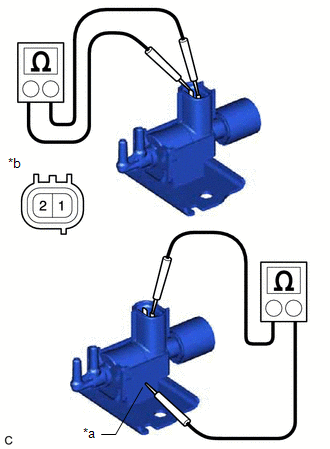
| (a) Measure the resistance according to the value(s) in the table below. Standard Resistance:
If the result is not as specified, replace the No. 1 vacuum switching valve assembly (for ACIS). |
|
(b) Check the No. 1 vacuum switching valve assembly (for ACIS) operation.
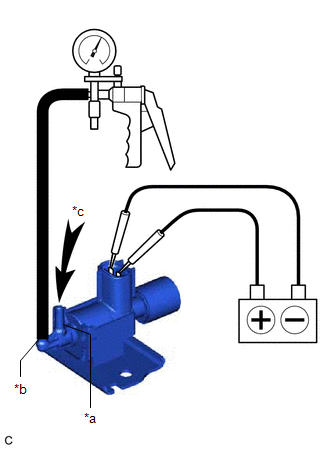
| (1) When vacuum is applied to the port (E), check that air is sucked into the filter. If the result is not as specified, replace the No. 1 vacuum switching valve assembly (for ACIS). |
|

| (2) Apply battery voltage across the terminals. When vacuum is applied to the port (F), check that air is sucked into the port (E). If the result is not as specified, replace the No. 1 vacuum switching valve assembly (for ACIS). |
|
READ NEXT:
 Installation
INSTALLATION PROCEDURE 1. INSTALL NO. 1 VACUUM SWITCHING VALVE ASSEMBLY (for ACIS)
(a) Install the No. 1 vacuum switching valve assembly (for ACIS) to the intake air surge tank assembly with the bol
Components
COMPONENTS ILLUSTRATION
*1 NO. 1 VACUUM SWITCHING VALVE ASSEMBLY (for ACIS)
*2 VACUUM HOSE SUB-ASSEMBLY
*3 V-BANK COVER SUB-ASSEMBLY
- -
N*m (kgf*c
Removal
REMOVAL PROCEDURE 1. REMOVE V-BANK COVER SUB-ASSEMBLY
Click here
2. REMOVE NO. 1 VACUUM SWITCHING VALVE ASSEMBLY (for ACIS)
(a) Disconnect the No. 1 vacuum switching valve assembly
SEE MORE:
Removal
REMOVAL CAUTION / NOTICE / HINT
The necessary procedures (adjustment, calibration, initialization, or registration) that must be performed after parts are removed and installed, or replaced during cylinder head gasket removal/installation are shown below. Necessary Procedure After Parts Removed/In
Assist Map Number Un-Writing (C1581)
DESCRIPTION This DTC will be stored if the power steering ECU (rack and pinion power steering gear assembly) determines that the assist map is not written in the ECU.
DTC No. Detection Item
DTC Detection Condition
Trouble Area Warning Indicate
Return-to-normal Condition
