
Toyota Camry (XV70): Removal
REMOVAL
CAUTION / NOTICE / HINT
The necessary procedures (adjustment, calibration, initialization, or registration) that must be performed after parts are removed and installed, or replaced during navigation antenna assembly removal/installation are shown below.
Necessary Procedure After Parts Removed/Installed/Replaced|
Replaced Part or Performed Procedure |
Necessary Procedures | Effect/Inoperative Function when Necessary Procedure not Performed |
Link |
|---|---|---|---|
| Disconnect cable from negative battery terminal |
Perform steering sensor zero point calibration |
Lane Tracing Assist System |
|
|
Pre-collision System | |||
|
Memorize steering angle neutral point |
Parking Assist Monitor System |
| |
|
Panoramic View Monitor System |
|
CAUTION:
Some of these service operations affect the SRS airbag system. Read the precautionary notices concerning the SRS airbag system before servicing.
Click here .gif)
.png)
PROCEDURE
1. REMOVE INSTRUMENT PANEL SAFETY PAD SUB-ASSEMBLY
Click here
2. REMOVE NO. 3 HEATER TO REGISTER DUCT SUB-ASSEMBLY
Click here
3. REMOVE NAVIGATION ANTENNA ASSEMBLY WITH BRACKET
| (a) Disconnect the connector. |
|
.png)
(b) Disengage the 2 claws.
| (c) Remove the 2 screws and navigation antenna assembly with bracket. |
|
.png)
4. REMOVE NAVIGATION ANTENNA ASSEMBLY
(a) Disengage the 2 claws and 6 guides to remove the navigation antenna assembly as shown in the illustration.
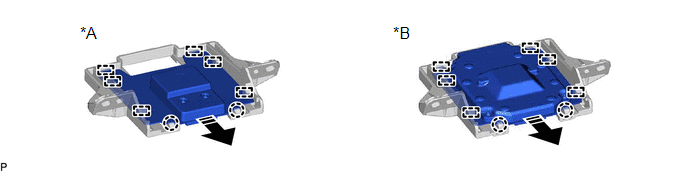
|
*A | w/o Manual (SOS) Switch |
*B | w/ Manual (SOS) Switch |
.png) |
Remove in this Direction |
- | - |
5. REMOVE NAVIGATION ANTENNA BRACKET
READ NEXT:
 Inspection
INSPECTION PROCEDURE 1. INSPECT NAVIGATION ANTENNA ASSEMBLY (w/o Manual (SOS) Switch)
(a) Check that the navigation antenna assembly cable is properly installed and does not have any sharp bends, pi
Installation
INSTALLATION PROCEDURE 1. INSTALL NAVIGATION ANTENNA BRACKET
2. INSTALL NAVIGATION ANTENNA ASSEMBLY (a) Engage the 6 guides and 2 claws to install the navigation antenna assembly as shown in the ill
SEE MORE:
Summary of functions
The multi-information display presents the driver with a variety of driving-
related data, such as the current outside temperature. The multiinformation
display can also be used to change the display settings
and other settings.
Shift position
Menu icon display area
Displays the follow
Dtc Check / Clear
DTC CHECK / CLEAR DTC CHECK USING TECHSTREAM (a) Connect the Techstream to the DLC3.
(b) Turn the ignition switch to ON. (c) Turn the Techstream on.
(d) Enter the following menus: Body Electrical / Air Conditioner / Trouble Codes. Body Electrical > Air Conditioner > Trouble Codes
(e) Check
