
Toyota Camry (XV70): Sun visors
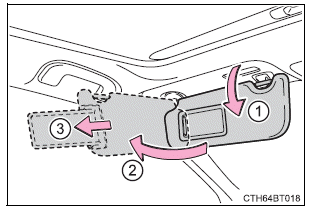
- To set the visor in the forward position, flip it down.
- To set the visor in the side position, flip down, unhook, and swing it to the side.
- To use the side extender, place the visor in the side position, then slide it backward.
Vanity mirrors
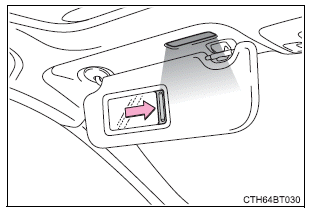
Slide the cover to open.
Vehicles with vanity lights: The light turns on when the cover is opened.
Vehicles with vanity lights: If the vanity lights remain on for 20 minutes while the engine is off, the lights will turn off automatically.
READ NEXT:
 Power outlet
Please use as a power supply for electronic goods that use less than
12 VDC/10 A (power consumption of 120 W).
Open the lid.
■The power outlet can be used when
Vehicles without a smart key s
USB charging ports
The USB charging ports are used to supply 2.5 A (USB Type-A port)
or 3.0 A (USB Type-C port) of electricity at 5 V to external devices.
The USB charging ports are for charging only. They are not d
Wireless charger (if equipped)
A portable device, such as a smartphone or mobile battery, can be
charged by just placing it on the charging area, provided the device is
compatible with the Qi wireless charging standard created by
SEE MORE:
Diagnostic Trouble Code Chart
DIAGNOSTIC TROUBLE CODE CHART Power Steering System
DTC No. Detection Item
DTC Detection Condition
Warning Indicate Return-to-normal Condition
Note Link
C1511 Torque Sensor1
Torque sensor malfunction
EPS warning light: Comes on
Ignition
Removal
REMOVAL CAUTION / NOTICE / HINT
The necessary procedures (adjustment, calibration, initialization, or registration) that must be performed after parts are removed and installed, or replaced during front frame assembly removal/installation are shown below. Necessary Procedures After Parts Removed/I
© 2023-2026 Copyright www.tocamry.com
