
Toyota Camry (XV70): Back-up Light Bulb
Components
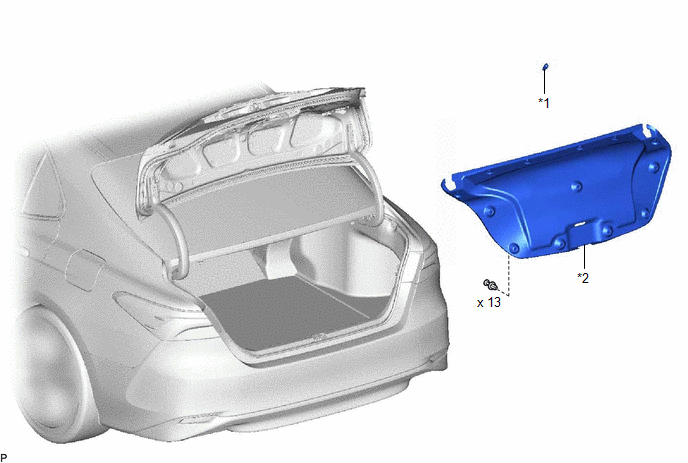
COMPONENTS
ILLUSTRATION
|
*1 | BACK-UP LIGHT BULB |
*2 | LUGGAGE COMPARTMENT DOOR COVER |
Removal
REMOVAL
CAUTION / NOTICE / HINT
HINT:
- Use the same procedure for the RH side and LH side.
- The following procedure is for the LH side.
PROCEDURE
1. REMOVE LUGGAGE COMPARTMENT DOOR COVER
Click here .gif)
2. REMOVE BACK-UP LIGHT BULB
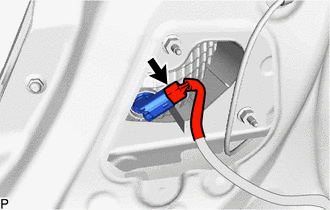
| (a) Disconnect the connector. |
|
(b) Turn the rear light socket plug with the back-up light bulb as shown in the illustration to remove them as a unit.
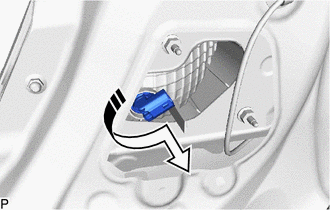
.png) |
Remove in this Direction |
(c) Remove the back-up light bulb from the rear light socket plug.
Installation
INSTALLATION
CAUTION / NOTICE / HINT
HINT:
- Use the same procedure for the RH side and LH side.
- The following procedure is for the LH side.
PROCEDURE
1. INSTALL BACK-UP LIGHT BULB
(a) Install the back-up light bulb to the rear light socket plug.
(b) Turn the rear light socket plug with the back-up light bulb as shown in the illustration to install them as a unit.
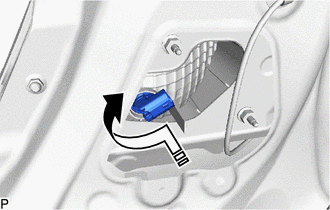
.png) |
Install in this Direction |
(c) Connect the connector.
2. INSTALL LUGGAGE COMPARTMENT DOOR COVER
Click here
.gif)
READ NEXT:
 Brake Fluid
ComponentsCOMPONENTS ILLUSTRATION
*1 BRAKE MASTER CYLINDER RESERVOIR FILLER CAP ASSEMBLY
- - ILLUSTRATION
*A except 2-Pot Caliper
*B for 2-Pot Caliper
Components
COMPONENTS ILLUSTRATION
*A for A25A-FKS
- -
*1 NO. 1 VACUUM HOSE CONNECTOR
*2 UNION TO CHECK VALVE HOSE
*3 VACUUM HOSE
*4 CLIP ILLUSTRATION
SEE MORE:
Drive Shaft System
PrecautionPRECAUTION
NOTICE OF REMOVING AND INSTALLING FRONT DRIVE SHAFT ASSEMBLY RH (for AWD)
(a) When removing and installing the front drive shaft assembly RH in an AWD vehicle, be sure to first drain all the transaxle oil and transfer oil. If removal and installation are carried out without
Low Pressure Fuel System Pressure - Too High (P008B00)
DESCRIPTION Refer to DTC P008A00. Click here
DTC No. Detection Item
DTC Detection Condition Trouble Area
MIL Memory
Note P008B00
Low Pressure Fuel System Pressure - Too High
Actual fuel pressure (for low pressure side) value higher than target fuel pres
