
Toyota Camry (XV70): Components
COMPONENTS
ILLUSTRATION
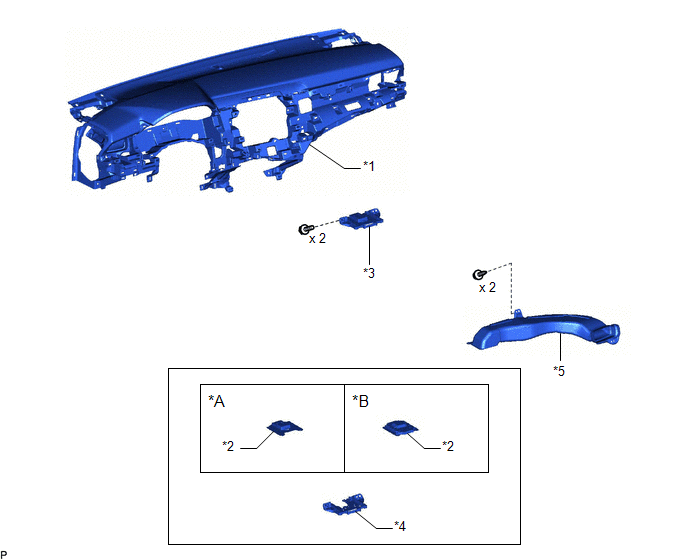
|
*A | w/o Manual (SOS) Switch |
*B | w/ Manual (SOS) Switch |
|
*1 | INSTRUMENT PANEL SAFETY PAD SUB-ASSEMBLY |
*2 | NAVIGATION ANTENNA ASSEMBLY |
|
*3 | NAVIGATION ANTENNA ASSEMBLY WITH BRACKET |
*4 | NAVIGATION ANTENNA BRACKET |
|
*5 | NO. 3 HEATER TO REGISTER DUCT SUB-ASSEMBLY |
- | - |
READ NEXT:
 Removal
REMOVAL CAUTION / NOTICE / HINT
The necessary procedures (adjustment, calibration, initialization, or registration) that must be performed after parts are removed and installed, or replaced during n
Inspection
INSPECTION PROCEDURE 1. INSPECT NAVIGATION ANTENNA ASSEMBLY (w/o Manual (SOS) Switch)
(a) Check that the navigation antenna assembly cable is properly installed and does not have any sharp bends, pi
Installation
INSTALLATION PROCEDURE 1. INSTALL NAVIGATION ANTENNA BRACKET
2. INSTALL NAVIGATION ANTENNA ASSEMBLY (a) Engage the 6 guides and 2 claws to install the navigation antenna assembly as shown in the ill
SEE MORE:
Tire Pressure Monitor Receiver Communication Stop (B1247)
DESCRIPTION The main body ECU (multiplex network body ECU) and tire pressure warning ECU and receiver communicate by direct line. If a malfunction occurs in this communication signal, B1247 is output by the main body ECU (multiplex network body ECU).
DTC No. Detection Item
DTC Detection
Installation
INSTALLATION PROCEDURE 1. INSTALL STOP LIGHT SWITCH ASSEMBLY
(a) Insert the stop light switch assembly until the threaded sleeve hits the pedal.
NOTICE: When inserting the stop light switch assembly, support the pedal from behind so that the pedal is not pushed in.
© 2023-2026 Copyright www.tocamry.com
