
Toyota Camry (XV70): Parts Location
PARTS LOCATION
ILLUSTRATION
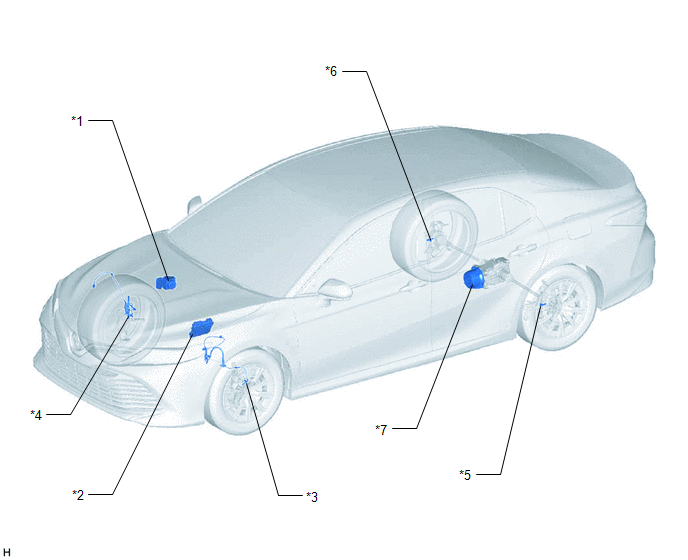
|
*1 | BRAKE ACTUATOR ASSEMBLY - SKID CONTROL ECU | *2 |
ECM |
| *3 |
FRONT SPEED SENSOR LH |
*4 | FRONT SPEED SENSOR RH |
|
*5 | REAR SKID CONTROL SENSOR LH |
*6 | REAR SKID CONTROL SENSOR RH |
|
*7 | TRANSMISSION COUPLING ASSEMBLY - 4WD LINEAR SOLENOID |
- | - |
ILLUSTRATION
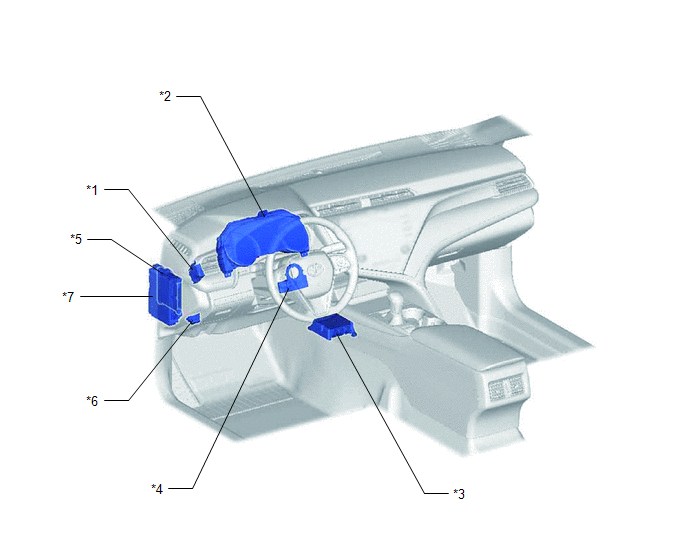
|
*1 | 4WD ECU ASSEMBLY |
*2 | COMBINATION METER ASSEMBLY - AWD WARNING MESSAGE (MULTI-INFORMATION DISPLAY) |
|
*3 | AIRBAG SENSOR ASSEMBLY - YAW RATE AND ACCELERATION SENSOR |
*4 | STEERING SENSOR |
|
*5 | MAIN BODY ECU (MULTIPLEX NETWORK BODY ECU) |
*6 | DLC3 |
|
*7 | INSTRUMENT PANEL JUNCTION BLOCK ASSEMBLY - ECU-DCC NO. 1 FUSE - ECU-IG1 NO. 2 FUSE |
- | - |
READ NEXT:
 System Diagram
SYSTEM DIAGRAM
How To Proceed With Troubleshooting
CAUTION / NOTICE / HINT
HINT:
Use the following procedure listed to troubleshoot the Dynamic Torque Control AWD System.
*: Use the Techstream.
PROCEDURE
1. VEHICLE BROUGHT TO W
Calibration
CALIBRATION
NOTICE:
Initial AWD functions such as acceleration are sometimes affected unless backup memory is cleared.
When the yaw rate and acceleration sensor (airbag sensor assembly) is
SEE MORE:
Problem Symptoms Table
PROBLEM SYMPTOMS TABLE
HINT:
Use the table below to help determine the cause of problem symptoms. If multiple suspected areas are listed, the potential causes of the symptoms are listed in order of probability in the "Suspected Area" column of the table. Check each symptom by checking the susp
When the TRAC/VSC systems are operating - Driving assist systems
The slip indicator light will flash
while the TRAC/VSC systems are
operating.
Disabling the TRAC system
If the vehicle gets stuck in mud, dirt or snow, the TRAC system may
reduce power from the engine to the wheels. Pressing
to turn
the system off may make it easier for you to rock the vehi
© 2023-2026 Copyright www.tocamry.com
