
Toyota Camry (XV70): Reassembly
REASSEMBLY
CAUTION / NOTICE / HINT
HINT:
- Use the same procedure for the RH side and LH side.
- The following procedure is for the LH side.
PROCEDURE
1. INSTALL REAR LIGHT LENS AND BODY
2. INSTALL REAR LIGHT PACKING
| (a) Install a new rear light packing. |
|
.png)
3. INSTALL REAR LIGHT SOCKET PLUG (for Bulb Type Back-up Light)
4. INSTALL REAR LIGHT CORD (for LED Type Back-up Light)
| (a) Connect the connector to install the rear light cord. |
|
.png)
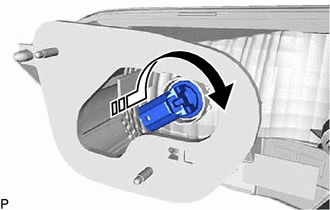
5. INSTALL BACK-UP LIGHT BULB (for Bulb Type Back-up Light)
(a) Install the back-up light bulb to the rear light socket plug.
(b) Turn the rear light socket plug with the back-up light bulb as shown in the illustration to install them as a unit.
.png) |
Install in this Direction |
READ NEXT:
 Installation
INSTALLATION CAUTION / NOTICE / HINT
HINT:
Use the same procedure for the RH side and LH side.
The following procedure is for the LH side.
PROCEDURE 1. INSTALL REAR LIGHT ASSEMBLY
Rear Side Marker Light Bulb
ReplacementREPLACEMENT CAUTION / NOTICE / HINT
HINT:
Use the same procedure for the RH side and LH side.
The following procedure is for the LH side.
PROCEDURE 1. REMOVE REAR COMBINA
Rear Turn Signal Light Bulb
ReplacementREPLACEMENT CAUTION / NOTICE / HINT
HINT:
Use the same procedure for the RH side and LH side.
The following procedure is for the LH side.
PROCEDURE 1. REMOVE REAR COMBINA
SEE MORE:
Lost Communication with ECM / PCM "A" (U0100,U0125,U0126,U0129,U0142)
DESCRIPTION These DTCs are stored if there is a malfunction in the CAN communication system connected to the blind spot monitor sensor.
HINT: If CAN communication system DTCs are stored, they may also be stored for other systems. Blind Spot Monitor Master
DTC No. Detection Item
DTC De
System Description
SYSTEM DESCRIPTION PANORAMIC MOON ROOF SYSTEM DESCRIPTION
(a) The panoramic moon roof system controls the sliding roof operation using the sliding roof ECU (sliding roof drive gear assembly) and roof sunshade ECU (sliding roof drive gear assembly). Operating the panoramic moon roof switch (roof c
© 2023-2026 Copyright www.tocamry.com
