
Toyota Camry (XV70): Removal
REMOVAL
CAUTION / NOTICE / HINT
The necessary procedures (adjustment, calibration, initialization or registration) that must be performed after parts are removed and installed, or replaced battery removal/installation are shown below.
Necessary Procedures After Parts Removed/Installed/Replaced|
Replaced Part or Performed Procedure |
Necessary Procedure | Effect/Inoperative Function when Necessary Procedure not Performed |
Link |
|---|---|---|---|
|
Battery terminal is disconnected/reconnected |
Perform steering sensor zero point calibration |
Lane Tracing Assist System |
|
|
Pre-collision System | |||
|
Memorize steering angle neutral point |
Parking assist monitor system |
| |
|
Panoramic view monitor system |
|
PROCEDURE
1. PRECAUTION
NOTICE:
- After turning the engine switch off, waiting time may be required before disconnecting the cable from the negative (-) battery terminal. Therefore, make sure to read the disconnecting the cable from the negative (-) battery terminal notices before proceeding with work.
Click here
.gif)
- When replacing the battery, use a new battery of the same dimensions with a capacity of 70 Ah or more at a 20-hour rate.
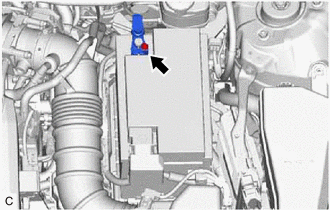
2. DISCONNECT CABLE FROM NEGATIVE BATTERY TERMINAL
| (a) Loosen the nut, and disconnect the cable from the negative (-) battery terminal. NOTICE: When disconnecting the cable, some systems need to be initialized after the cable is reconnected. Click here |
|
3. REMOVE BATTERY
(a) Disengage the 2 claws and remove the battery terminal cap from the positive (+) battery terminal in the order shown in the illustration.
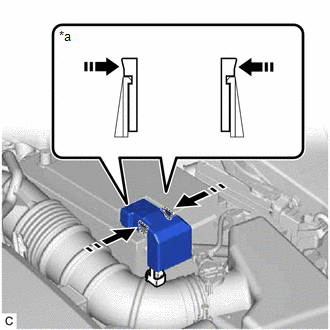
|
*a | Side View of Claws |
 |
Push Battery Terminal Cap Here |
 |
Push |
| (b) Loosen the nut and disconnect the cable from the positive (+) battery terminal. |
|
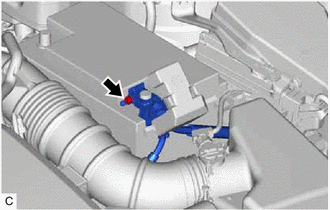
| (c) Remove the bolt and No. 2 battery clamp from the battery clamp sub-assembly. |
|

(d) Remove the battery from the vehicle.
READ NEXT:
 Installation
INSTALLATION PROCEDURE 1. INSTALL BATTERY
(a) Install the battery to the vehicle.
(b) Install the No. 2 battery clamp to the battery clamp sub-assembly with the bolt.
Torque: 18.5 N
2gr-fks Coolant
ComponentsCOMPONENTS ILLUSTRATION
*1 RADIATOR CAP SUB-ASSEMBLY
*2 RADIATOR DRAIN COCK PLUG
*3 NO. 1 ENGINE UNDER COVER
- - ReplacementREPLACEMENT CAUTION / NOT
2gr-fks Drive Belt
ComponentsCOMPONENTS ILLUSTRATION
*1 FRONT FENDER APRON SEAL RH
*2 V-RIBBED BELT RemovalREMOVAL PROCEDURE
1. REMOVE FRONT WHEEL RH Click here
2. REMOVE FRONT FENDER APRON
SEE MORE:
Disassembly
DISASSEMBLY PROCEDURE 1. REMOVE FRONT CENTER ULTRASONIC SENSOR (w/ Parking Support Brake System)
Click here 2. REMOVE FRONT CORNER ULTRASONIC SENSOR (w/ Parking Support Brake System)
Click here 3. REMOVE FRONT CORNER ULTRASONIC SENSOR RETAINER (w/ Parking Support Brake System)
Click her
Reassembly
REASSEMBLY PROCEDURE 1. INSTALL FUEL PUMP
HINT: Perform "Inspection After Repair" after replacing the fuel pump.
Click here
(a) Apply gasoline to a new O-ring. Then install the O-ring and fuel pump spacer to the fuel pump.
*1 O-ring
*2 Fu
